





Key Takeaway: The best text summarizer tools for students in 2026 depends on what you’re summarizing, and no free tool handles every input type reliably, making it essential to match the tool to the task before signing up.
- TLDR This is the only major free option requiring no account, but has no PDF support
- SciSummary is the strongest free pick for academic PDFs, but caps at 5 summaries per month
- QuillBot’s free summarizer handles up to 1,200 words. Paid unlocks 6,000
- Scholarcy is the best paid upgrade for research-heavy students, with citation extraction
- Scanned PDFs, data tables, and multi-column layouts cause problems for almost every summarizer tool
- A summary is a starting point, not a finished product.
- Always verify key claims against the original before citing
Are you tired of having 47 tabs open, a never-ending list of things to read, but no time to read them? That’s what most of these new AI-based text summarizers were created for. The difficulty with many of the “best of” lists provided today is that they simply provide you with a long list of tools, without letting you know which ones are best suited for students, which ones have a free option, or if one will cost you money at the last minute.
This article will help solve that issue by providing an unbiased comparison of the best text summarizer tools available as of 2026, including their pros and cons, real pricing, free plan limits, recommended student stacks, and anything else you may need to select the correct tool for your workflow.
Quick Picks of Best Text Summarizer Tools for Students (Free First, Then Best Paid Upgrade)
Not sure where to start? See below our top recommendations based on your student use case. The limitations for each tool’s free version are included in the chart as well.
| Best For | Tool | Free Plan Reality |
| No account, fast paste | TLDR This | Unlimited short texts; no PDF upload |
| Browser extension | Wordtune | 10 rewrites/day free; extension available |
| PDF and research papers | SciSummary | 5 summaries/month free; built for academic papers |
| Long documents | QuillBot Summarizer | Up to 1,200 words free; paid unlocks 6,000+ |
| Lecture transcripts | Notta | 120 minutes of transcription/month free |
| Multilingual texts | DeepL Write + Summary | Free tier available; strong language support |
| Best paid upgrade | Scholarcy | From $4.99/month, built specifically for students |
A note on “free” tools: Almost every tool on this list caps something on the free plan, whether that is word count, daily runs, PDF uploads, or export options. The chart above tells you about each one’s limitations prior to signing up.
Looking for something that will take your notes beyond a summary and help you write submission-ready writing? Look no further than Walter Writes’ AI tools and workflow for students, as it includes all the other significant AI tools that most lists overlook.
What Students Actually Need from an AI Summarizer (The Decision Framework)
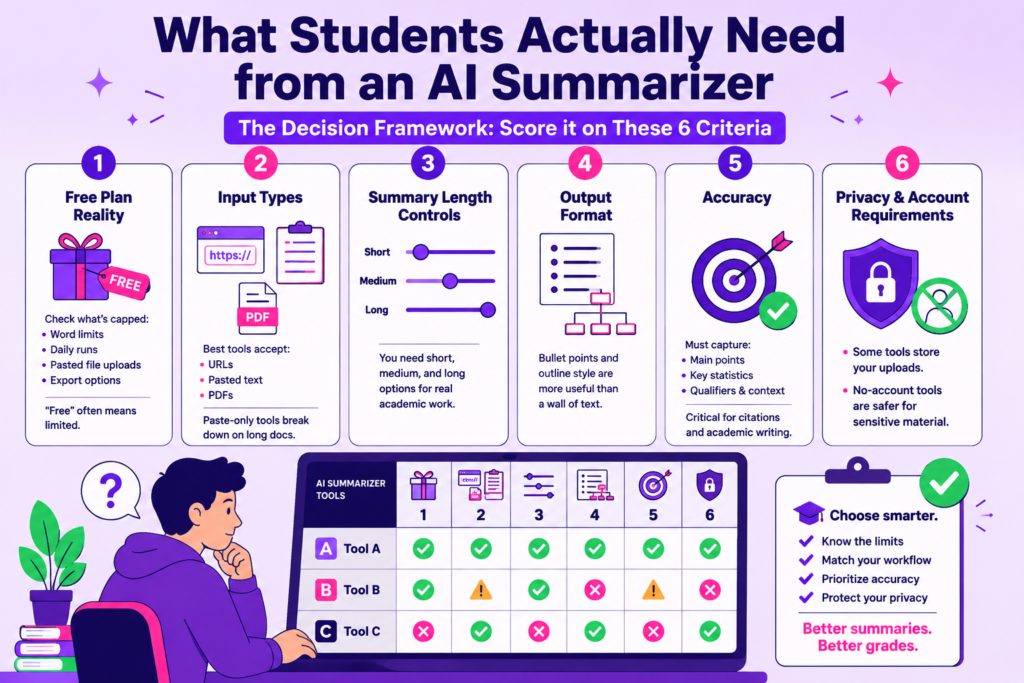
To find a summarizer tool, most students just Google the name of the tool in the hope of finding required information about the product. This won’t usually work at the last minute when an assignment is due.
Before you do anything else, score it on these six criteria:
1. Free plan reality: What exactly is capped in your free account? Word limits, daily runs, pasted file uploads, and export options all vary by tool. Check before you start.
2. Input types: Is the tool capable of accepting input as URLs, pasteable text, or PDFs only? Tools that only allow pasting will fall apart quickly if they are used for processing large research documents.
3. Summary length controls: You need short, medium, and long options. If a tool can only produce an output of one paragraph, then it is designed for casual reading and not for serious schoolwork.
4. Output format: Bullet points and outline style are more useful than a wall of compressed text for study purposes. Check what the tool actually produces.
5. Accuracy: Does the summary accurately represent the main point of your document, the number of key statistics referenced, and the qualifying information that is present? The most important thing to know about accuracy is when doing academic writing and referencing.
6. Privacy and account requirements: Some tools store your uploaded documents. No-account tools are safer when dealing with sensitive material.
The idea of using a summarizer can be explored further with other study aids. For that, see our list of the best productivity tools for students.
How AI Text Summarization Works
Paste in a wall of text and get back something readable. That is the basic idea. But knowing what happens in between helps you catch bad summaries before they cause problems.
Extractive vs Abstractive Summarization (And What Is Safer for School)
There are two methods behind most summarizer tools.
- Extractive summarization pulls sentences directly from the source and stitches them together. Nothing is rewritten. It is more accurate but can feel choppy.
- Abstractive summarization rewrites the content in new words, similar to how a human would summarize. It reads more naturally but introduces more risk. Abstraction can also change the meaning of the original content by phrasing something in a way that changes its essence.
Extractive is safest for academic work when accuracy is most important. Abstraction is fine for quick preparation to read a document, but you should always check if all the key claims are correct.
Why Summarizers Can Be “Confidently Wrong”
AI summarizers do not understand content. Instead, the AI summary predicts what is important in the content based on patterns of importance. As such, it can omit a critical qualifying term, misquote a statistic, or miss an essential definition to which the entire argument relies.
The more complex or nuanced the original source, the greater the risk of this occurring.
The 2-Minute Student Validation Method
Before you use any AI summary for coursework, run this quick check:
- Does the summary include the main thesis or argument?
- Are all major numbers and statistics cited correctly?
- Are any critical qualifiers mentioned?
- Does it match the conclusion of the original?
If you get an answer of no on one of these questions, refer to the source for that portion. It will take you two minutes and protect you from citing something that was never present in the original.
Comparison Table: Best Text Summarizer Tools at a Glance
| Tool | Best For | Strength | Weakness | Free or Paid |
| TLDR This | Quick no-account summaries | No sign-up needed, fast paste | No PDF support, basic output | Free |
| QuillBot Summarizer | Long text summarization | Adjustable summary length, clean output | 1,200-word limit on free plan | Free (limited) |
| Resoomer | Articles and news | Good at identifying key ideas in editorial content | Weak on academic or technical papers | Free |
| Wordtune | Reading and rewriting summaries | Browser extension, natural-sounding output | 10 rewrites per day on the free plan | Free (limited) |
| SciSummary | Research papers and academic PDFs | Built for science and academic content | Only 5 summaries per month are free | Free (limited) |
| Notta | Lecture and meeting transcripts | Transcription plus summary in one | 120-minute transcription cap on the free plan | Free (limited) |
| ChatGPT (free tier) | Flexible summarization of pasted text | Handles most content types, good length control | No direct PDF upload on the free plan, no source citing | Free (limited) |
| Scholarcy | Research papers and long documents | Flashcard export, citation extraction, and PDF support | Paid only for full features | Paid (from $4.99/mo) |
| Notion AI | Notes and study workspace integration | Summarizes inside your existing Notion workflow | Requires a Notion subscription | Paid (add-on) |
| Speechify Summary | Audio and text content | Useful for students who consume content in audio format | Better as part of the full Speechify plan | Paid |
Best Free AI Text Summarizer Tools (By Student Scenario)
Instead of one giant ranked list, here are the best free tools organized by what you are actually trying to do.
No Account, Fast Paste
TLDR This
TLDR This allows users to quickly summarize an article by copying it into the browser window to get its key points in seconds. No sign-up, no friction.
- Key features: Text paste, URL summarization, auto-removes ads and clutter from web articles
- Pricing: Free with no account required
- Limitation: No PDF support, and output is basic with no format controls
Resoomer
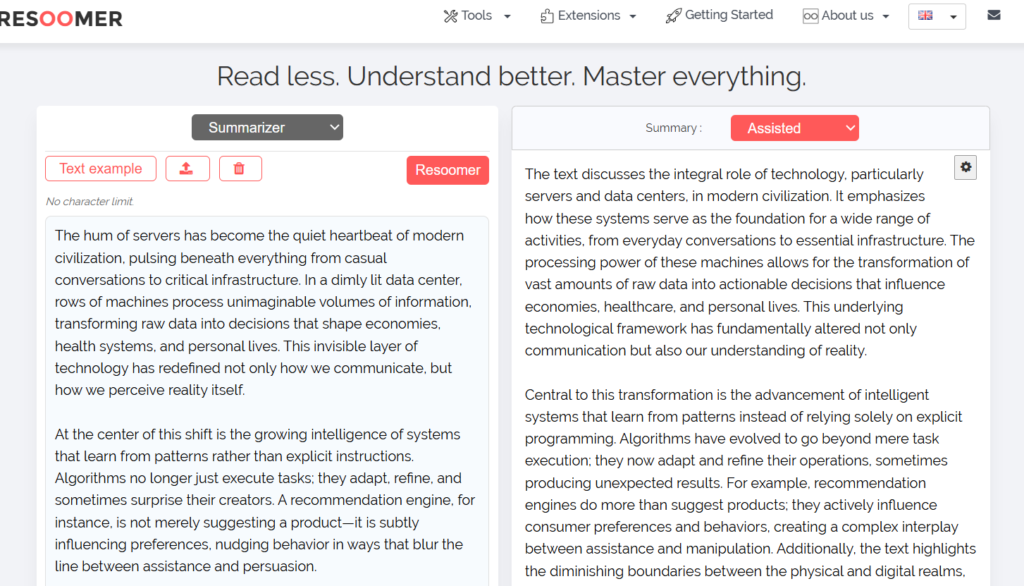
Resoomer is a tool that can identify the main points of an article or editorial piece and put those main points into easy-to-read sections.
- Key features: Text and URL summarization, French and English support, no account needed
- Pricing: Free for core use
- Limitation: Struggles with dense academic or technical writing and is not built for research papers
Browser Extension for Readings
Wordtune
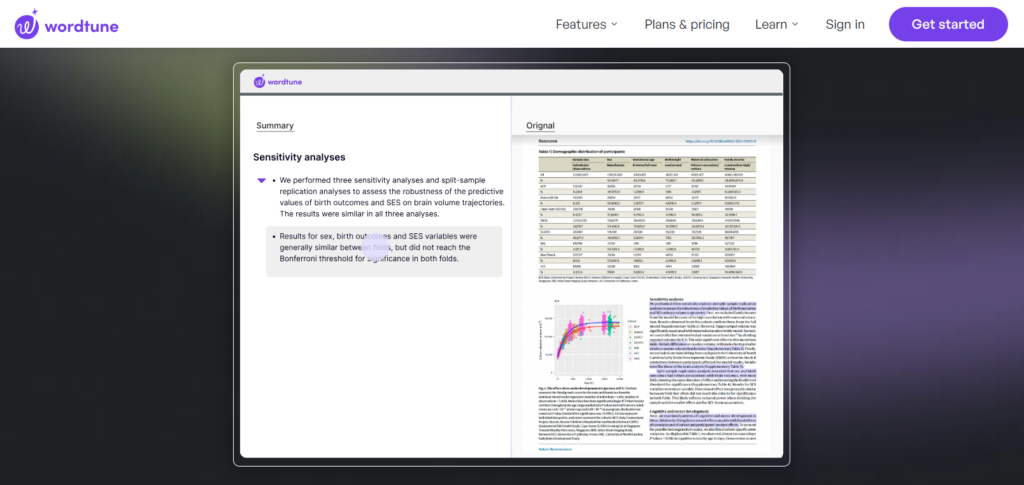
Wordtune lets you highlight text on any webpage and get a summary without switching tabs. It will also provide alternative word choices when you want to write about some information in your notes.
- Key features: Chrome extension, inline summarization, rewrite suggestions, tone options
- Pricing: Free plan available with 10 rewrites per day
- Limitation: Daily cap is easy to hit, and no PDF upload on the free tier
PDF and Research Paper Summarizers
SciSummary
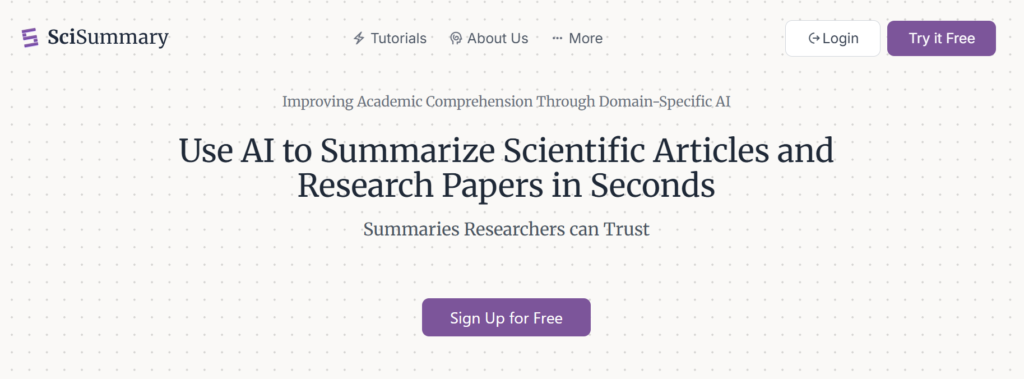
SciSummary is built specifically for academic and scientific PDFs. It preserves technical terminology and structures the output around the paper’s key findings.
- Key features: PDF upload, academic language support, structured summary output
- Pricing: The free plan includes 5 summaries per month
- Limitation: Very limited on the free tier. Email delivery only, no instant on-screen output
QuillBot Summarizer
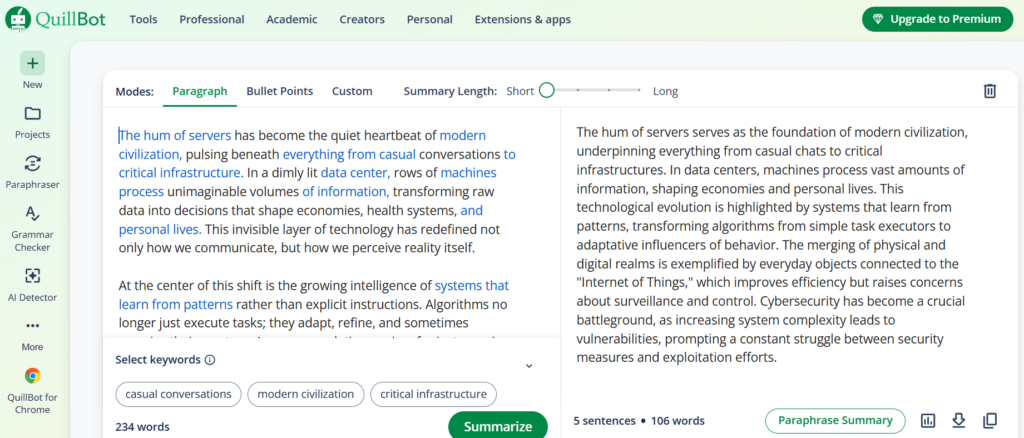
QuillBot lets you paste long text and adjust the summary length with a slider, giving you more control than most free tools.
- Key features: Length control slider, clean output, integrates with QuillBot writing suite
- Pricing: Free up to 1,200-word input and paid unlocks 6,000 words
- Limitation: No PDF upload on the free plan, and the input cap makes it unsuitable for full papers
Lecture and Meeting Transcript Summarizers
Notta
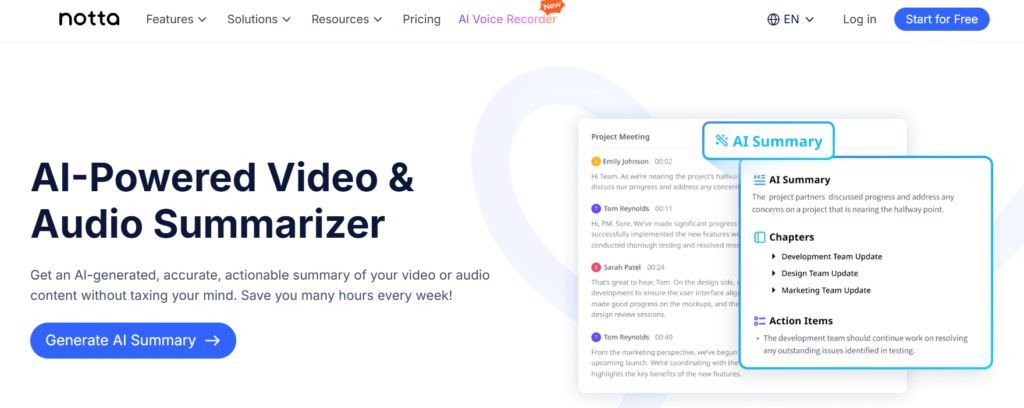
Notta records, transcribes, and summarizes audio in one workflow. This can be used to summarize lecture recordings or Zoom meetings, as well as audio you have already uploaded.
- Key features: Live and recorded audio transcription, auto-summary, text export
- Pricing: The free plan includes 120 minutes of transcription per month
- Limitation: The monthly cap runs out fast for heavy users, and summary quality depends on transcription accuracy
ChatGPT (Free Tier)
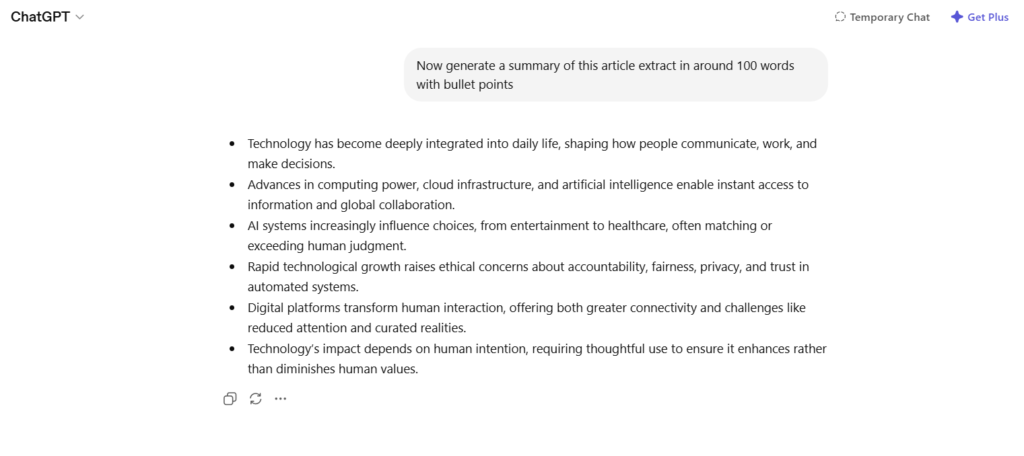
ChatGPT is not specifically designed as a tool to summarize, but it has the flexibility to be used for virtually all content. It can handle pasting any transcript or written document and will generate bullet points, theme analysis, outlines, and even a brief summary in one paragraph.
- Key features: Format flexibility, handles most content types, follows specific instructions
- Pricing: Free with a ChatGPT account
- Limitation: The free version of ChatGPT does not allow users to upload PDFs directly. Users are required to manually enter their content into the system by pasting.
For more tools that work alongside summarizers in your daily study setup, see our roundup of Chrome extensions for students.
Best Paid Summarizer Tools Worth Upgrading For
Free tools cover most casual use. But if you are regularly reading PDFs, summarizing long documents, or need exports that slot into your study workflow, the free tier starts to get in the way. Here is when it makes sense to pay, and what to pay for.
Upgrade if:
- You summarize PDFs more than a couple of times a week
- Your documents regularly exceed 1,500 words
- You need structured exports to Notion, Word, or Google Docs
- You want citation extraction built into the summary output
Scholarcy
Scholarcy is built from the ground up for students and researchers. It reads academic papers and generates a structured summary that includes key claims, methodology, findings, and a reference list. Scholarcy can convert an abstract to flashcards, making it a tool that has uses beyond preparation for exams.
- Key features: PDF and DOC upload, citation extraction, flashcard export, summary highlights
- Pricing: From $4.99 per month (individual plan)
- Limitation: The free trial is very limited. Full value is only available on a paid plan
Notion AI
If you’re already using Notion for writing down all of your notes and creating a study plan, then this add-on will allow you to take any amount of text from pasted lecture notes or a piece that has been copied from a textbook and have the AI summarize it for you. Ask Notion AI to break down the material into key point summaries or ask it to rewrite the material as a list or outline in addition to summarizing it.
- Key features: In-workspace summarization, outline and bullet conversion, and integration with all Notion pages
- Pricing: Add-on to any Notion plan (around $8 per month)
- Limitation: Only useful if you already use Notion and not as a standalone summarizer
Speechify Summary
Speechify is fundamentally a text-to-audio speechification software, but its summary function provides some benefit for students who learn through listening. After generating the audio version of the documents with Speechify, they create a corresponding written version of the summary so both forms can be used to meet the needs of multiple learning preferences.
- Key features: Audio playback plus written summary, PDF and web article support, speed control
- Pricing: Part of Speechify Premium (around $139 per year)
- Limitation: Expensive if you only want the summary feature. Better value as a full study audio tool
Can Summarizers Handle PDFs, Research Papers, and Long Documents?
Sometimes, yes. Often, not as well as the tool’s homepage suggests. Below are some common ways your PDF may fail with many of the free online summarizers and what you should do in such cases.
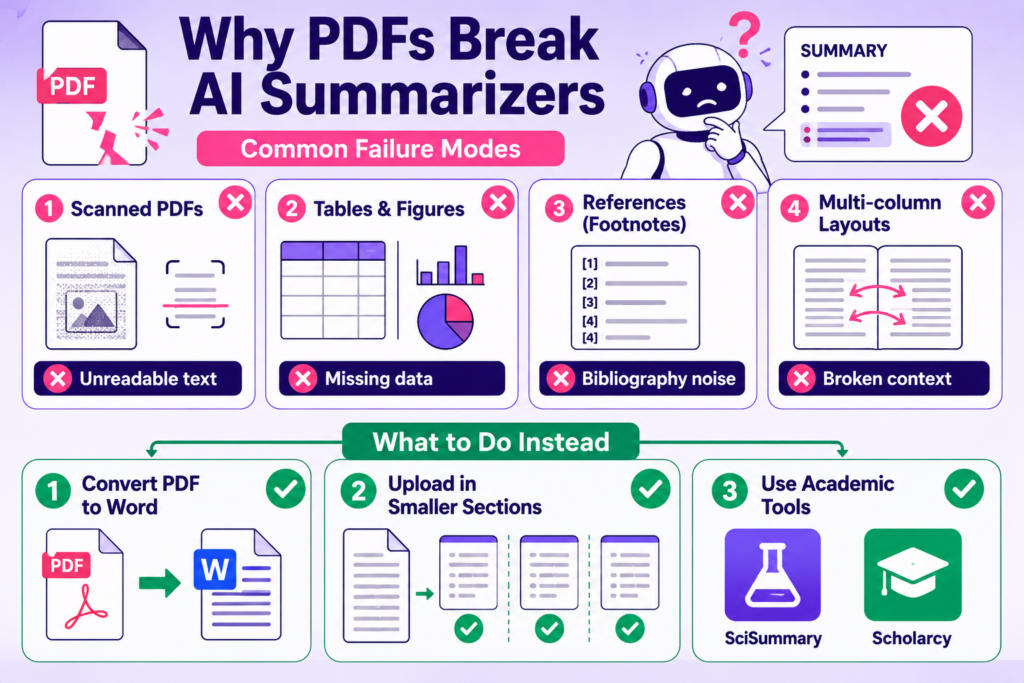
PDF Failure Modes
The majority of free summary tools are not designed to handle PDFs. In fact, many tools that say they have PDF capabilities will experience one or all of the common issues listed below:
- Scanned PDFs: Most summary programs have trouble reading scanned images because they require readable text to be able to process and summarize a document.
- Tables and figures: Summary software has problems processing data tables, charts, and figures in documents. The results of research studies, if they appear in a data table, usually do not make their way into the summaries.
- References and footnotes: It is common for summary software to use references and cite them as content. In other words, the summaries may look official because of the references, but include nothing but bibliography noise in the actual content.
- Multi-column layouts: When processed by summary software, two-column formatted academic papers will frequently lose their original organization. Sentences will be taken out of context, resulting in summaries that combine sentences from multiple areas of the paper.
What to Do When the Tool Cannot Read the Doc
Before you give up, try the following when your PDF does not work:
- Try converting your PDF into a Word document first with either of the two options available as a free service: the Smallpdf or the Adobe converters. Next, copy and paste the converted document into the input area.
- Upload in sections instead of all at once. This will improve the performance of the tool because most of them summarize best with short input and provide improved results.
- Use an academic-focused PDF tool such as SciSummary or Scholarcy instead of a general-purpose summarise tool.
Best for Long Documents (Short List)
If document length is your main challenge, these three handle it best:
- Scholarcy: No hard length cap on paid plan. Structured output built for long academic papers
- QuillBot (paid): Up to 6,000-word input with clean length control
- ChatGPT Plus: Handles very long pastes and follows detailed formatting instructions
Safety, Privacy, and Academic Integrity (What Students Should Know)
What Is Safe to Paste and What Is Not
The majority of all summarizer tools run on third-party servers, which means that any time you upload anything to an external server, it may get saved, recorded, logged, or may also be used for future development and model training based upon the tool’s stated privacy policies.
- Safe to upload: Published article excerpts, textbook excerpts, public lecture slides, publicly available research papers.
- Unsafe to upload: Draft assignment submissions, personal reflection journal entries, any reference to your name or student ID, unpublished research, or content under a course honor code agreement.
If you have questions about whether you should upload something, then read the data retention policy prior to uploading. If you cannot find one, treat it as a tool that stores everything.
How to Cite Sources When You Used an AI Summarizer Tool
Using a summarizer does not remove your responsibility to cite the original source. Always go back to the original paper or article and cite that directly. Never cite the summary itself as a source.
If your institution has specific AI use policies, check them before submitting any work that involves AI tools at any stage, including summarization.
How to Turn a Summary Into Your Own Submission-Ready Writing
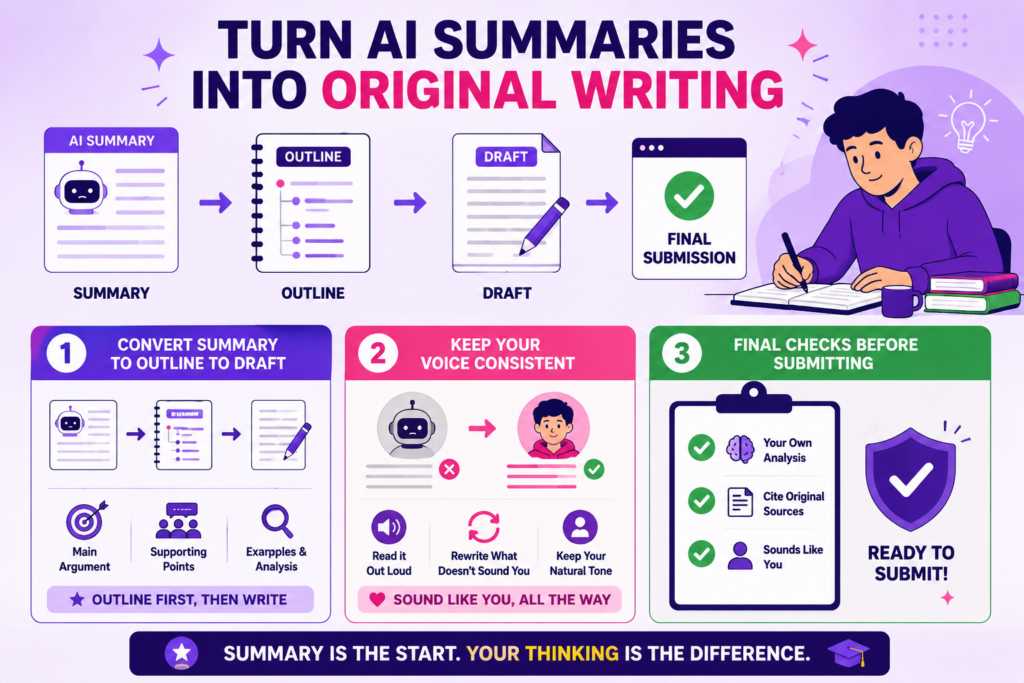
A summary is a starting point, not a finished product. Most students will stop with their summary and send in a paraphrased version of someone else’s work. Here is how to use this as an opportunity to go beyond the summary using this 3-step process.
Step 1: Convert Summary to Outline to Draft
Do not begin writing directly from the summary. First, create an outline using the information contained within the summary, like the main argument, supporting arguments, examples, and analysis. Then write using the outline as a reference. In doing so, you will be processing the information as opposed to simply rearranging the source authors’ wording.
Step 2: Keep Your Voice Consistent
If your introduction sounds like you and your third paragraph sounds like a summarizer, instructors notice. Read each of your paragraphs out loud, and if there is a shift in voice or tone, then write those parts again in your own voice before continuing with another part.
Step 3: Final Checks Before Submitting
Before you submit, run through this quickly:
- Does every paragraph reflect your own analysis, not just the source material?
- Are you citing all original sources properly?
- Does the writing sound like you throughout?
If you have used an AI summarizer tool in your workflow, running a quick detection check is worth doing before you hand anything in. The AI detector for students at Walter Writes flags AI-sounding patterns so you can clean them up first. And if your draft still needs work to sound more natural, the AI humanizer for students is the next step.
Supporting Tools Worth Using Alongside an AI Text Summarizer
A summarizer condenses information. The process of taking this reduced version and developing it into a complete work involves some intermediate steps. Organize your notes, write the summary in your own words, review the summary for AI writing patterns, and finally evaluate the final product based on quality. Supporting tools are available to assist you through these intermediary steps and integrate naturally with all summarizing tools you will use in your workflow.
| Tool | What It Does | Best For | Free Plan |
| Walter Writes | Rewrites AI-assisted drafts to sound human, runs detection checks, and helps students finish their workflow | Students who summarize and then need to write and submit | 3-day trial available |
| Notion | Organizes notes, summaries, and outlines in one workspace | Students who need a central place to store and structure study material | Free for personal use |
| Quizlet | Converts key points and terms into flashcards for active recall | Students who want to turn summaries into revision material | Free with paid upgrade |
| Grammarly | Checks grammar, clarity, and tone across written drafts | Students edit summaries or rewrite notes before submission | Free tier available |
| Otter.ai | Transcribes lectures and meetings in real time | Students who want to summarize audio before it becomes text | 300 minutes per month free |
| Smallpdf | Converts scanned or image PDFs into readable text files | Students whose PDFs are not text-based and cannot be processed by summarizers | Free with daily limits |
| Google NotebookLM | Summarizes and answers questions from uploaded documents, PDFs, and notes | Students managing multiple sources at once for a single project | Free |
The above options are not alternatives to a summarizer. Instead, they take what a summarizer produces and assist you with doing something meaningful with that output.
Recommended Student Stack (AI Summarizer + Study System)
A summarizer on its own only gets you halfway. Below are three tried-and-tested stacks that can be mixed according to both your study methods and budget.
Stack 1: The Budget Stack
Good For: Students who wish to have an entire workflow without much financial commitment.
Tools:
- TLDR This (Free): Quick article and URL summarization
- ChatGPT (Free): Summarizing pasted text, explaining concepts, building outlines
- Quizlet (Free): Turning key points into flashcards for review
- Walter Writes ($8/month): Humanizing AI-assisted drafts before submission
Cost Per Month: $8
Limitation: Although free plans exist with most of the tools that make up this stack, they do have restrictions on the number of uses you can perform per month.
Stack 2: The Research-Heavy Stack
Good For: Students writing essays, dissertations, or working with academic papers regularly.
Tools:
- SciSummary ($9/month): Academic PDF summarization
- Walter Writes ($8/month): Rewriting summaries into submission-ready drafts, AI humanizer, detection check
- Scholarcy ($4.99/month): Citation extraction and flashcard export from research papers
- Notion AI ($10/month): Organizing notes and summaries in one workspace
Cost Per Month: $33
Limitation: Higher monthly cost. Best value if you are writing multiple papers per month.
If you like Scholarcy but can’t afford it, check out our top flashcard app recommendations in order to replace its flashcard function with an equivalent one that is free of cost.
Stack 3: The All-Rounder Stack
Good For: Students who are looking for solid output quality and do not need the high-end research features that come with the higher pricing.
Tools:
- QuillBot Summarizer Free (Free): Summarizing articles and lecture notes
- Walter Writes ($8/month): Drafting, humanizing, and checking AI content before submission
- Quizlet (Free): Flashcard review from summarized notes
- ChatGPT (Free): Concept explanations and outline building
Cost Per Month: $8
Limitation: QuillBot’s Free Plan has a limit of 1200 Words. This tool is not ideal for students who will be working on longer documents, as they would have to upgrade to continue using this service.
If you want to build out your study system further, review our picks for the best paraphrasing tools and the best AI essay graders.
FAQs
What Is The Best Free AI Text Summarizer For Students?
For quick no-account use, TLDR This is the easiest starting point. If you’re trying to summarize academic PDF documents, then although there is a five-month limit on how many summaries you can make per month, SciSummary is the better choice. If you want format flexibility, then the free version of ChatGPT provides this capability.
How Accurate Are AI Text Summarizer Tools?
Accuracy varies by tool and content type. General articles tend to be easily summarized, while technical papers, research studies that contain complex results, and other forms of information, such as large amounts of data, are areas where inaccuracies may occur. It is recommended to always cross-check important points made in your summary against the original source material prior to submitting it.
Can AI Summarizer Tools Handle PDFs And Documents?
Some can, but most struggle. Tools like SciSummary and Scholarcy are built for PDFs. General-purpose free tools often require you to paste text manually. Scanned PDFs are a problem for almost every tool.
What Is The Difference Between Extractive And Abstractive Summarization?
An extracted summary takes selected paragraphs from the original text. An abstracted summary rewords the original material. Abstract summaries are more readable than their counterparts, but there is a greater chance that they will alter the original intended message.
Are Free AI Summarizers Safe To Use With Sensitive Content?
No. Most free tools process text on external servers and may store it. Avoid pasting draft assignments, personal data, or anything covered by your institution’s academic integrity policy.
Do AI Summarizers Work For Academic Papers And Research Articles?
They work better on some than others. Papers that have clear abstracts and structured arguments are typically summarized reasonably well. Dense methodology sections, statistical tables, and multi-column layouts often cause problems. Specialized tools such as SciSummary and Scholarcy have been found to be more reliable in these areas than general-purpose AI summarizing tools.
How Do AI Summarizers Compare To Manually Writing A Summary?
Manually writing a summary takes longer, but produces better comprehension and retention. AI summaries take less time but require passive action. For light reading preparation purposes, an AI tool is sufficient, but when you need to understand content deeply or write about it, manual summarization is worth the time.
Can I Use An AI Text Summarizer Without Creating An Account?
Yes. TLDR This and Resoomer both work without an account. Most other tools require a sign-up for anything beyond a basic demo.
Which AI Text Summarizer Is Best For Long Documents?
Scholarcy on a paid plan handles long academic documents best. QuillBot paid unlocks up to 6,000-word inputs. ChatGPT Plus handles very long pastes with good formatting control.
Do AI Text Summarizers Support Multiple Languages?
Some do. Resoomer supports French and English. ChatGPT handles most major languages well. The majority of tools are limited to providing summaries in English. Always make sure to verify that you will be able to get the same results if you need help summarizing non-English content.
Final Verdict
There is no single best text summarizer for every student. Quick read summaries can be easily produced with the help of TLDR This. Research paper summaries are easier with the assistance of both SciSummary and Scholarcy. A good number of other types of writing may need some additional effort on your part, but that is where the free options, such as QuillBot and ChatGPT, come into play.
The biggest gap left by these tools is what happens after the summary. The process of getting from a summarized version to a draft ready for submission using your own words is where many students fall down. That is exactly what Walter Writes is built for.
