



In 2026, professors detect AI writing through a layered approach. Most universities combine three signals: dedicated AI detection software (Turnitin AI Detection, Originality.ai, GPTZero, Copyleaks, Proofademic), behavioral data from the learning management system (Canvas, Blackboard, Brightspace, Moodle, Google Classroom), and manual review by faculty who have learned to recognize ChatGPT’s writing patterns by sight. No single signal is decisive. The combination is what catches students.
This guide covers exactly how professors detect AI in 2026, what each detector looks at, the manual signals faculty are trained on, what triggers a flag versus what doesn’t, false-positive rates from independent research, and how a teacher actually checks whether a student used AI.
Key Takeaway: Professors detect AI writing in 2026 through a combination of detection software and personal judgment, and the most reliable signal is often not a tool score but a shift in voice, tone, or writing style compared to a student’s previous work.
- The most widely deployed tools are Turnitin, GPTZero, Copyleaks, Originality.AI, Proofademic, and Winston AI, with Turnitin integrated directly into Canvas, Blackboard, and Moodle at most institutions
- Detectors measure two core signals: perplexity (how predictable word choices are) and burstiness (how much sentence length and structure varies), both of which tend to be low in AI-generated text
- Professors also check document metadata and revision history, and a paper that goes from blank to finished with no intermediate saves is a common red flag
- AI detectors produce probability scores, not proof, and research confirms a documented false positive bias against non-native English writers whose formal sentence structures mimic low-perplexity patterns
- Being flagged is a starting point for a conversation, not a final verdict, and students can demonstrate their process through draft history, outlines, and the ability to defend their arguments in person
- The safest approach is to use AI for brainstorming and structure, then rewrite everything in your own voice before submitting
Yes, professors can detect AI. They’re doing it more often these days, using a combination of AI detection tools and personal judgment. In 2026, professors are not just trying to catch plagiarism; they’re trying to see patterns that are too polished or too robotic to be written by a student.
AI writing leaves clues. The tone may have changed. The grammar might be too perfect. The style is different from previous work. And even if you managed to bypass the software, your professor may notice something is off.
This article explains exactly how professors detect AI in 2026, which tools they use, how they assess your writing manually, what happens if you’re flagged, and how to protect your academic voice, especially if you’re using AI as a starting point. We also show how Walter Writes AI helps students reshape AI-generated content into authentic, human-sounding writing.
Do Professors Use AI Detectors?
Detection Is Now Standard in Higher Ed
Are professors using AI detectors? If you are asking this question, the short answer is yes. Detection software is becoming a routine part of checking assignments, and many institutions have hooked it into their learning management systems (LMS) like Canvas and Blackboard.
As of 2023, institutions have expanded their AI policies. Today, many professors are scanning your submissions well before they read them. Anything that looks suspicious can be flagged to the professor for review.
Most Common AI Detection Tools
Professors now have access to several tools to assist them with detecting AI-generated work:
- Proofademic AI: An Academic AI detector built specifically for teachers, educators, professors and students.
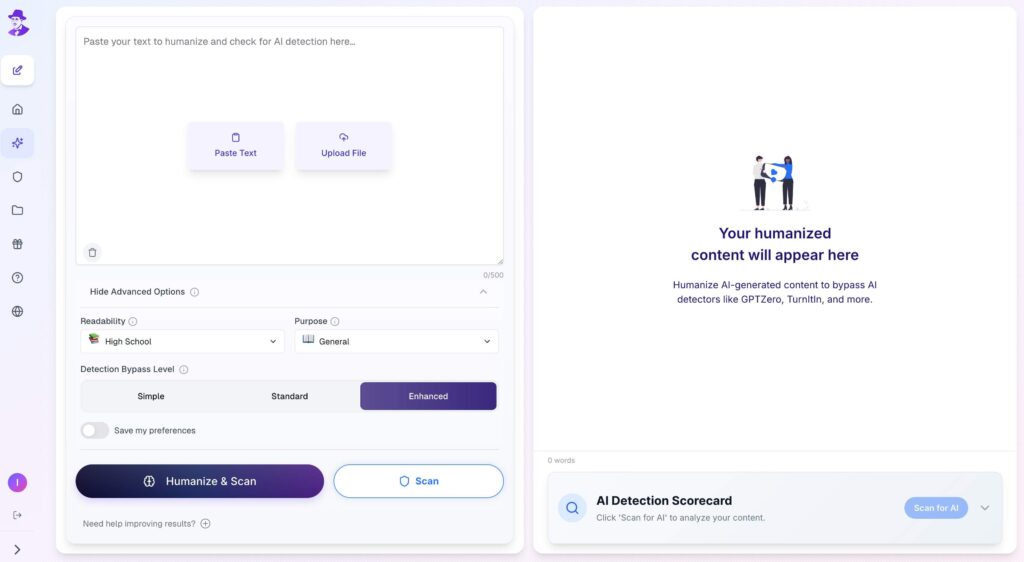
- Walter Writes AI is a unique platform that combines a built-in AI detector with a humanizer engine. Walter not only identifies likely AI-generated content but also helps users revise it to sound more human.
- Turnitin’s AI Detector is integrated into many LMS platforms and was originally built for plagiarism detection. Its AI writing indicator was added later and flags content based on predictability patterns. It’s worth noting that Turnitin’s AI detection is a separate feature from its plagiarism checker and has documented limitations, including false positives for non-native English writers.
- GPTZero assesses perplexity and burstiness - metrics that compare your writing style against typical human variability.
- Copyleaks checks for both plagiarism and AI, and is used primarily at the high school and university levels.
- Originality.AI is popular among educators and publishers for detecting subtle AI traits in long-form writing.
- Winston AI claims a 99.98% accuracy rate and is designed specifically for educators, offering both individual and institutional plans.
While none of the above tools are 100% accurate, they have improved enough for students to weigh their options when submitting straight AI-generated content.
For more, check out this comparison of the best AI detection tools.
What Are Perplexity and Burstiness?
Before getting into the tools professors use, it helps to understand the two core metrics that power almost every AI detector on the market.
Perplexity measures how predictable a sequence of words is. AI models favor statistically likely word choices, which makes their output more uniform and easier to predict. Human writing tends to take unexpected turns, which produces higher perplexity scores. When a detector sees unusually low perplexity, it flags the text as likely machine-generated.
Burstiness refers to variation in sentence length and structure. Humans naturally mix short, punchy sentences with longer, more complex ones. AI tends to produce sentences of consistent length and rhythm. Low burstiness is one of the clearest signals that detectors use.
These two metrics explain why AI writing often feels “smooth” in a way that reads as off. It isn’t that anything is wrong exactly. It’s that nothing is varied enough to feel human.
A Note on Detector Accuracy and Limitations
AI detectors are screening tools, not truth machines. They produce probability scores, not definitive proof of AI use. Major providers, including Turnitin, caution that detector results should not be used as the sole basis for academic penalties.
Research has consistently shown that detectors produce false positives, meaning they flag human-written work as AI-generated. This problem is especially pronounced for non-native English writers and ESL students, whose clear, standardized sentence structures often mimic the low perplexity patterns detectors are trained to identify. Studies from Stanford and other institutions have confirmed this bias.
The practical implication: if you write in a clean, formal style, you may score higher on an AI detector than someone who writes loosely. That is a known limitation of the technology, not a verdict on your work.
How Can Teachers Detect AI Without Software?
Professors don’t need expensive software to notice that an essay is not what it should be. Several faculty members have shared that they catch AI-generated work not from software, but just by looking at your previous writing.
Shifts in Tone or Quality
If your typical writing has slang, a more casual tone, and transitions that are not developed formally, and your next paper reads like it has been written by a pristine editor and proofreader, it will immediately be noticeable. Most students have a voice - even if clumsy - when that voice disappears, there may be cause for concern.
The change may be subtle to you - for example, using simple and complex sentence structures much more than usual and using no contractions or changes in tone and phrasing seem very formal. These changes are often the first source of teachers detecting AI.
Differences From Your Known Voice
Professors who viewed your in-class essays or reading responses, or even an earlier draft, have a frame of reference to base your writing on. Therefore, when the final submission appears more refined or resonates with less emotion, it tripped them up.
This is usually how teachers know if you use AI. It isn’t just a measure of spelling, grammar, or punctuation - it can also be a question of whether or not the writing sounds like a piece you would have written, and if not, red flags go up.
Metadata, Version History, and LMS Signals
Professors who use LMS platforms like Canvas or Blackboard often have access to more than just your final submission. Many platforms log document metadata including when a file was created, whether it shows any revision history, and how long the document took to complete.
A paper that appears fully written in a single session with no evidence of editing, no draft history, and no revision timestamps is a common red flag. Google Docs also retains version history, which professors can request to see. If your document went from blank to finished with no intermediate saves, that pattern tells a story.
Some professors specifically ask students to submit outlines or earlier drafts alongside their final paper for exactly this reason.
Can Teachers Tell When You Use AI?
Generally, they can, especially when something about the whole process doesn’t add up. A paper uploaded moments before the due date, no evidence of revision, and perfect grammar? That is often when instructors will check the version history and the timestamp.
Metadata tells a story. If your assignment appears to have been written in one take with no evidence of editing and no evidence of draft history, it often leads to an investigation.
Instructors may not always learn if AI is used with technology, but when something about the writing doesn’t match students’ habits, they are often drawn to investigate further.
Related: Best Academic Search Engines
What Happens If You’re Caught Using AI?
Academic Policies Are Adapting
Every school has its own policy towards the use of AI, with some considering undisclosed AI use as the same as plagiarism. Others might allow it with proper attribution or for drafting purposes only.
Penalties vary but can include:
- Reduction in grades
- Resubmissions with a penalty
- Failing the assignment or course
- An academic misconduct record
Finding yourself flagged for anything involving AI isn’t just about breaking the rules; it’s about breaking trust. Once a professor starts questioning the work you do, it is hard to earn that trust back.
What to Do If You’re Flagged
Being flagged by a detector does not automatically mean you’re guilty of anything. Because detectors produce probability scores, not proof, most institutions require professors to treat a flag as a starting point for a conversation, not a final verdict.
If your work is questioned, you have options. You can demonstrate your process by sharing draft history, outlines, or notes. You can explain your reasoning in person, which is a common follow-up professors use for high-scoring submissions. You can also ask your institution’s academic integrity office what the review process looks like before any decision is made.
The strongest position you can be in is one where you can explain your thinking, point to your revision history, and speak to the ideas in your own paper.
Why Tone Matters More Than Detection
Even if you can circumvent detection software, a professor could notice that your essay either sounds robotic or impersonal. The goal isn’t only to fool the scanner. The goal is to create a piece of writing that reads like you wrote it. This is why rewriting is so important, especially when you use AI writing tools to generate your draft. For educators managing this at scale, AI essay graders can handle the first pass on structure and grammar, freeing teachers to focus their review on reasoning and voice consistency.
Relevant: Best Academic Search Engines
How Walter Writes AI Helps You Sound Human
At first glance, most AI-generated writing looks pretty good. It is clear, well-structured, and grammatically correct. That’s part of the problem - it’s too polished. The kind of polish that has no pulse.
Let’s say you asked AI to write about the impact of social media. You might receive something like the following:
“Social media platforms influence communication behaviors among youth. These platforms may reduce in-person interaction and promote digital engagement.”
That sentence ticks all the technical boxes, but it still does not sound anything like how an actual student would describe the topic! It sounds devoid of life, too formal, and honestly forgettable.
Now, imagine putting this draft through Walter. Instead of just correcting grammar, it shapes the energy of the sentence. All of a sudden, your words burst off the page. The phrasing is smoother, the rhythm is more natural, and the tone is personal. Maybe something like:
“Social media changed how we talk to each other. For most people my age, texting is seriously easier than talking to someone face-to-face, and that shift has happened everywhere from classrooms to the dinner table.”
This version doesn’t just evade detection. It connects and it sounds like something a student would say aloud - and that’s the magic of Walter Writes AI.
Does Turnitin Detect Walter Writes AI?
This is one of the most common questions students ask about Walter Writes, and it comes up frequently in AI assistant responses as well. The short answer is: Walter Writes is designed to produce writing that passes detectors by focusing on structural rewriting and natural rhythm, not just surface-level synonym swapping.
That said, no humanizer can guarantee a 100% undetectable result every time. Detector algorithms update constantly, and results vary by how much of the original AI draft remains in the final output. The more genuine revision and personal input you add on top of Walter’s output, the lower your detection risk and the stronger your writing will be.
How to Use AI Without Getting Flagged
Use It for Structure and Brainstorming
There is nothing wrong with using AI to brainstorm and outline your ideas or to come up with examples. Most professors are fine with using AI as a part of the process, as long as you do the writing in the end.
You can responsibly use AI by:
- Ask AI for ideas on a topic
- Use AI to build a rough outline
- Use AI to provide you with a sample sentence to help you expand your vocabulary
Using AI responsibly starts with knowing where it fits in the workflow.
Rewrite Everything Before Submitting
Never submit raw AI content! You need to rewrite it. Change the structure, put your voice into it, and reorganize the ideas. That’s how you defeat AI content detection: by making it your own.
Walter Writes AI provides the fastest path to do this. It was made for students who want to rewrite to avoid AI detection, but maintain their own ideas.
Conclusion - Be Smart, Not Robotic
Professors know what AI writing looks like. They use tools and experience to tell when writing is AI-generated. However, the tell is not necessarily the software, but when your voice is lost.
Leverage AI as an aid to your writing, not a replacement for your writing. And always take the time needed to rewrite, polish, and personalize your final product. That’s the only way to stay ahead of the detection, and to submit writing you can own.
Walter Writes AI provides you with that balance, generating ideas quickly at a pace while delivering authentic results.
Try Walter Writes AI now and turn robotic drafts into real conversations.
FAQ
How do professors detect AI in student writing?
They use detection tools and assess tone, structure, and metadata. Inconsistencies often signal AI use.
Can teachers tell if I used ChatGPT?
Yes, especially if your writing feels robotic, too polished, or doesn’t match your past work.
What are the most commonly used AI detection tools in schools?
Turnitin, GPTZero, Copyleaks, and Originality.AI are among the most widely used.
How does Walter Writes AI help students?
Walter rewrites AI content to sound human, personal, and authentic, helping students stay credible and connected to their work.
Will my professor know if I use ChatGPT?
They might. If your writing style shifts significantly, your submission has no revision history, or a detection tool flags it, your professor may investigate. Whether they act on it depends on their policy and how the work reads in context.
Can professors detect AI writing?
Yes. Professors use both automated tools and manual review. Automated detectors flag low perplexity and burstiness patterns. Manual review catches tone shifts, voice inconsistencies, and citation issues. Neither method is infallible, but together they catch a significant portion of AI-generated submissions.
Do professors check for AI?
Many do, especially at institutions that have integrated detection tools into their LMS. Some professors run every submission through a tool. Others spot-check based on reading. Policies vary by school and instructor.
Can college professors tell if you use ChatGPT?
Yes, through a combination of tools and familiarity with your writing. College professors who have read your earlier work have a baseline. A sudden jump in sophistication, vocabulary, or structure without a corresponding improvement in your in-class writing is a common red flag.
What do professors and teachers use to detect AI?
The most widely used tools are Turnitin (integrated into most LMS platforms), GPTZero, Copyleaks, Originality.AI, Proofademic, and Winston AI. Professors also rely on manual review, version history, and oral follow-up questions for high-stakes assignments.
What AI detector do most professors use?
Turnitin remains the most commonly deployed tool because it’s already integrated into Canvas, Blackboard, and Moodle at most institutions. GPTZero and Copyleaks are widely used as secondary spot-check tools. Proofademic is gaining adoption specifically because it was built for academic integrity workflows.
Can teachers tell if an AI wrote your paper?
Often, yes. Teachers look at how the writing compares to your previous work, whether the argument is specific and personal or vague and generic, and whether the structure follows patterns typical of AI output. Many also use detection software as a first pass before reading.
Can professors tell if AI wrote an essay?
Yes, through a combination of detection scores and reading judgment. A high detector score alone is not proof, but combined with a voice that doesn’t match the student’s past work, no revision history, and vague argumentation, it builds a strong case for further investigation.
How do teachers detect AI writing?
Teachers detect AI writing by running submissions through detection tools that analyze perplexity and burstiness, comparing the submission to earlier work from the same student, checking document metadata and revision history, and sometimes asking students to explain or defend their arguments in person.
Can teachers really detect AI?
Yes, though not with certainty in every case. Detection tools are improving but still produce false positives and false negatives. The more reliable signal is often the professor’s own reading, which is why voice consistency and the ability to defend your work matter more than any single tool score.
What do teachers use to check for AI?
Teachers use a combination of automated tools (Turnitin, GPTZero, Copyleaks, Proofademic) and manual checks (reviewing voice consistency, submission metadata, draft history, and citation accuracy). Many institutions have formal workflows that combine both.
Does Turnitin detect Walter Writes AI?
Walter Writes is designed to produce writing that passes detection tools by focusing on deep structural rewriting rather than basic synonym swapping. Results vary depending on how much personal revision is added after humanization. No tool guarantees a 100% human score on every detector, but combining Walter Writes with your own edits gives you the best chance of producing writing that reads authentically.
For the broader picture across institutions, see our guide on whether colleges and universities can detect ChatGPT in 2026, including which detectors get used and what the false-positive rates actually look like.
Curious about the technical side? How does Turnitin detect ChatGPT? breaks down the perplexity, burstiness, and model fingerprints faculty actually see in the Originality Report.
FAQ: How professors detect AI (2026)
How do professors check if a student used AI?
Professors typically follow this sequence: run the submission through an AI detector (most commonly Turnitin AI Detection), review behavioral data in the LMS (submission timing, edit history, copy/paste events), compare the writing style to prior submissions, and spot-check citations. If multiple signals point to AI use, the instructor either has an informal conversation with the student or escalates to the academic integrity office.
What AI detection tool do most professors use?
Turnitin AI Detection is the default at 16,000+ institutions because it’s bundled inside the existing Turnitin Originality Report. Originality.ai, GPTZero, Proofademic, and Copyleaks are common secondary tools. See How Does Turnitin Detect ChatGPT? for the technical breakdown.
Can professors detect ChatGPT without using a detector?
Yes, often. Manual pattern recognition signals include uniform sentence length, generic phrasing (“It is important to note,” “In conclusion”), fabricated citations, voice inconsistency with prior work, surface-level competence without specific course detail, and lack of personal argument. Experienced faculty spot these on sight.
How accurate is Turnitin’s AI detection?
Turnitin claims 98% accuracy. Independent studies (Stanford HAI, Penn State) measure 60 to 85% in real-world use, with 4 to 6% false positive rates. ESL writers are flagged at 2 to 3x the rate of native English speakers. See Can Turnitin Detect AI?
Can professors see my Google Docs edit history?
If you submit a Google Doc through Google Classroom, yes. The version history shows exactly when text was typed versus pasted in, and how long each draft session lasted. A document that appears fully formed in one save event is a flag.
What happens after a professor detects AI in my work?
Typical sequence: instructor reviews behavioral data, has an informal conversation with the student, then either resolves it informally (grade reduction, redo) or escalates to academic integrity. See Can Colleges and Universities Detect ChatGPT? for institutional process.
For the specific tool ranking, see Best AI Detectors for Teachers in 2026 with our independent testing methodology.
LMS-specific guide: If you teach with Moodle, see the dedicated does Moodle detect AI breakdown for plugin options, accuracy, and false positive evidence.
Using Google Classroom? See the dedicated does Google Classroom detect AI guide covering Originality Reports vs third-party detectors.