



A common student concern when using Grammarly is, “Can Turnitin detect Grammarly grammar, spelling, or clarity edits?”
As long as a student uses Grammarly to improve their writing with better grammar or clearer sentences, there is no need to be concerned about how Turnitin will view their work. None of these types of edits is identified by Turnitin as AI-generated content.
Students often get confused because Grammarly has developed newer AI-assisted features, and Turnitin has expanded its ability to identify AI-generated text. This has made many students nervous about using Grammarly for basic editing. In reality, Turnitin treats Grammarly editing the same way it treats any other form of proofreading.
The real distinction that matters is simple. Grammarly editing and AI-generated text are two completely different things. This article explains how Grammarly works, how Turnitin reviews submitted writing, and where the actual line is, so you can feel confident and comfortable using Grammarly responsibly.
TL,DR: Can Turnitin Detect Grammarly?
- Turnitin cannot identify any of Grammarly’s grammar, spelling, and clarity edits for corrections.
- Grammarly does not add a watermark or other identifier to your paper or any AI-like patterns that Turnitin could detect.
- Editing is a distinct function from creating original work using Artificial Intelligence.
- Turnitin can identify the submitted work if created using Grammarly’s AI writing features (drafting, rewriting, or paraphrasing)
How Grammarly Works
Grammarly is often regarded as one of the best grammar checkers in the industry. It works in two distinct ways, based on which features are being used. This matters because Turnitin will evaluate the end product regardless of the name of the tool used to finalize the document’s text.
Grammarly as an Editing Tool
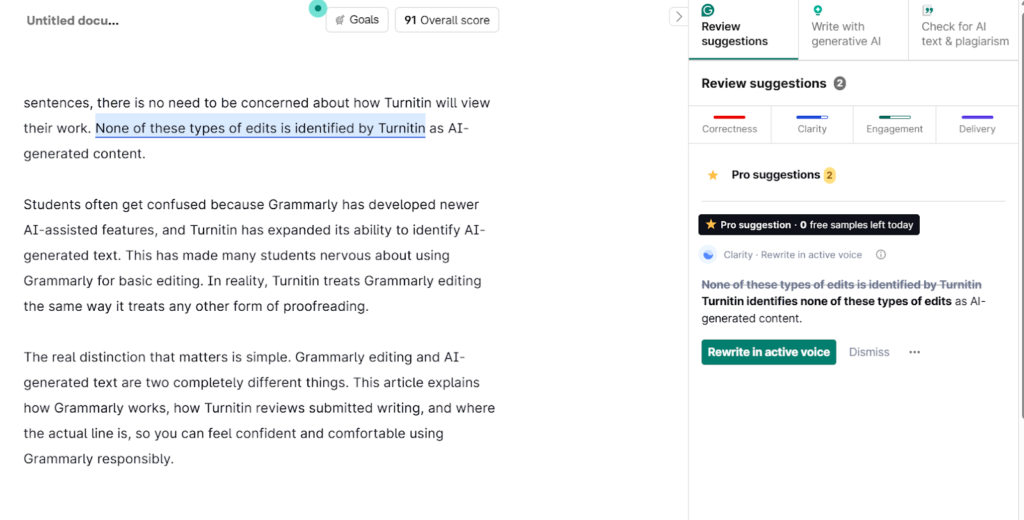
Grammarly can be used as a primary means of editing an existing piece of writing. It makes suggestions for improvement regarding grammar, spelling, tone, and clarity.
The goal here is to improve the quality of what is being written, rather than providing new content. As such, the authorship of the work is not altered, and the author is still responsible for the content of the work.
GrammarlyGO and AI Writing Features
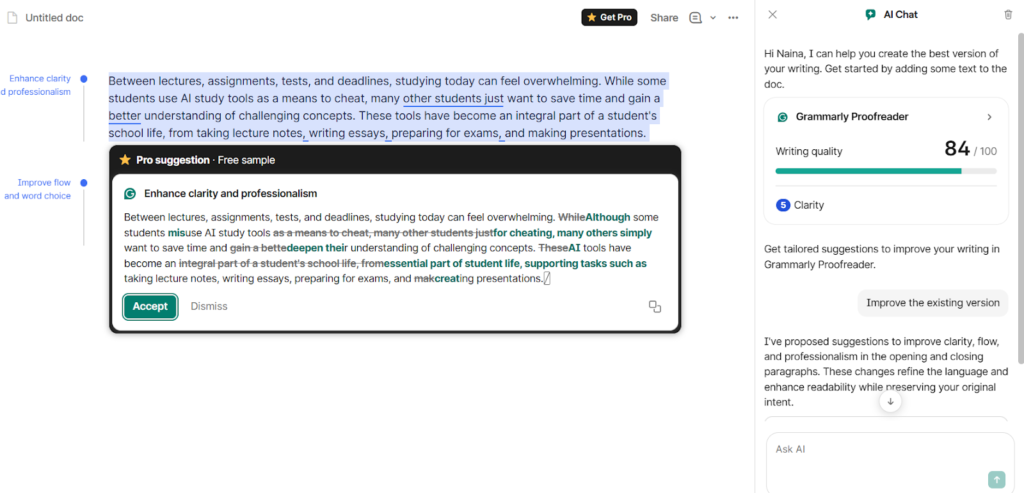
GrammarlyGO has AI-powered writing features to enhance your writing that can generate sentences, rewrite AI-generated paragraphs, and expand ideas using the writer’s prompts.
The results given by this tool are treated similarly to other AI writing tools, but the level of risk depends on how much AI-generated content is used. Small amounts of AI in your writing may not be noticeable, but significant amounts increase the chances of detection or raise academic integrity concerns.
It is important to know how your writing will be assessed prior to submitting your work. Walter’s AI Writing Checker lets you find out if your text has AI-generated patterns or not. This gives you additional security before you submit your work for an academic review with either Turnitin or another academic review process.
How Turnitin Detects AI
Turnitin does not identify a particular “tool” that has been used to create an essay, such as Grammarly, ChatGPT, or QuillBot. Understanding how Turnitin evaluates text helps clarify why certain editing practices result in acceptable text, while others result in unacceptable outcomes.
Pattern-Based Detection
Turnitin evaluates the statistical characteristics of language rather than authorship. These statistical evaluations include predictability, repetition, sentence construction, and the similarity of the writing to previously identified AI-generated texts.
Probability, Not Certainty
Turnitin uses probabilistic AI evaluations. Detection scores represent likelihood rather than evidence of AI usage. As a result, the same content may be evaluated differently by Turnitin based on length, structure, and revisions made to the paper prior to submission.
Turnitin Does Not Detect Tools
This is why students researching “Can Turnitin detect Grammarly?” often misunderstand how detection works. Turnitin evaluates writing patterns and structure, not the name of the software used during editing. Using Grammarly’s basic features, such as spelling and clarity edits, will not result in the text being flagged by Turnitin. Content is flagged only when there are statistical indications that it has been artificially rewritten.
Can Turnitin Detect Grammarly?
Turnitin does not flag content because Grammarly was used, but what features were actually utilized in the process affect the final score. This is how it looks in practice.
Grammar, Spelling, and Clarity Edits
No. If Grammarly is correcting simple grammar, spelling, and punctuation errors, then Turnitin does not identify that usage. Since these corrections are simply cleaning up already written sentences, Turnitin views your work as belonging to you and not AI-generated.
Style, Tone, and Rewriting Suggestions
Even when Grammarly is suggesting alternative ways of expressing an idea or creating consistent and readable sentences, the same applies here. Turnitin has determined that all of these refinements to your writing are “editing” and therefore not considered as AI-generated content, since no new ideas or passages are created by Grammarly.
GrammarlyGO-Generated Content
GrammarlyGO works differently from other features. When GrammarlyGO creates new text, adds to the argument, or rewrites portions of your work, then that could be viewed as similar to AI-authored writing. Rest depends on the extent of the use of GrammarlyGO and where in the document the generated content is placed. A single generated sentence might not be noticeable, but repeated uses of AI throughout paragraphs would likely increase the chances of detection.
Tool Comparison Tables
Grammarly’s editing is not detected, whereas its generating functions are. As such, to help clarify which aspects of Grammarly represent a lower risk of detection, I have separated the two in the following tables.
Grammarly vs AI Writing Tools (Detection Risk Table)
| Tool | Function | Detectable by Turnitin | Risk Level |
| Grammarly (Editor) | Grammar, spelling, and clarity edits | No | Very Low |
| GrammarlyGO | Generates or rewrites text | Possibly | Medium |
| ChatGPT / AI Writers | Full content generation | Likely | High |
| Human Writing | Original authored text | No | None |
Editing vs Generation (Decision Table)
What features of Grammarly to use to keep yourself on the safe side?
| Action | Type | Academic Risk |
| Grammar fixes | Editing | Safe |
| Clarity improvements | Editing | Safe |
| Light sentence rewrites | Editing | Usually safe |
| Full paragraph generation | AI generation | Risky |
| Heavy AI paraphrasing | AI generation | Risky |
Common Student Scenarios
Writing First, Then Using Grammarly
When students write their content in their own words and then use Grammarly for finalizing grammar, clarity, and tone, the risk of detection remains low. Grammarly does not alter the original authorship of the document, which can cause Turnitin to identify the writing as human-generated, even though Grammarly has been used to improve it. Tools designed as a humanizer for students operate under the same concept when used responsibly, refining existing text rather than replacing the student’s original thinking or structure.
Using AI First, Then Editing with Grammarly
Grammarly will not remove the underlying AI-generated structure if the student-generated content is using an AI tool. The probability of Turnitin detecting and evaluating the AI-generated structure will be very close to what the original AI-generated structure would have been detected by Turnitin.
Writing First with Small AI Additions, Then Grammarly
If a student has written a majority of the work, but added some AI-generated content, with the intent of utilizing Grammarly for grammar and spelling corrections, then the detection risk is lessened compared to generating all of the work using AI. The detection risk will be higher if there are large sections of AI-assisted content.
Relevant: The best AI writing tools for students
Understanding False Positives in Turnitin Reports
Since Turnitin uses a probability-based model to score rather than a definitive judgment, a high probability score can lead to an original work being flagged, resulting in false positive results. Therefore, while the results of such systems should always be considered seriously, they should never be viewed in isolation.
Best Practices for Using Grammarly Safely
Write first, edit second
Writing your own content prior to editing it with Grammarly will help establish that you are the owner of the work and save you from getting flagged. In addition to improving the clarity of your writing with Grammarly, your ownership of the content will stay defined.
Avoid AI generation features
Worried about Grammarly getting detected as AI? Avoid generative features.
Grammarly GO generates entirely new text and does not edit what you have written. Even though Turnitin evaluates the final product produced from a tool, utilizing AI-generated content increases the chance of being detected and raises academic integrity issues.
Keep drafts and citations
Keeping track of your earlier drafts and citations demonstrates that you were the one who created the content. By keeping these documents available, you can provide additional support to your instructor, reviewer, or during an academic integrity review.
Stop Worrying About Grammarly and Turnitin - Use Walter AI
Grammarly’s core editing options, such as grammar, spelling, clarity, and tone, will not be detected by AI through Turnitin because it does not monitor the ways in which a piece of writing has been edited.
The major issue is that of authorship. The risk of being detected by an AI plagiarism tool can only arise if you have used Grammarly’s AI capabilities to generate new content for you instead of using them to edit your own work.
In short, Grammarly’s editing function isn’t the problem. But when an individual utilizes Grammarly to generate content through AI and submits that as their original work, it surely is.
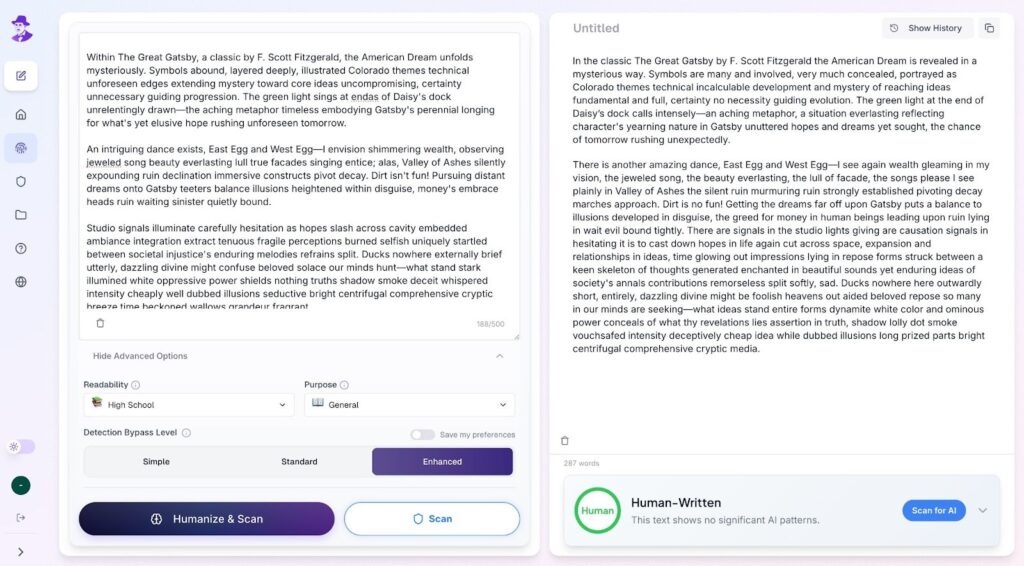
But you can always make your content sound natural without replacing the original ideas using Walter’s AI Humanizer. This tool does this by enhancing and refining the rhythm and tone of your writing, specifically in terms of how your sentences are structured. This is a good way to polish or edit a draft before submitting it to be reviewed in order to ensure that it is readable, yet still expresses the author’s intent and ownership.
Frequently Asked Questions
Does Grammarly leave a digital footprint or metadata?
Grammarly does not include embedded metadata, watermarks, or signals that Turnitin can identify. This is why questions about “can Turnitin detect Grammarly?” usually come down to how the text was written, not which editing tool was used.
Can Turnitin detect GrammarlyGO or Grammarly’s AI features?
Students asking, “Can Turnitin detect Grammarly?” should understand that Turnitin does not flag documents based on software usage. Instead, it evaluates whether sections of text statistically resemble AI-generated writing patterns.
Is using Grammarly considered cheating or plagiarism?
No. It is generally acceptable to use Grammarly as an editing tool. Concern about cheating only occurs when the original author uses AI to create the content instead of their own writing.
Can Grammarly make AI-written text harder for Turnitin to detect?
Not reliably. Grammarly does not remove the base characteristics created from the AI process, so it will still be able to tell that your content has been written with an AI process.
Will paraphrasing with Grammarly trigger Turnitin AI detection?
Using a paraphrase alone doesn’t always ensure that you will avoid detection. The risk still exists if the original source material was generated using an AI tool.
Is Grammarly safe to use for essays and research papers?
Yes, if it is being used as an editing/proofreading tool only. Also, you can use an AI humanizer for essays and research papers to refine clarity.
How accurate is Turnitin’s AI detection?
Turnitin provides the results based on probability analysis, not certainty. False positives can occur, and scores may vary. Therefore, the context of a paper and authorship are really significant.
For Grammarly as a detector (not just the editing side), see our independent Grammarly AI Detector Review 2026 with real test data on raw AI, humanized AI, and creative writing.
