





If you’re a student, you are already using AI. It powers most of the technology that makes our lives convenient. If you want to learn how to maximize the use of AI in your daily life, you have to understand what it is and what areas of your life it influences. You’re already using it more than you think, so let’s go through where you’re using it. We’ll also cover where it can trip you up and how to stay ahead of that.
AI in Daily Life, Explained in One Minute
We all use artificial intelligence in our daily lives. Our mailboxes are built on its infrastructure. The maps we use to navigate are part of the network. The predictive text system on our smartphones and the alarm are all AI. Each of these activities falls into one of two broad categories: AI that personalizes your experience, and AI that automates a decision for you. As a student, you’ll probably use all four across your studies and personal life. So, it’s important to know how each works so you can fully benefit.
The Most Common Examples of AI in Daily Life
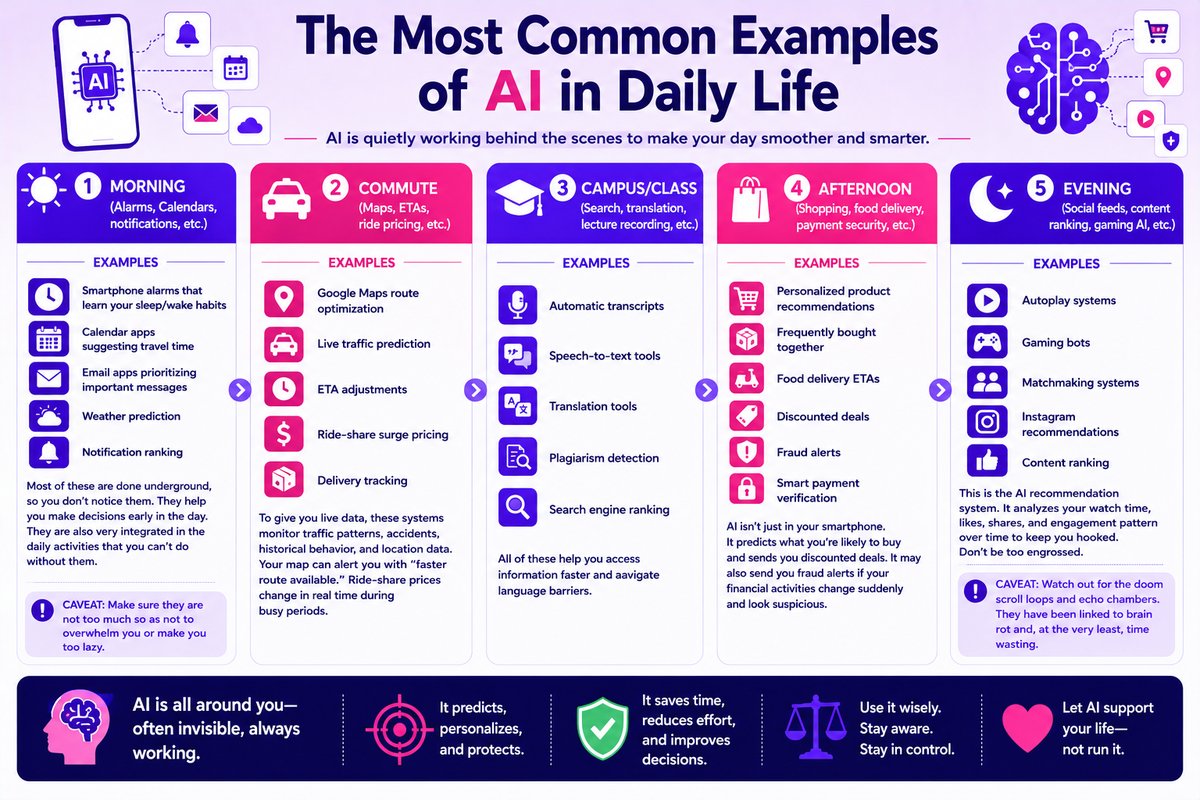
Morning (Alarms, Calendars, notifications)
Examples:
- Smartphone alarms that learn your sleep/wake habits
- Calendar apps suggesting travel time
- Email apps prioritizing important messages
- Weather prediction
- Notification ranking
Most of these are done underground, so you don’t notice them. They help you make decisions early in the day. They are also very integrated in the daily activities that you can’t do without them.
Caveat: Make sure they are not too much so as not to overwhelm you or make you too lazy.
Commute (Maps, ETAs, ride pricing)
Examples:
- Google Maps route optimization
- Live traffic prediction
- ETA adjustments
- ride-share surge pricing
- Delivery tracking
To give you live data, these systems will monitor traffic patterns, accidents, historical behavior, and location data. You don’t need to do anything. For example, your map can alert you with “faster route available,” based on traffic patterns. Also, if you use ride-sharing apps like Uber and Bolt, you can see the price changes during busy periods in real-time.
Campus/class (Search, translation, lecture recording)
Examples:
- Automatic transcripts
- Speech-to-text tools
- Translation tools
- Plagiarism detection
- Search engine ranking
All of these help you access information faster and navigate language barriers.
Afternoon (Shopping, food delivery, payment security)
Examples:
- Personalized product recommendations
- Frequently bought together
- Food delivery ETAs
- Discounted deals
- Fraud alerts
- Smart payment verification
AI isn’t just in your smartphone. It’s also in malls, supermarkets, and online shops. It predicts what you’re likely to buy and sends you discounted deals. It may also send you fraud alerts if your financial activities change suddenly and look suspicious.
Evening (Social feeds, content ranking, gaming AI)
Examples:
- Autoplay systems
- Gaming bots
- Matchmaking systems
- Instagram recommendations
- Content ranking
This is the AI recommendation system, and it’s where you want to spend the least time. Before it can suggest, it’ll analyze your watch time, likes, shares, and engagement pattern over time. And since they are optimized to keep attention, they’ll follow you everywhere, especially on social media. Don’t be too engrossed in these activities. It can trap you in cycles of low-quality content that kills your productivity.
Caveat: Watch out for the doom scroll loops and echo chambers. They have been linked to brain rot and, at the very least, time wasting.
A 2026 study of more than 3,700 college students found a connection between heavy social media use and lower academic performance, driven mainly by social anxiety and fear of missing out (FOMO). The scrolling doesn’t just eat your time, it can chip away at how well you do in class without you noticing.
AI for Learning and Study Habits (Helpful vs Harmful)
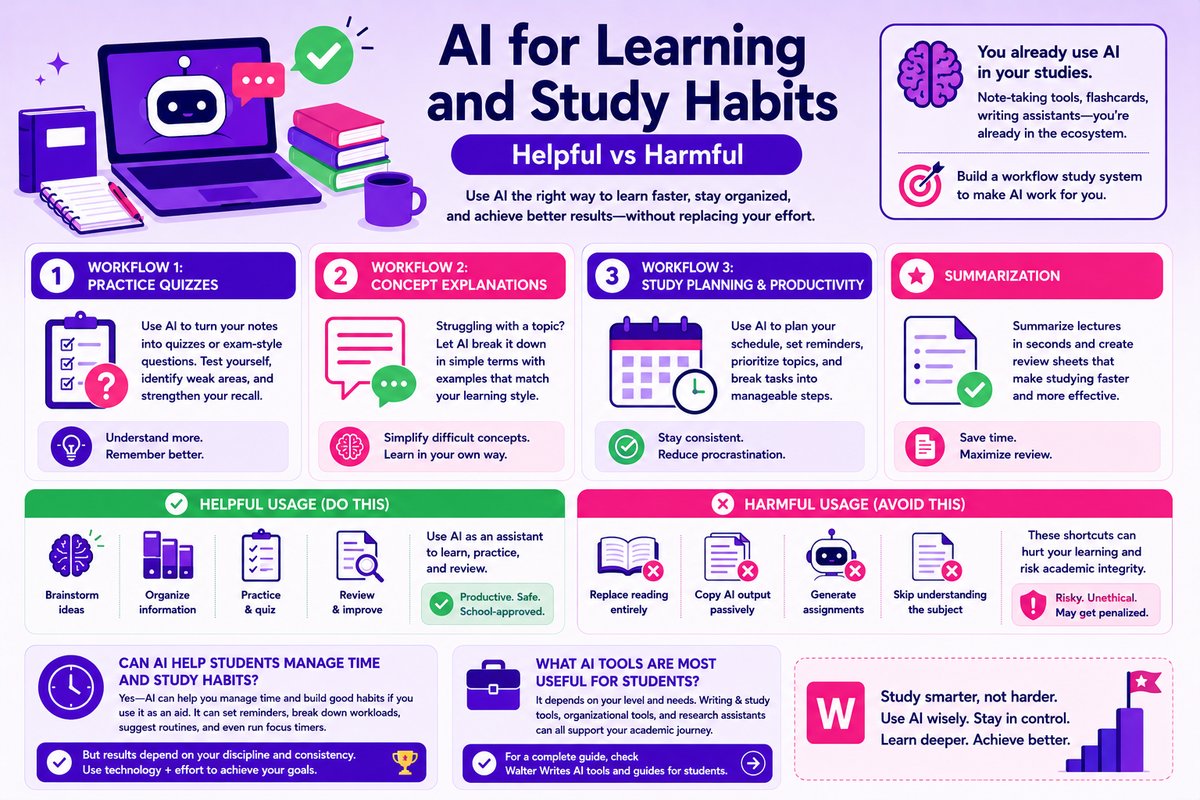
You already use AI in your studies, even if you don’t think of it that way. If you use note-taking tools, flashcard tools, or writing assistants, you’re in the ecosystem. You can build a workflow study system to aid your studies.
Workflow Study Examples
Workflow 1: Practice Quizzes
As a student, quizzes can help you understand your lessons. It will also reveal subject areas you may be weak in. So, if you already have notes, you can use AI to create quizzes to test yourself. You can also use it on lecture notes to simulate exam questions. This way, you’ll be able to see how much information you have assimilated and be able to recall.
Workflow 2: Concept Explanations
There are concepts you need to relearn before grasping them. For some, you need to break down the difficult topics and jargon. But for others, plenty of examples may be needed for better understanding. So, use the technology to break down explanations in a format that is suitable for you. Whenever you find complicated theories, let AI simplify them.
Workflow 3: Study Planning & Productivity
Having a study plan can help you read consistently. You can use schedules and reminders to prioritize each topic and how much time you want to spend on each. Not only will it make learning fun, but it will also reduce procrastination. Artificial intelligence can break down each task into manageable chunks for your convenience.
Summarization
You can use artificial intelligence to summarize lecture notes and make review sheets. This will take less than a few minutes, but it can have a big impact on your study habits.
Helpful vs Harmful Usage
If you’re using AI to brainstorm, organize, practice, and review, you’re safe. Schools generally don’t prohibit this kind of use, but policies vary, so check your syllabus or student handbook to be sure. Don’t use AI to replace reading entirely or copy what it supplies passively without confirming. Also, avoid generating assignments from AI without first understanding the subject matter. At the end of the day, you want AI to help you complete assignments without replacing effort and learning.
Can AI Help Students Manage Time and Study Habits?
Yes, AI can help you manage time and develop good study habits. However, that is dependent on how you use it. For best results, use it as an aid. Develop reminders, break down workload, suggest study routines, and even a focus timer. All of these will only benefit when you’re disciplined and consistent. The goal is to use technology along with effort to achieve good scores.
What AI Tools Are Most Useful for Students?
The most useful tools are those that help you achieve most of your school activities. As a result, the tools depend on your current level and needs. Fortunately, the tools are not restricted to specific categories. There are writing and study tools if your current needs are in that area. There are also organizational tools you can use to be productive. And if you need research assistance as a Master’s or PhD student, you’ll find a handful of options. For a complete guide, check Walter Writes AI tools and guides for students.
AI in Writing, Autocorrect, and Communication

Is Using AI for Schoolwork Cheating?
Depending on your school’s policy on usage, how you use AI largely determines whether it counts as cheating or not. Also, the way you use AI can greatly affect the outcome. We’ll look at rules that are generally valid. But check your institution for specific policy to be on the safe side.
Category 1: When It Is Allowed
Generally, AI is considered safe for brainstorming ideas, outlining, grammar correction, and practice quizzes. It doesn’t matter whether you’re using it in or out of class. A good rule of thumb is to use it as an assistance. It should help you learn faster and easier, not replace critical thinking.
Category 2: When It’s Risky
You’re expected to do most of your academic work by yourself. You shouldn’t use AI to answer exams or write essays. Anytime it’s used to bypass learning opportunities, most schools consider that a violation of academic integrity policy. Also, completing an assignment with artificial intelligence and claiming it as your own breaks academic integrity. You may be penalized for the action. It comes down to whether you can own the work, regardless of which tool you used.
Category 3: Always Verify
Whenever you use artificial intelligence to come up with statistics, facts, or quotations, always verify. This is to avoid hallucination, which you can experience with many large language models like ChatGPT and Gemini. They can make up fake facts, cite incorrect facts, or write misleading summaries. If you use AI in any stage of your work, make sure to verify all information gathered through it.
The Ownership Test
Before submitting any work to your instructor, you should try to own it. How? By making sure you can explain the work. You should be able to break down your arguments, reasoning, and word choices when questioned by your teacher. Even if you didn’t use AI, being unable to explain your work makes it suspicious. Your ability to defend your work shows ownership.
The Source Test
Another very important step is ensuring you cite sources and verify relevant information. If you bring up a fact, it should have a trail you can trace. Also, every citation should be duly checked to ensure accuracy and authenticity. The more familiar you are with your work, the easier it is to maintain integrity when presenting.
AI detection As Part of a Student Reality
Most schools have integrated AI checks into their workflow. They use tools like Turnitin, GPTZero, and Originality.ai to check students’ submissions. As a student, your school probably has a system in place to check your work, and that most likely has some AI automations in place. That’s why you should pay attention, especially if you use tools like Grammarly to edit your work.
AI detectors are the most commonly used tools by institutions. They are used for determining whether a human or an AI wrote a piece of text. They analyze text for language patterns common with machine-generated writing. But not all are accurate and reliable.
Turnitin, one of the AI detectors widely used by schools, reports a false positive rate under 1%. That number sounds reassuring, but it only reflects Turnitin’s own tool. Other detectors don’t fare nearly as well, especially against non-native English writers, whose essays get flagged as AI-generated at far higher rates. A low reported error rate from one company doesn’t mean you’re in the clear.
They sometimes flag legitimate human-written content. That happens a lot when the content is formal academic writing, non-native English writing, or short text samples. The reason is simple. Most of these writings contain patterns common with AI text, which these detectors look for.
If you’re a student, the best is to only use AI detection scores as part of your review process. If possible, run your draft through an AI detector for student writing checks before submitting. This will help you identify sections that may need work. And for teachers, it should not form the basis of their pass/fail judgment.
Understanding how these detection systems work and their limitations will always be important. Resources explaining what ChatGPT is and how it works, or a Turnitin AI detector review, will give students and teachers useful details. With these resources, learn how to review, fact-check, and revise your work.
When Students Use Generative AI
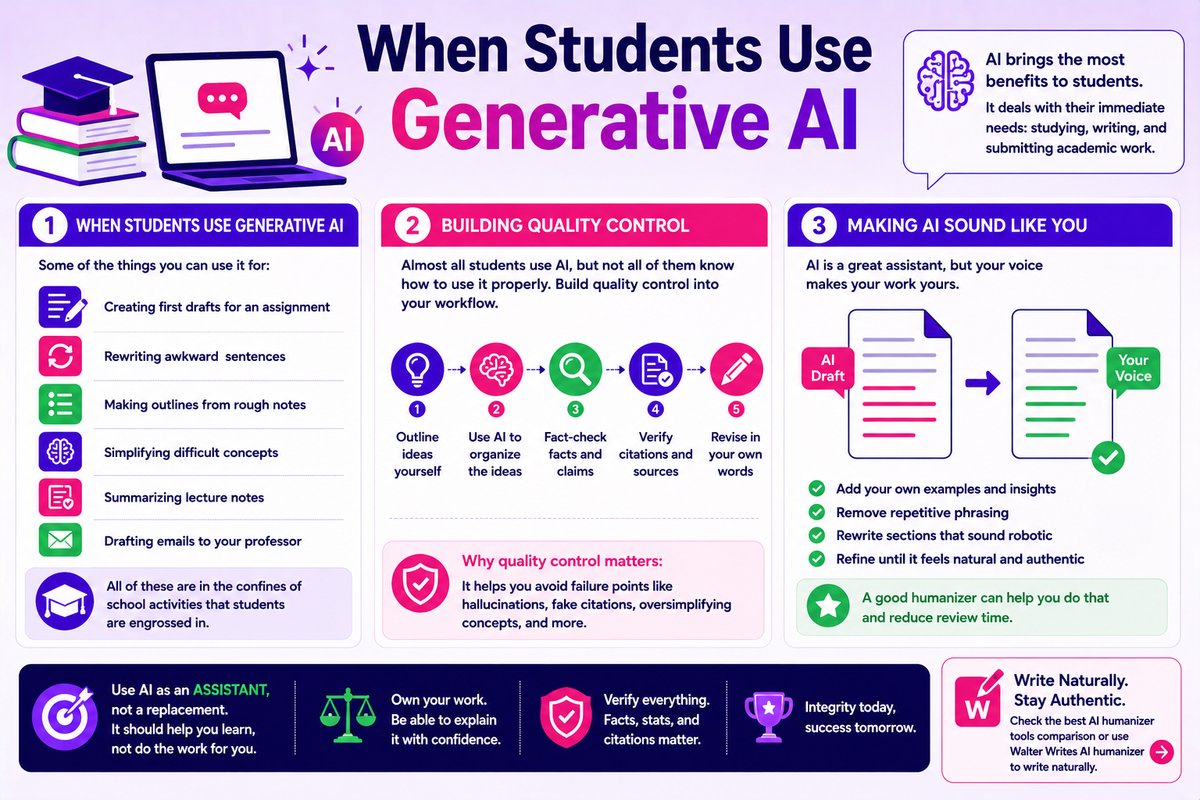
Generative AI brings the most benefits to students. This is because it deals with their immediate needs: studying, writing, and submitting academic work. Some of the things you can use it for are:
- Creating first drafts for an assignment
- Rewriting awkward sentences
- Making outlines from rough notes
- Simplifying difficult concepts
- Summarizing lecture notes
- Drafting emails to your professor
All of these are in the confines of school activities that students are engrossed in.
Building Quality Control
Most students use AI in some form, but not all of them know how to use it properly. As a student, most of your interaction will revolve around using AI as an assistant. You should never allow it to cross into doing work that influences your score. We recommend setting up a workflow similar to this:
- Outline ideas yourself
- Use AI to organize the ideas
- Fact-check facts and claims
- Verify citations and sources
- Revise in your own words
When you build quality control into your AI-assisted research and drafting, you’ll avoid the failure points. They are hallucinations, fake citations, oversimplifying concepts.
Making AI Sound Like You
If you want AI to sound like you, you have to review and refine its output until it sounds natural. One way of making it natural is to add examples. Removing repetitive phrasing and rewriting sections that sound robotic will have the same effect. A good humanizer can help you do that and reduce review time. Check the best AI humanizer tools comparison or use Walter Writes AI humanizer to write naturally.
The Risks of Depending on AI As a Student
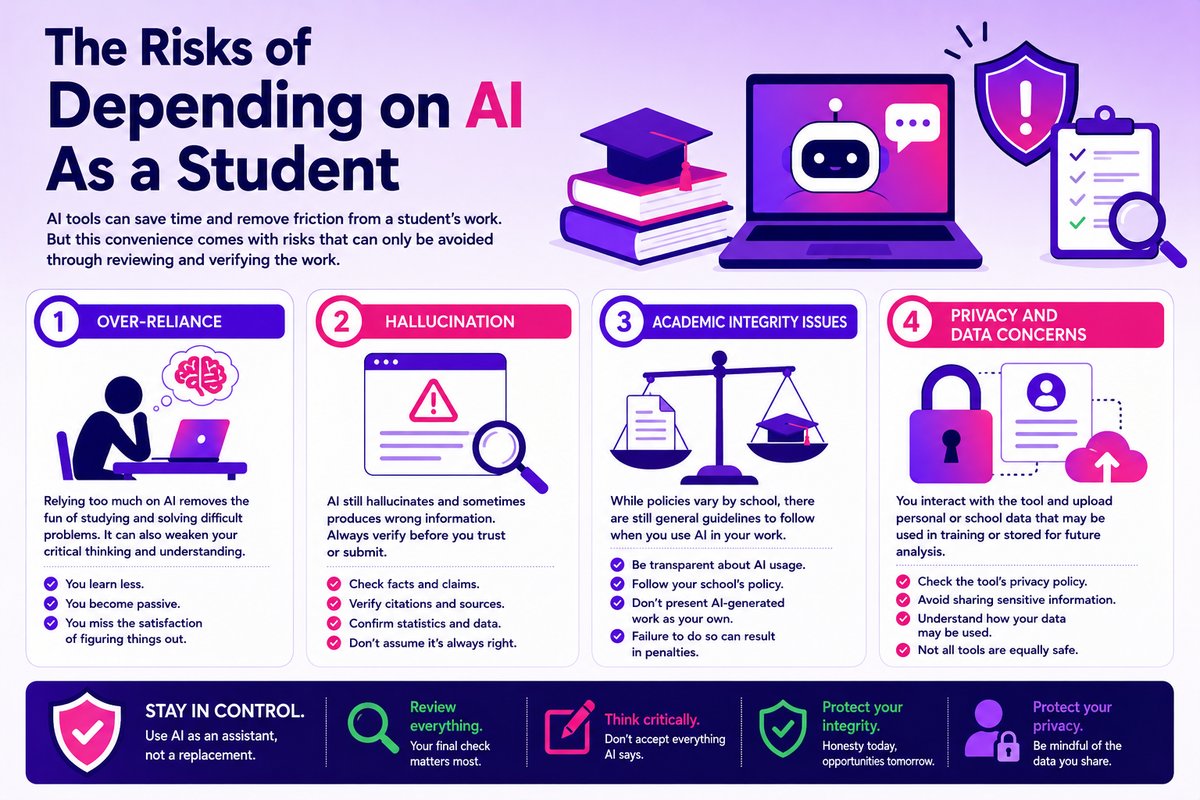
AI tools can save time and remove friction from a student’s work. But this convenience comes with a risk that can only be avoided through reviewing and verifying the work.
Risk 1: Over-Reliance
Whenever you use AI in your assignment, make sure you check before submitting. This due diligence is important if you want your work not to be flagged for AI. Aside from safeguarding your work, it also makes you proactive. As you review, you are also reading and increasing your understanding of the text. Relying too much on artificial intelligence will remove the fun of studying and solving difficult problems.
Risk 2: Hallucination
AI still hallucinates a lot and sometimes produces wrong information. The best way to avoid it is to check your work before submitting. Look at the facts, citations, and statistics, and make sure they are real and not made up.
Risk 3: Academic Integrity Issues
While policies vary by school, there are still general guidelines to follow when you use machine-generated output in your work. You must be transparent about how much AI contributed to your work. Failure to do so might expose you to the risks of being penalized.
Risk 4: Privacy and Data Concerns
Remember, some tools may use what you upload to train future versions of the platform, so check the settings or privacy policy before you share anything personal. Some tools even store the data and use it in their analysis.
Frequently Asked Questions
What Are the Most Common Examples of AI in Daily Life?
Some examples of AI in daily life include Google Maps traffic prediction, spam filters in email apps, chatbots, and predictive text on smartphones. Aside from the personal level, artificial intelligence is also being used in the corporate world. Banks’ fraud detection alerts are a typical example. From these examples, it’s clear that AI use falls into two broad categories. One is to personalize user experiences, and the other is to automate decision-making.
How Do Students Already Use AI Without Realizing It?
Many students use educational apps that use AI in the background. For example, they use the technology to recommend study materials, track learning progress, or personalize quizzes. Some language apps also use AI to provide instant feedback on speaking and grammar, and create custom learning experiences tailored to their level. Other ways students encounter artificial intelligence are through navigation apps, translation tools, search rankings, YouTube recommendations.
What AI Tools Are Most Useful for Students?
Students benefit from grammar checkers, flashcard generators, scheduling apps, translation tools, and study assistance. These tools may support learning, but don’t replace critical thinking.
How Does AI Work in Social Media Feeds and Recommendations?
Social media platforms use AI to analyze interactive actions such as clicks, likes, comments, and watch time. They use the data to predict what users will engage with and update their recommendations based on that.
Is Using AI for Schoolwork Considered Cheating?
It depends on the school’s policy on AI usage. Some allow brainstorming, outlining, and study assistance. What is generally frowned upon is using AI and claiming the work entirely as your own.
How Does AI Help With Language Translation and Communication?
It helps with predictive text technology, grammar correction, and translation. These are built with artificial intelligence into several platforms that offer translation and communication services. However, the recommendations should not be taken at face value, as they can sometimes miss context.
What Are Examples of AI in Healthcare That Students Might Encounter?
Students may encounter AI through appointment scheduling systems, wearable fitness trackers, hospital portals, and symptom-checker chatbots. These systems don’t replace medical practitioners, but rather serve as assistants.
Can AI Help Students Manage Their Time and Study Habits?
Yes. AI tools can be used to organize tasks, create study schedules, send reminders, summarize notes, and even recommend productivity strategies. To get the best of them, you must engage with them, rather than just let them automate everything for you.
What Are the Risks of Depending on AI As a Student?
Don’t rely too much on AI. It will reduce your critical thinking skills. Also, it can generate inaccurate information or biased outputs. As a student, verify all sources and facts before you use them.
How Is Generative AI Different from Other Types of AI in Everyday Life?
Traditional AI, like spam filters, predicts and recommends. Generative AI is different because it generates new content from datasets. Examples are tools like ChatGPT that produce text, images, and code.
