




Key Takeaway: SafeAssign is a reliable similarity checker built into Blackboard, but it was never designed to detect AI-generated content, and a high score is not a plagiarism verdict but a starting point for review.
- SafeAssign checks text overlap. It cannot detect AI-generated writing
- A fully AI-written essay with no copied sources can score 0%
- Below 15% is low risk. 15-40% warrants review. Above 40% needs inspection
- References, citations, and templates are commonly flagged but are not plagiarism
- Context matters more than the number. A 5% score can still be plagiarism
- SafeAssign has a smaller database and fewer filtering options than Turnitin
Some students focus too much on SafeAssign percentages rather than understanding them. Knowing what goes on behind the score will do more good than being scared of seeing 30%. What SafeAssign does is to give you a similarity score after comparing your text with existing data. Therefore, your score isn’t actually a plagiarism verdict. It’s just to show how much your text matches other available texts. But how reliable is it? And how do you read and interpret the originality report? In this SafeAssign plagiarism checker review, we’ll evaluate the reliability of SafeAssign and how you can interpret your report so you don’t panic unnecessarily or revise and ruin an excellent paper.
What SafeAssign Is (and What It Isn’t) in 2026
It may look like you already know it, but there are quite a few things you may not be aware of. It’s common knowledge that SafeAssign is a plagiarism checking tool built directly into Blackboard. It is used mostly by Universities, Colleges, and instructors creating assignments. If enabled, all your assignments will pass through it automatically. That means any attempt to cheat will most likely be exposed.
When you submit, the tool checks your work against internet sources, academic publications, and student paper repositories. It will then produce an Originality report with a percentage score highlighting parts of your paper that match external resources. The match can include sources you cited or definitions/common phrases you used in your work. You won’t be penalized because your work comes up with matches. Rather, the score is to tell your examiner how much of your work is already in the public database. This makes it easier for them when reviewing your work.
SafeAssign isn’t an AI content detector, nor would it evaluate the quality of your work. It cannot even determine if your citations are properly done. So, when you check your score and it is high, don’t panic. Instead, review the part that matches other sources and evaluate whether it is properly sourced. From there, you can decide to paraphrase and cite or remove parts that are not relevant. If you’re trying to understand academic integrity, check the Walter Writes student guides for AI and plagiarism checks.
SafeAssign Review: How the Tool Works
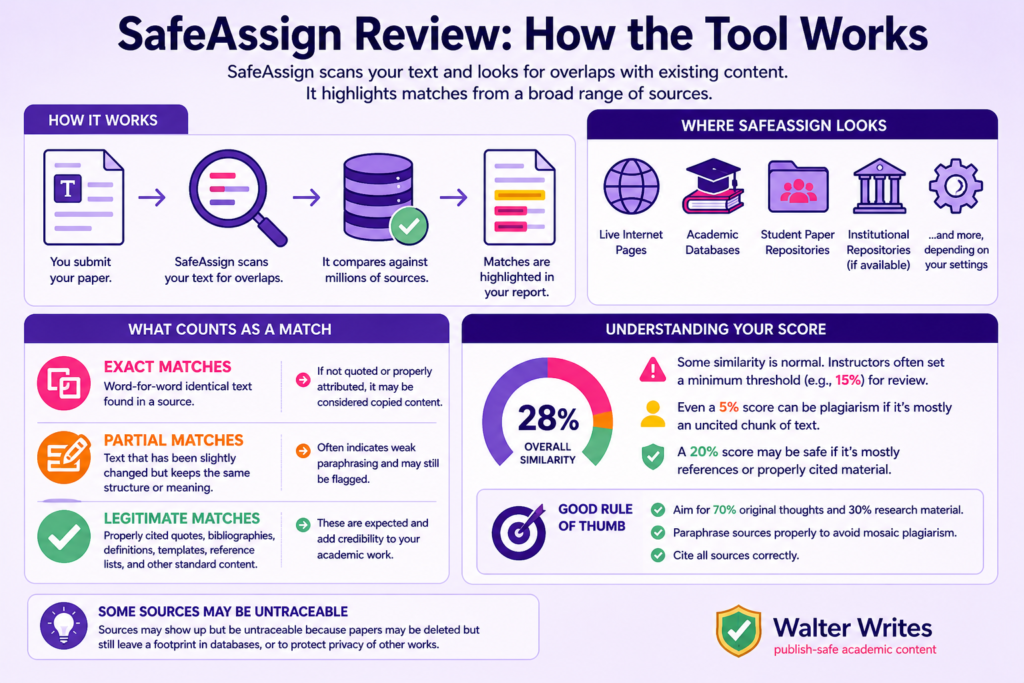
SafeAssign scans your text and looks for overlaps with existing content. The existing content may be found on live internet and databases. When it finds a match, it highlights it. It covers a very broad area, mostly online. The tool checks internet pages, academic databases, student paper repositories, etc. If your institution (university) maintains a repo, it will also be indexed and searched. These are just examples of places that the tool will compare your paper to. There may be more, depending on how your instructor or institution sets up their system.
What Counts as a Match
Exact Matches
This is when a word-for-word identical sentence is found from a source in your write-up. If it is not a quote or a properly attributed text, then it will be considered copied content. In that case, you may be penalized for plagiarism.
Partial Matches
External text that has been slightly modified but with the same structure can also be picked up. If a student paraphrases a text poorly, it’s easy for the tool to pick up the source. Although this is better than the exact matches, it indicates weak writing.
Legitimate Matches
Not all matches are the same. Some will lead to plagiarism, while others will be within the allowed academic standards. This includes properly cited quotes, bibliographies, definitions, assignment templates, reference lists, etc. They form the fulcrum of your entire paper. The appearance of these (when cited) lends credence to your document, not diminishing its academic integrity. Proper academic writing relies on established definitions and citations that match existing literature. It demonstrates solid research.
As a student, you should expect some levels of matching. That’s why teachers set a minimum percentage (e.g., 15%) as a warning indicator. It’s when a paper crosses this level that they review to determine whether the student plagiarized. Even a 5% score can be plagiarism if it’s mostly an uncited chunk of text. A 20% score, on the other hand, may be safe if it’s just a bibliography. A good rule of thumb is to make 70% of the paper your own original thoughts and 30% for research material. Also, the cited sources should be properly paraphrased, so you do not become guilty of mosaic plagiarism.
When you check your work yourself in SafeAssign, some sources may show up but be untraceable. Sometimes papers are deleted, but still have a footprint in databases. Other times, it is to protect other works for privacy reasons.
How to Read a SafeAssign Originality Report
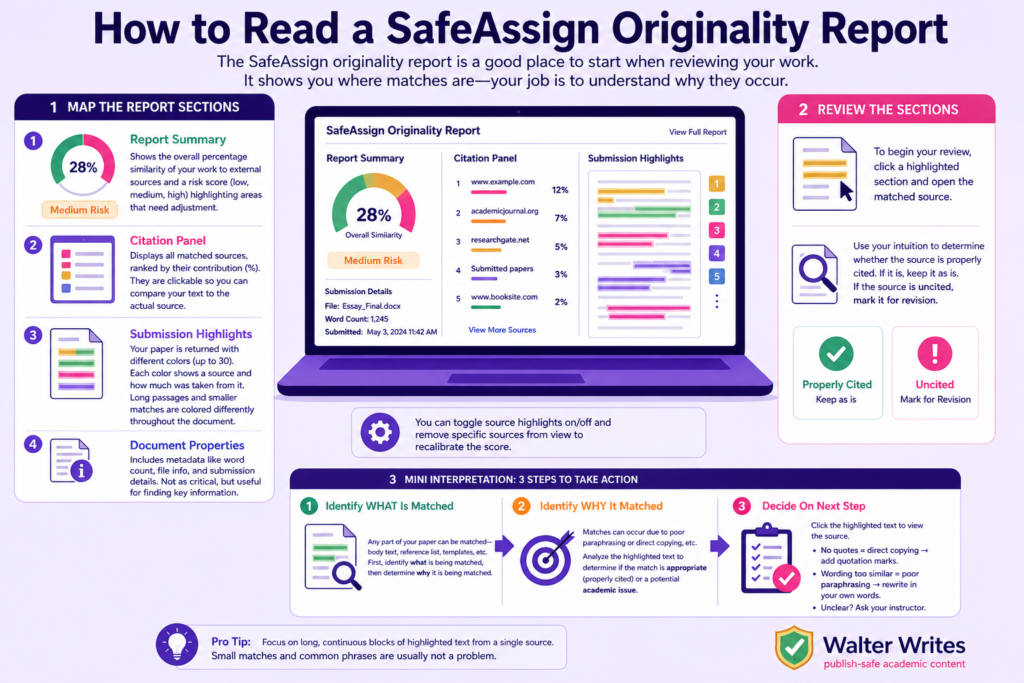
The SafeAssign originality report is a good place to start when reviewing your work. Since it shows you where matches are, your job is to understand why they occur.
Map The Report Sections
Report Summary
This shows the overall percentage similarity of your work to external sources. It will also come with a risk score (low, medium, high) so you can see areas that need adjustment.
Citation Panel
This is where you can see all the matched sources, ranked by their contribution in %. They are also clickable, so that you can compare your text to the actual source.
Submission Highlights
Your paper is returned with different colors (up to 30). Each color shows a source and how much was taken from it. Long passages from a single source and smaller matches are colored differently and dispatched throughout the document.
Document Properties
This includes all metadata, such as word count and file info. Not as critical as the other sections, but can be useful for finding information like submission details.
You can toggle source highlights on/off and remove specific sources from view to recalibrate the score.
Review The Sections
To begin your review, click a highlighted section and open the matched source. You’ll need to use your intuition to determine whether the source is properly cited. If it is, keep it as is. If the source is uncited, mark it for revision.
Mini Interpretation
Step 1: Identify WHAT Is Matched
Any part of your paper can be matched. It could be the body, your reference list, template, etc. Once you identify that, you need to know why it is being matched.
Step 2: Identify WHY It Matched
There are many reasons a certain part of your paper may be matched. It could be due to poor paraphrasing or direct copying, for example. In both cases, you must analyze the highlighted text to determine if the match is appropriate (properly cited) or a potential academic issue.
Step 3: Decide On Next Step
Click on the highlighted text to show the source. If the text lacks quotation marks, it’s direct copying. In that case, add a quotation mark. However, if the wording is too similar to the source, it means you’ve paraphrased poorly. Rewrite the section or text in your own words. If you’re unclear, ask your instructor for further instruction.
What Is a ‘Good’ SafeAssign Score?
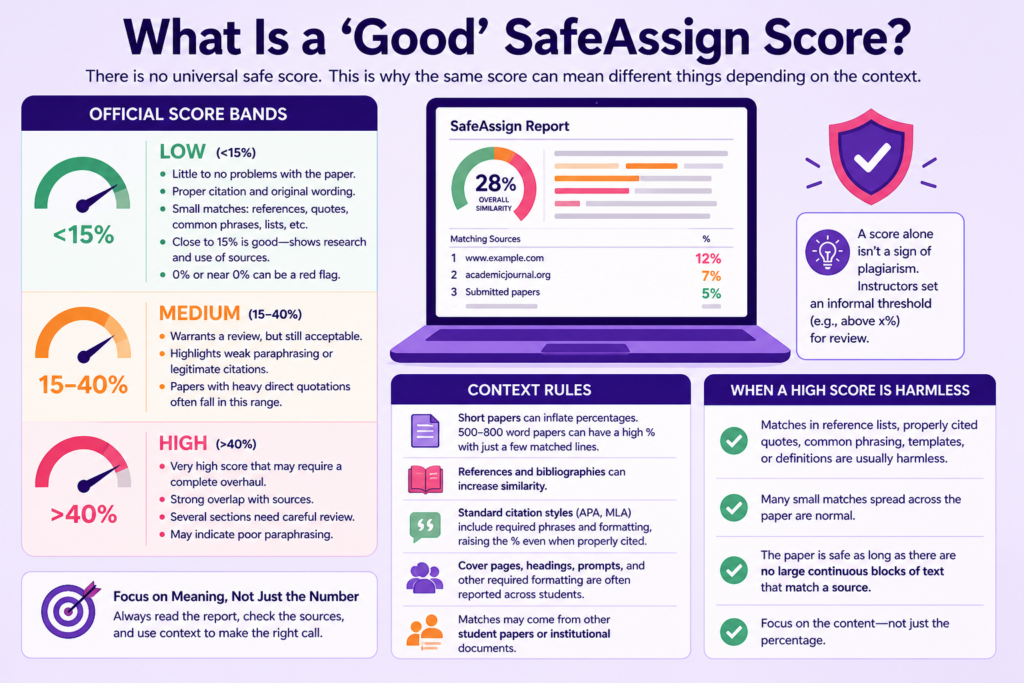
There is no universal safe score. This is why the same score can mean different things depending on the context.
Official Score Bands
Low: <15%
This is the lowest and indicates little to no problems with the paper. It indicates proper citation and original wording. There will be small matches mainly for references, direct quotes, common phrases, lists, etc. Anything close to 15% is good because it means the student did enough research and used secondary sources. 0% or anything close to it is often a red flag for some teachers.
Medium: 15-40%
This will often warrant a review, but still a good score. This is where weak paraphrasing or legitimate citations will be highlighted. Papers that are heavy on direct quotations fall in this category.
High: 40%
This is a very high score that may require a complete overhaul. It means there is a strong overlap between the papers and sources being matched. Several sections will be highlighted for careful inspection. This could also indicate that a student cannot paraphrase properly.
Context Rules
- Short papers can inflate percentages. Assignments ranging from 500 to 800 words will have a high % with just a few matched lines.
- References and bibliographies are two other factors that can increase the paper’s similarity to other sources.
- Standard citation styles, such as APA or MLA, require specific quotes and shared formatting. This can result in a higher % even if the work is properly attributed.
- Cover pages, headings, prompts, and other required formatting are often reported across students. Sometimes, sources that match in a paper may be documents from other students.
When a High Score Is Harmless
If the matches in the document are reference lists, properly cited quotes, common phrasing, templates, or definitions, they won’t get the student penalized. Also, many small matches, especially across the document, are normal. The paper is safe as long as a large continuous block of highlights does not trigger the score.
It’s important to understand that a score alone isn’t a sign of plagiarism. That is why many instructors set an informal threshold (e.g., above x%) for a review.
Why SafeAssign Flags References, Citations, Templates, etc.
You already know that SafeAssign flags text similarity. This doesn’t harm the paper. But it’s important to know why some elements are flagged and what to do about them.
Standard Elements Commonly Flagged
Reference Lists
Students often use citation formats like APA, MLA, Harvard, etc., depending on their institution. Many sources are cited with similar formats, which makes SafeAssign pick up on them. As long as your references are formatted correctly, you won’t have a problem. Just make sure you don’t rewrite sources just to avoid being detected.
Required Templates
Institutional formatting, similar headings and titles, and cover pages, are frequently flagged. This happens because multiple students use the same structure and formats in their papers. When you see any of these that are marked, you can leave them as is since it’s not a problem.
Fixed Institutional Names
Course titles or official program names may be flagged because several students across disciplines use them. When you use any of these terms, keep them accurate and don’t rephrase just to “avoid matches”.
Definitions
Dictionary-style definitions and widely used academic phrasing are frequently flagged, too. There are limited ways to express concepts like this. So, the best thing you can do is to paraphrase where appropriate and cite sources that are not your own.
Important Note
When writing, don’t hide text (using white font) as some students do. Being flagged is not inherently bad in itself. Also, don’t try to beat the system by over-paraphrasing. Maintain clear writing and proper citation. Here is what to do if you’re flagged and unsure what to do next.
SafeAssign vs Turnitin
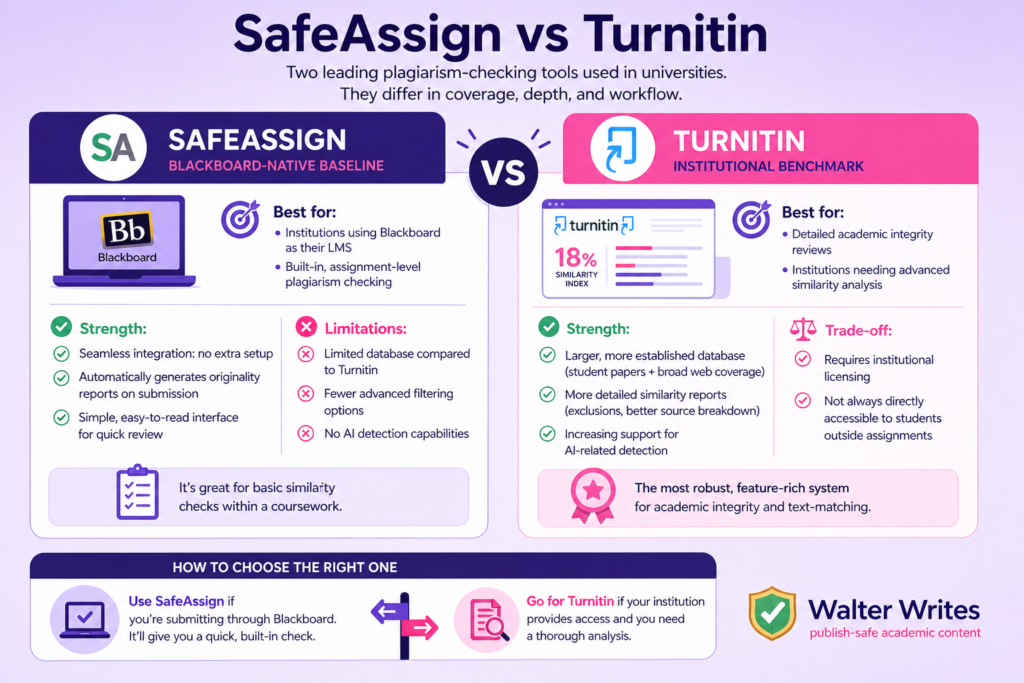
SafeAssign and Turnitin are the two main plagiarism-checking tools used in universities. They differ in coverage and depth of the report analysis. The way they integrate student and instructor workflow also differs. Let’s look at their differences in detail:
SafeAssign (Blackboard-native baseline)
SafeAssign is a plagiarism checking tool built directly into Blackboard, used mostly by institutions and instructors creating assignments.
Best for:
- Institutions using Blackboard as their LMS
- Built-in, assignment-level plagiarism checking
Strength:
- Seamless integration: no extra setup
- Automatically generates originality reports on submission
- Simple, easy-to-read interface for quick review
Limitations:
- Limited database compared to Turnitin
- Fewer advanced filtering options
- No AI detection capabilities
It’s great for basic similarity checks within a coursework
Turnitin (Institutional benchmark)
It is widely considered the most robust, feature-rich system for academic integrity and text-matching.
Strength:
- Larger and more established database (extensive student paper repositories and broader web coverage)
- More detailed similarity reports (control over exclusions and better source breakdown)
- Increasing support for AI-related detection
Trade-off:
- Requires institutional licensing
- Not always directly accessible to students outside of assignments
Best suited for detailed academic integrity reviews. Check Turnitin AI Detector Review for more information on its capabilities.
How to Choose the Right One
- Use SafeAssign if you’re submitting through Blackboard. It’ll give you a quick, built-in check.
- Go for Turnitin if your institution provides access and you need a thorough analysis.
Does SafeAssign Have AI Detection?
SafeAssign doesn’t have a built-in AI detection system. Some students or instructors may assume it should detect AI since it checks for originality. However, originality in SafeAssign means content that doesn’t match existing sources. Therefore, it can’t determine human-written or AI-generated content. It doesn’t analyze writing patterns or predictability that’s associated with AI tools. A student can submit a fully AI-generated essay with no copied sources and have a good score. Only the instructor might be able to determine the presence of AI.
If you’re a student, use SafeAssign to check if you accidentally copied something. That way, you can cite appropriate sources before submitting. For teachers, don’t expect this tool to detect AI-generated text. If you want a tool that’ll help you determine if the content is generated by AI, use AI detection tools. There are a couple of good options, like Walter Writes AI detection, that you can try.
Does SafeAssign Detect AI-Generated Content?
No, SafeAssign does not directly detect AI-generated content. It is not designed for that. Rather, it checks for text overlap with existing sources. Its work is closer to that of a plagiarism checker than to an AI detector. AI content is often generated anew, without copying, so it can easily bypass SafeAssign. A paper can be 100% AI-written and still appear original in SafeAssign. However, it can indirectly flag AI content. If your paper looks very similar to another’s due to similar use of AI, SafeAssign may be able to detect the similarity.
Generally, you want to use SafeAssign to check your paper for citation issues. If you want to check your draft for AI risk before submitting, use an AI detector for students.
Check Your Draft for AI Risks With Walter Writes AI Detector
What To Do Next (Role-Based Playbooks)
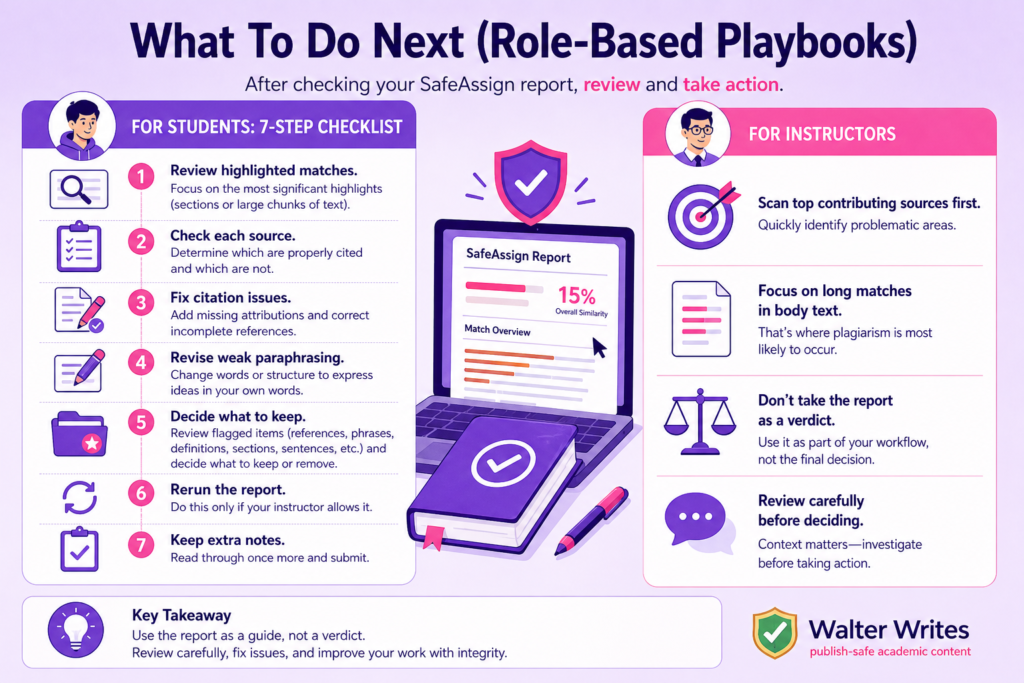
After checking your SafeAssign report, the next thing is to review and take steps. We’ll have separate guidance for students and teachers.
For Students: 7-Step Checklist
Step 1: Review the highlighted matches in the report. Focus on the most significant highlights. It could be sections or a large chunk of text.
Step 2: Check each source and determine which is properly cited and which is not. This will make or mar your paper, so take your time here.
Step 3: Fix citation issues you identified in the previous step. If a source comes up but is not cited, add a proper attribution. Ensure there are incomplete references. If there are, correct them.
Step 4: Revise any weak paraphrasing by changing words or structure. That is, try to express the ideas in your own words.
Step 5: Decide what to keep from what you’ve discovered. Look at the references, templates, phrases, definitions, sections, sentences, etc., that have been flagged and decide which ones you want to keep and which to cut out.
Step 6: Rerun the report once you’re done with your adjustments. This is only if your instructor allows it.
Step 7: Keep extra notes you may need later before submitting. Read through once more and submit.
For Instructors
Scan the top contributing sources first. Your job is to quickly identify problematic areas. Focus on long matches in body text, as that is where plagiarism is most likely to occur. As a teacher, never take the report as a verdict. Rather, make it a part of your workflow and review it carefully before making any decision on a paper. If you need AI support, you can check these AI detectors for teachers from Walter Writes.
Walter Writes Allows You to Run Checks on Your Work Before Submitting
Bottom Line: Is SafeAssign Reliable?
SafeAssign is reliable for its intended purpose, which is to detect text similarity between a paper and existing sources. It can be used as an initial screening to detect near-verbatim matches, citation similarities, and copy-paste overlap. However, it isn’t effective in flagging AI-generated writing or deep analysis. In any setup, use SafeAssign for similarity checking and external tools for AI-risk evaluation. For comparison, here are the best plagiarism checkers.
Frequently Asked Questions
Does SafeAssign Detect AI-Generated Content?
No, SafeAssign does not directly detect AI-generated content. It is not designed for that. Rather, it checks for text overlap with existing sources.
What Is a Good SafeAssign Score?
There is no universal good score. However, you can use the common bands of <15%, 15-40%, and >40% to guide the review of your report. Moreover, the context of the score matters more than the percentage.
How Accurate Is SafeAssign at Detecting Plagiarism?
Is SafeAssign accurate in detecting Plagiarism? It’s effective for picking up text overlap, but you have to review for context and intent.
Why Is SafeAssign Flagging My References and Citations?
Standard formats, like references, are used across papers. That’s why they are flagged. It is normal and wouldn’t harm the paper.
Can SafeAssign Detect Paraphrasing?
If the paraphrasing is poorly done, it may be detected. The way to avoid this is to write in your own words and cite properly.
How Does SafeAssign Compare to Turnitin?
SafeAssign is a basic LMS integrated into Blackboard, while Turnitin has a much larger database and deeper analysis capabilities.
Can Students See Their SafeAssign Originality Report?
If the instructor enables it by default, students will be able to see. Otherwise, it’s not possible.
Does SafeAssign Store Submitted Papers in Its Database?
Yes, the papers are in the institutional databases, stored for future matching.
What File Types Does SafeAssign Support?
The format may vary by institution, but the most common ones are DOC, DOCX, PDF, and TXT.
What Database Does SafeAssign Check Against?
It matches papers against student paper repositories, internet sources, and academic content.
If you need to rewrite AI content fast, try our AI humanizer for writers - 300 words free, no signup required.
SafeAssign is built into Blackboard. For the broader picture on whether Blackboard detects AI and ChatGPT through SafeAssign and Turnitin integrations, see our 2026 guide.
