





Many SEO content teams and digital marketers now use AI in their workflow, so AI detector tools are important for quality assurance. However, many people take their scores as final, rather than as part of a review process. Passing a detector isn’t a guarantee that the content will rank, and neither is it a quality signal. What is more important is publishing content that is helpful and trustworthy. That is what search engines want and what they will rank. So, in this article, we’ll look at the real use of detection in SEO workflows, how to interpret the scores, and how to improve flagged content without damaging SEO quality.
How an SEO AI Detector Works
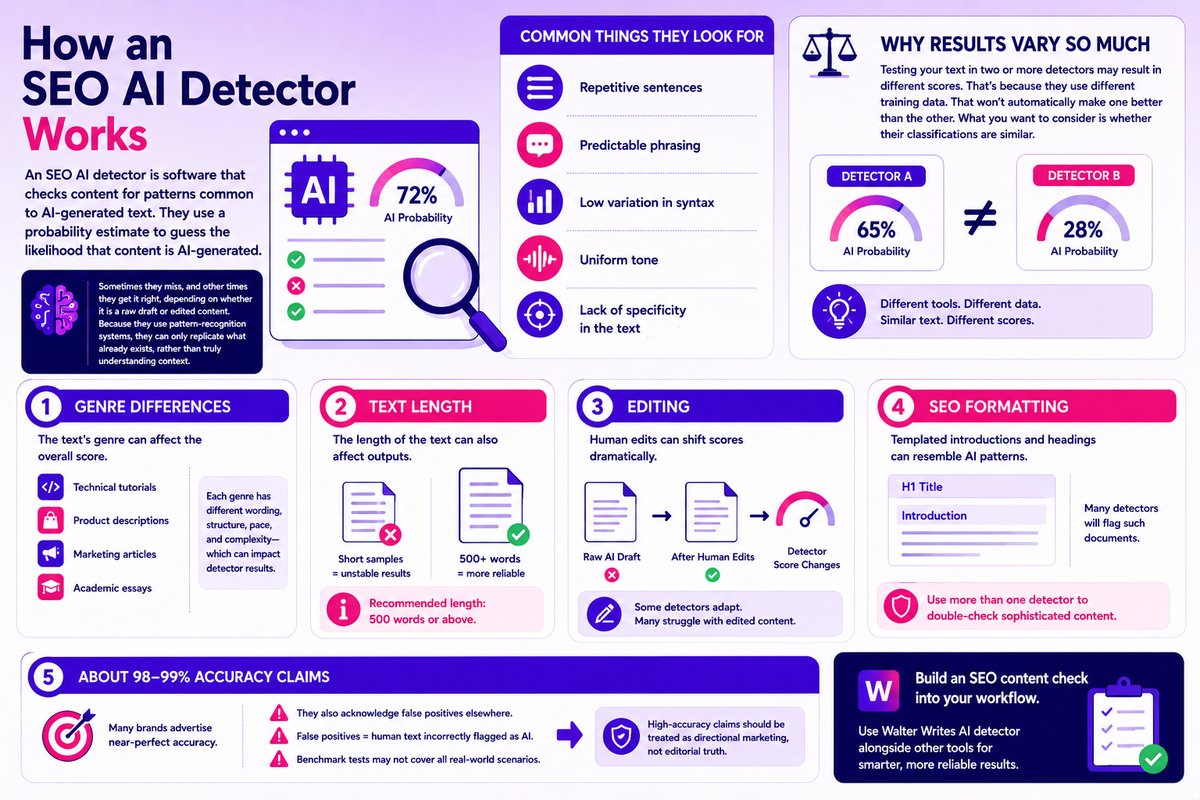
An SEO AI detector is software that checks content for patterns common to AI-generated text. They use a probability estimate to guess the likelihood that content is AI-generated. Common things they look for:
- Repetitive sentences
- Predictable phrasing
- Low variation in syntax
- Uniform tone
- Lack of specificity in the text
Sometimes they miss, and other times they get it right, depending on whether it is a raw draft or edited content. Because they use pattern-recognition systems, they can only replicate what already exists, without truly understanding context.
Why Results Vary So Much
Testing your text in two or more detectors may result in different scores. That’s because they use different training data. That won’t automatically make one better than the other. onsider whether their classifications are similar.
Genre Differences
First, the text’s genre can affect the overall score. For example, technical tutorials and product descriptions may yield different results. The same with a marketing article may have different results from an academic essay. The latter is more complex in terms of wording, structure, pace, etc.
Text Length
The length of the text can also affect outputs. A short sample is likely to have unstable results because there is little data for the detector to draw from. The recommended length is 500 or above. Anything lower will not produce reliable results.
Editing
Human edits can shift scores dramatically. While some will pick up the changes and score accordingly, many detectors will become problematic at the new reality shift. Some will perform well on raw human and AI drafts but become unstable when the same draft is humanized.
SEO Formatting
Templated introductions and headings can resemble AI patterns. As such, many detectors will flag such documents. That’s why you should use more than one detector when you’re dealing with a sophisticated document. That way, you can double-check and be sure the result you’re getting is accurate. Brands like Walter Writes AI detector can be paired with others to build an SEO content check into your workflow.
About 98-99% Accuracy Claims
Many detector brands advertise near-perfect accuracy. They also acknowledge false positives elsewhere on the page. This is self-contradictory. Because false positives mean there will be cases where the detector will incorrectly flag human text as AI text. In addition, benchmark tests may not encompass all scenarios that may happen in a real-world publishing environment. Therefore, high-accuracy claims should be treated as directional marketing. Don’t take it as editorial truth.
Does Google Penalize AI Content That Fails an AI Detection Check?
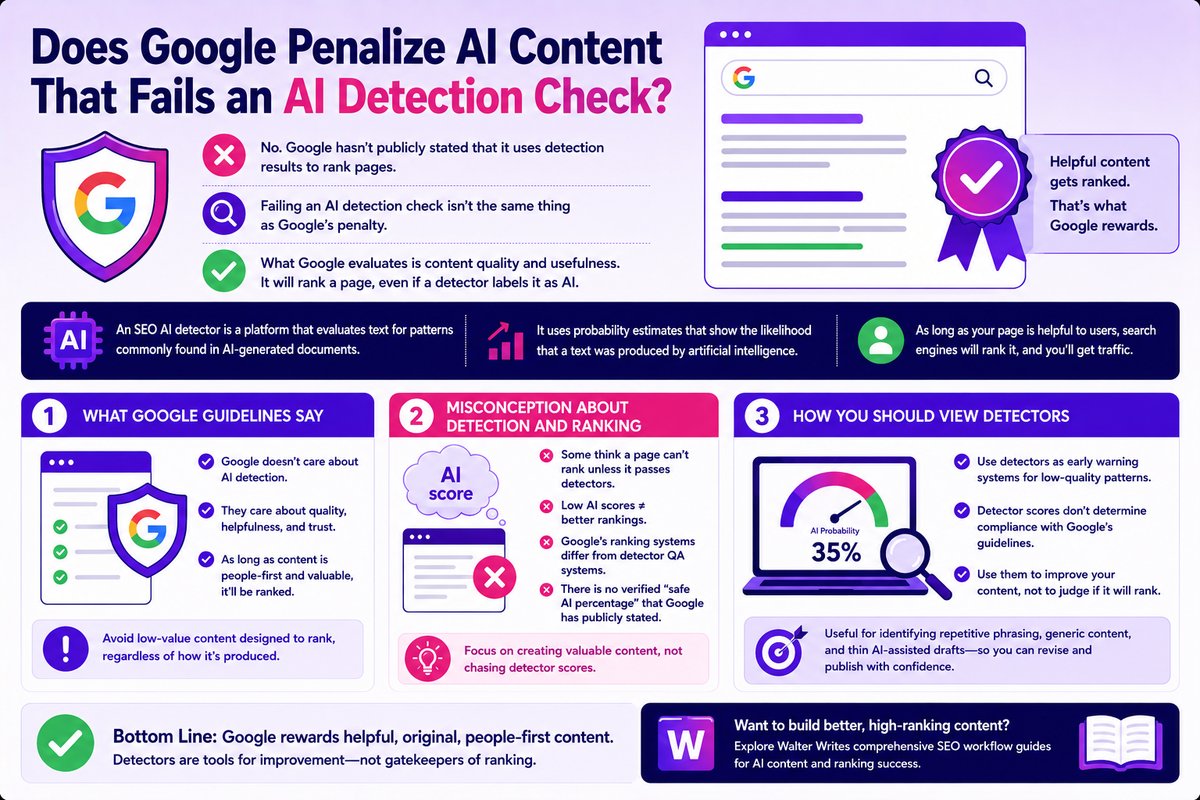
No. Google hasn’t publicly stated that it uses detection results to rank pages. Failing an AI detection check isn’t the same thing as Google’s penalty. Google can penalize a page even though it passes detection. What Google evaluates is content quality and usefulness. It will rank a page, even if a detector labels it as AI.
An SEO AI detector is a platform that evaluates text for patterns commonly found in AI-generated documents. It uses probability estimates that show the likelihood that a text was produced by artificial intelligence. The fact that content is flagged does not automatically mean that it is AI-written. As long as your page is helpful to users, search engines will rank it, and you’ll get traffic.
What Google Guidelines Say
When you review Google search essentials, you’ll realize Google doesn’t care about AI detection. They only care about how valuable the content is to their users. As long as content is people-first, helpful, and trustworthy, it’ll be ranked. What Google wants webmasters to avoid is low-value content designed to rank, regardless of how it’s produced.
Google backs this up in its own documentation. Search Central’s guidance on helpful content says its ranking systems are ‘designed to prioritize helpful, reliable information that’s created to benefit people,’ regardless of how it was made. Google also recommends disclosing it when automation, including AI generation, played a role in producing the content. (Source: Creating Helpful, Reliable, People-First Content)
Misconception About Detection and Ranking
Some users are misled into thinking that their page cannot rank unless it passes detectors. This is because some detector tool pages equate low AI scores to better rankings. But Google’s ranking systems differ from internal editorial QA systems that detectors use. There is no verified safe AI percentage that Google has publicly stated can assist in ranking.
How You Should View Detectors
As an SEO team, use detectors as early warning systems for low-quality patterns. Detector scores don’t determine compliance with Google’s guidelines. They should rather help your team make better content. They are useful for identifying repetitive phrasing, generic content, and thin AI-assisted drafts, and for revising them before publishing. Walter Writes has comprehensive SEO workflow guides for AI content if you want to explore more options.
Where AI Detection Fits in a Modern SEO Workflow
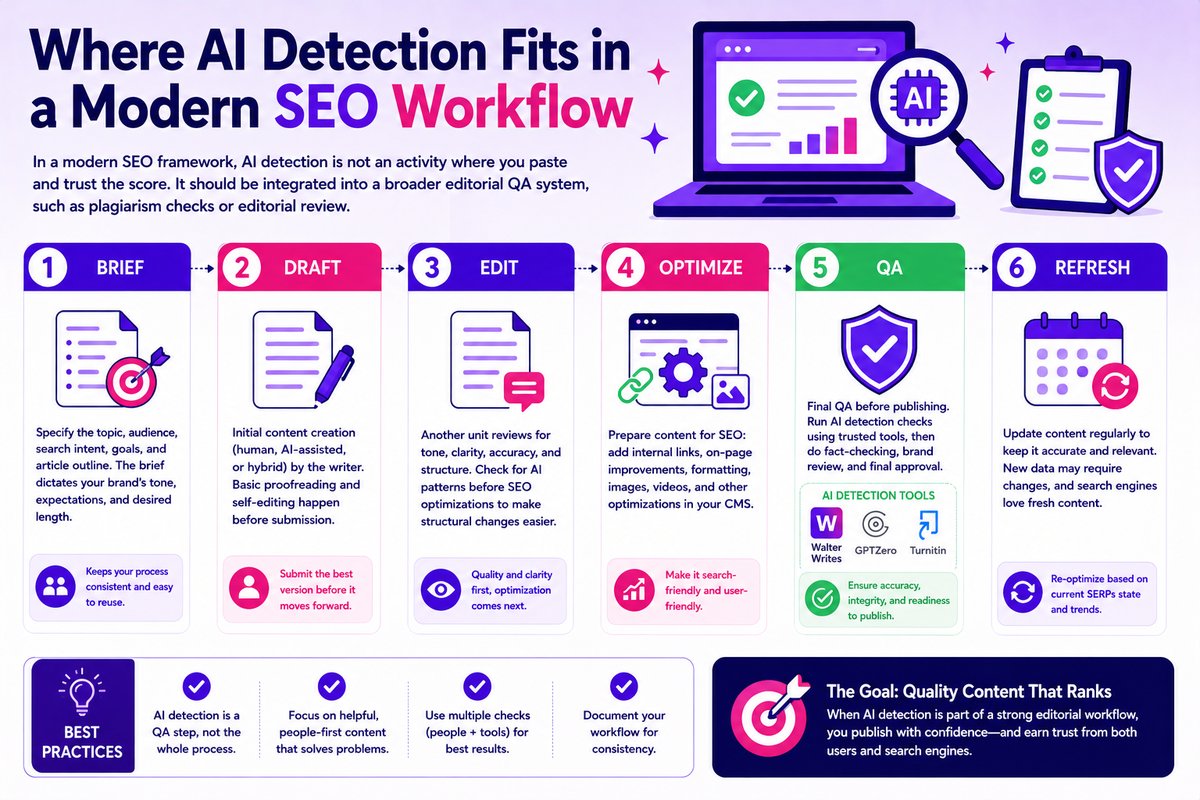
In a modern SEO framework, AI detection is not an activity where you paste and trust the score. It should be integrated into a broader editorial QA system, such as plagiarism checks or editorial review. In a normal QA system, you have the brief, draft, edit, QA, and publish.
Brief
This is where you specify the topic, audience, search intent, goals, and article outline. The brief is an important component because it dictates your brand’s tone, expectations, and desired length. With the brief, your SEO team can collaborate with the content team to ensure every important detail is dialed in. Once you have it set up, you can reuse it. It also keeps your publishing process consistent.
Draft
This is the text of the article and what the writer will submit to your SEO team. It’s the initial content creation, be it human, AI-assisted, or hybrid. At this stage, the writer can also act as the editor, so all proofreading and editing are done before submission. But a better option would be to have a separate stage where another unit reviews the text.
Edit
At this stage, another unit (usually the editor) will review the content for tone, clarity, and accuracy. You can have a checkpoint here. While editing, check for AI patterns before SEO optimizations. This will make it easier to review the structure before optimizations are layered in.
Optimize
Before publishing, the content needs to be prepared for SEO. This includes adding internal links, on-page improvements, and other formatting. It is also at this stage that images or videos are added. All of these can be done in any CMS that allows SEO formatting.
QA
This is the last step before publishing. A separate check is done to ensure readability. This is where you perform AI detection checks for the article. There are many brands you can choose from, including Walter Writes, GPTZero, and Turnitin. After this comes fact-checking, brand review, and final approval.
Refresh
Another step you can include in your QA process is content updates. Sometimes, aging can affect content. New data might make some information outdated, requiring regular updates. Search engines also love fresh content. And it’ll also help you re-optimize based on the current SERPs state.
Step-By-Step: How to Use a Free SEO AI Detector
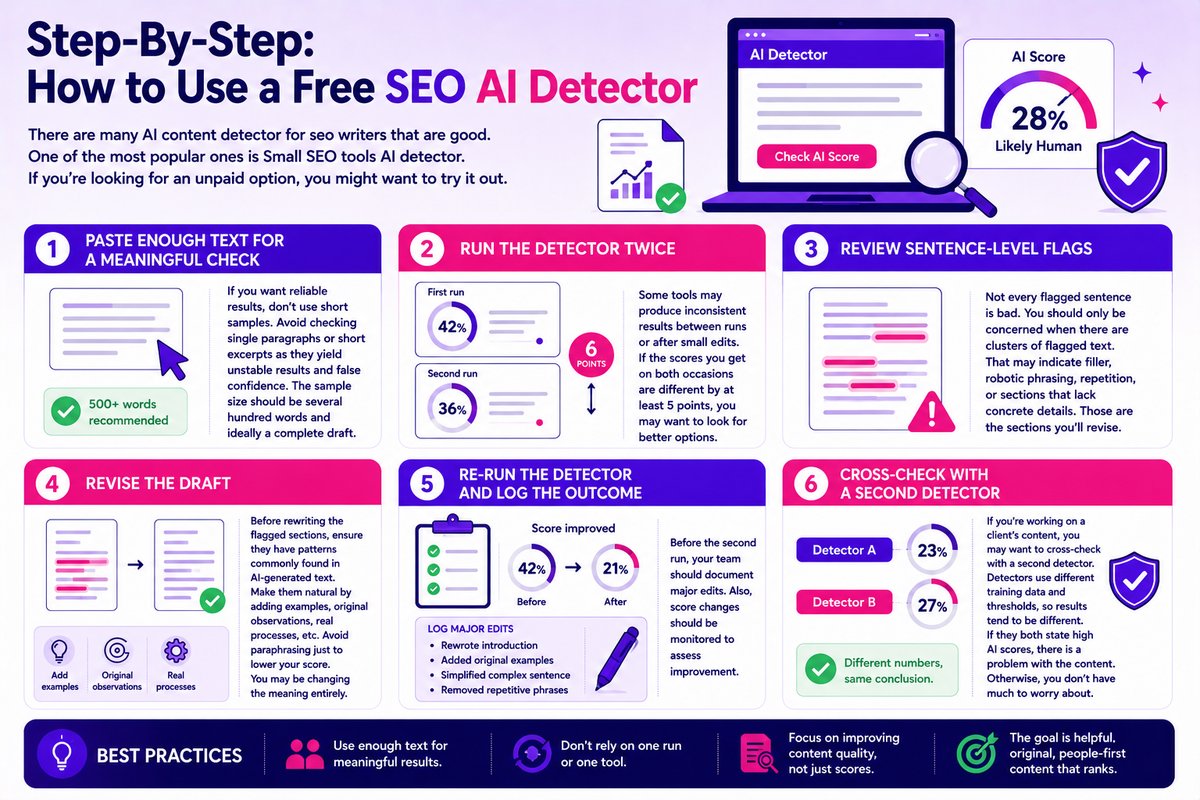
There are many AI content detector for seo writers that are good. One of the most popular ones is Small SEO tools AI detector. If you’re looking for an unpaid option, you might want to try it out.
Step 1: Paste Enough Text for a Meaningful Check
If you want reliable results, don’t use short samples. Avoid checking single paragraphs or short excerpts as they yield unstable results and false confidence. The sample size should be several hundred words and ideally a complete draft.
Step 2: Run the Detector Twice
Some tools may produce inconsistent results between runs or after small edits. That’s how you know which is a working tool and which is a failed one. If the scores you get on both occasions are different by at least 5 points, you may want to look for better options.
Step 3: Review Sentence-Level Flags
Not every flagged sentence is bad. You should only be concerned when there are clusters of flagged text. That may indicate filler, robotic phrasing, repetition, or sections that lack concrete details. Those are the sections you’ll revise.
Step 4: Revise the Draft
Before rewriting the flagged sections, ensure they have patterns commonly found in AI-generated text. Make them natural by adding examples, original observations, real processes, etc. You must avoid paraphrasing just to lower your score. You may be changing the meaning entirely, and the underlying problems may still be present.
Step 5: Re-run the Detector and Log the Outcome
Before the second run, your team should document major edits. Also, score changes should be monitored to assess improvement.
Step 6: Cross-check With a Second Detector
If you’re working on a client’s content, you may want to cross-check with a second detector. Detectors use different training data and thresholds, so results tend to be different. The score/percentage may differ, but they should point to the same thing. If they both state high AI scores, there is a problem with the content. Otherwise, you don’t have much to worry about.
Fixing Content That Fails an AI Detection Check
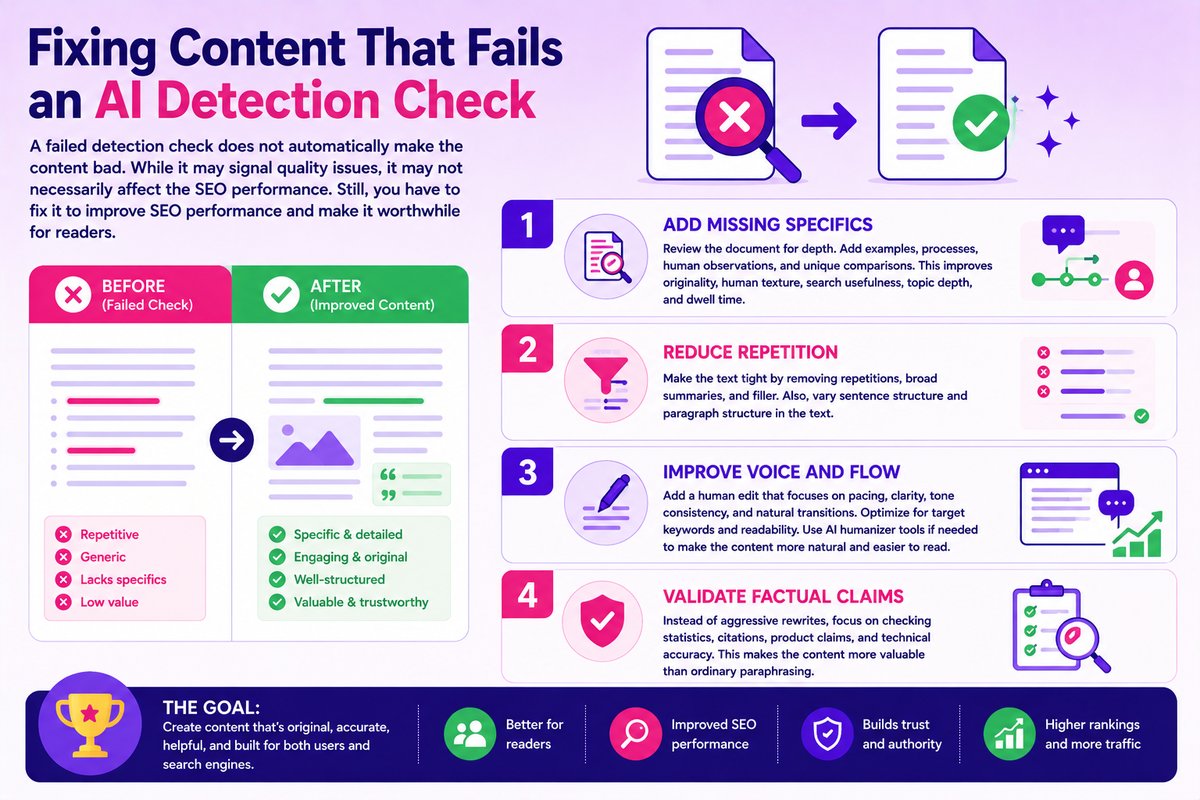
A failed detection check does not automatically make the content bad. While it may signal quality issues, it may not necessarily affect the SEO performance. Still, you have to fix it to improve SEO performance and make it worthwhile for readers.
Add Missing Specifics
Review the document for depth. If it is missing examples, processes, human observations, and unique comparisons, that’s where you want to start. AI-assisted text often lacks depth. So, adding these details naturally improves originality and human texture. It can also improve search usefulness, topic depth, and dwell time.
Reduce Repetition
Make the text tight by removing repetitions, broad summaries, and filler. Also, vary sentence structure and paragraph structure in the text.
Improve Voice and Flow
Add a human edit that focuses on pacing, clarity, tone consistency, and natural transitions. This is also where you’ll optimize for the terms you’re trying to rank for. Good editing makes the content trustworthy and easier to read. Fortunately, there are many AI humanizer tools for readability that you can choose to make the process easier.
Validate Factual Claims
Instead of aggressive rewrites, which can introduce errors, focus on checking statistics, citations, product claims, and technical accuracy. This will make the content more valuable than ordinary paraphrasing.
Surfer SEO AI Detector Review
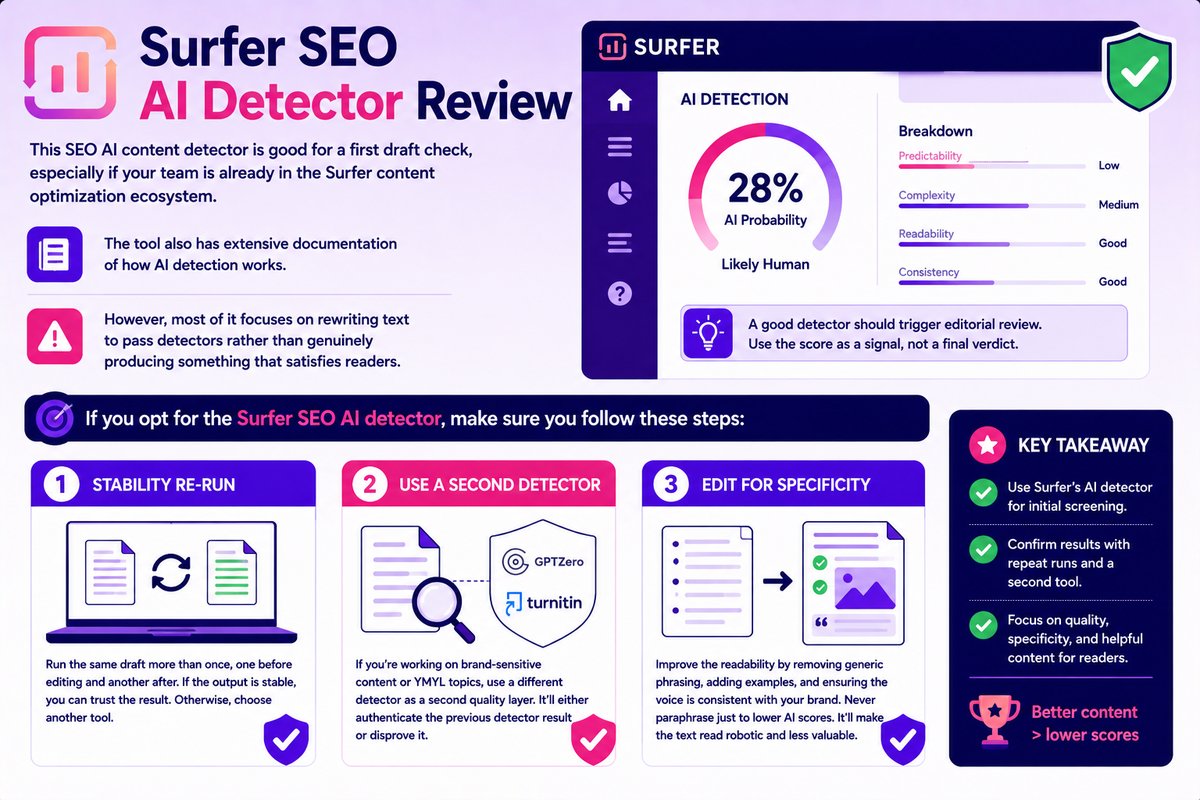
This SEO AI content detector is good for a first draft check, especially if your team is already in the Surfer content optimization ecosystem. The tool also has extensive documentation of how AI detection works. However, most of it focuses on rewriting text to pass detectors. A good detector should trigger editorial review. If you opt for the Surfer SEO AI detector, make sure you follow these steps:
Step 1: Stability Re-run
Run the same draft more than once, one before editing and another after. If the output is stable, you can trust the result. Otherwise, choose another tool.
Step 2: Use a Second Detector
If you’re working on brand-sensitive content or YMYL topics, use a different detector as a second quality layer. It’ll either authenticate the previous detector result or disprove it.
Step 3: Edit for Specificity
Improve the readability by removing generic phrasing, adding examples, and ensuring the voice is consistent with your brand. Never paraphrase just to lower AI scores. It’ll make the text read robotic and less valuable.
Best Workflow Choice for SEO Teams Who Want Consistency
Most AI detector tools offer a free plan, which is often not enough. While you get the opportunity to paste your text and check scores, you miss out on more important features. What do you do with the score? How do you revise the text? And most importantly, how do you know the sections that are weak and need reworking? The issue isn’t finding another detector. It’s removing the bottleneck after the score appears.
You can’t build a workflow with a free detector that helps your team scale. You still have to copy text between tools, rewrite elsewhere, then re-test repeatedly until you get a decent score. If you truly want detection to work for you, pair it with editing and revision without tool-hopping. You should be able to draft, edit, improve, and recheck in the same tool.
Walter Writes AI detector can help create this workflow consistency. You can write, edit, humanize, and do detection checks inside one workflow. That way, you can act on the detection result immediately without switching tabs. Other tools you can consider are GPTZero and Copyleaks for cross-checking the final draft.
Frequently Asked Questions
What Is an AI Detector and Why Does It Matter for SEO?
An AI detector estimates whether writing has a pattern found in AI-generated texts. It helps SEO teams find repetitive, overly templated text before publishing. It should be used as a QA tool only.
Does Google Penalize AI-Generated Content That Fails an AI Detection Check?
There is no evidence that Google uses third-party detector scores as a ranking signal. Google has stated that it focuses on helpfulness, value, and quality when ranking pages. The only factor that may cause a penalty is scaling low-quality content. Google spells this out under what it calls scaled content abuse, which it defines as when many pages are generated for the primary purpose of manipulating search rankings and not helping users. Its spam policy documentation names generative AI directly as one way this happens. The penalty targets scale and low value together, not a failed detection score. (Source: Google Search spam policies)
Which AI Detector Is Best for SEO Content Teams?
There are no universally best detectors. To select the right detector, you have to test. When you find one that is consistent, fits your workflow, and has sentence-level insights, then go with it.
Where Does AI Detection Fit in an SEO Content Workflow?
It should be used in two places: after the first draft and during human editing in the final QA. It should be placed alongside fact-check, readability review, and editorial QA sessions.
Can AI Detectors Produce False Positives on Human-written Content?
Yes, with common triggers being polished grammar, short samples, repetitive formatting, etc.
Should I Run AI Detection Before or After Human Editing?
You should do both. The first should be used to identify obvious AI patterns in the content, while the second should be used to confirm that revisions have improved the text’s readability.
What AI Detection Score Is Acceptable for Published SEO Content?
There is no universal safe score for published SEO content. If a piece of content has a high AI score, it’s a signal to review the content again. A low score doesn’t automatically mean the content is safe for publishing.
How Do I Fix Content That Fails an AI Detection Check?
To make the content sound more human, you can add specifics, examples, and original insights. Also, reduce generic summaries and repetitions as they make the content sound machine-generated. Finally, avoid meaning-distorting rewrites just to lower scores.
Is Surfer SEO’s AI Detector Accurate Enough to Use in Production?
It may be useful for identifying fully AI-generated text. However, it may not be accurate enough for professional production.
Do I Need More Than One AI Detector in My Workflow?
One tool may be sufficient for low-risk drafts. However, if you’re handling client-facing content, that’ll benefit more from cross-checking.
