



Yes, teachers and professors can detect AI-generated content in PowerPoints (PPT).
Nowadays, there are a lot of tools, and also with manual review, they can spot slides created using AI like ChatGPT.
But AI Humanizer like Walter AI‘s can ensure that your content sounds natural and authentic, making it harder to detect as AI-generated.
In this article, we’ll explain how the AI detection works and how you can avoid being flagged.
Let’s dive in!
How Do Teachers Detect AI in PowerPoints?
Teachers can easily identify AI text in your PowerPoint slides by considering your content for repeated contraction, unnatural smoothness, or over-formal language.
They also use AI detection tools to identify AI-generated text, like content generated by ChatGPT. But it is hard for them to identify images that you use in your slides, whether they were generated by AI or not.
Teachers also use their experience (you have surely experienced this!) to detect mismatches in style, depth and coherence - particularly when students mix AI and their own work.
Key Methods Teachers Use to Detect AI Content
We all know how many AI detection tools, such as GPTZero, Copyleaks, Walter’s Synthetic Text Checker are available in the market. These tools are the primary method which provide teachers with insight into linguistic patterns, sentence structures, and stylistic elements.
Another smart technique teachers use is to follow up with questions. These can test the student’s comprehension to identify whether or not the content was written by AI without true understanding of it.
And we’ll be honest with you, if you use AI-generated content, you’ll face a hard time answering those follow-up questions.
Relevant: AI tools for teachers
How to Make Your PowerPoint Feel Authentically Yours
So far, the easiest way to make PowerPoint feel like it’s yours is to use an AI humanizer tool.
Let us show you how:
For instance, let’s generate a short personal statement using ChatGPT:
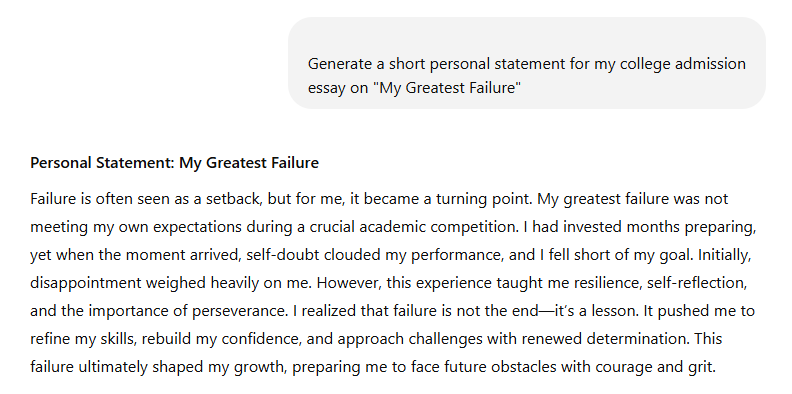
Now let’s see how this statement scores on some of the top AI detectors with Walter Writes AI Detector:
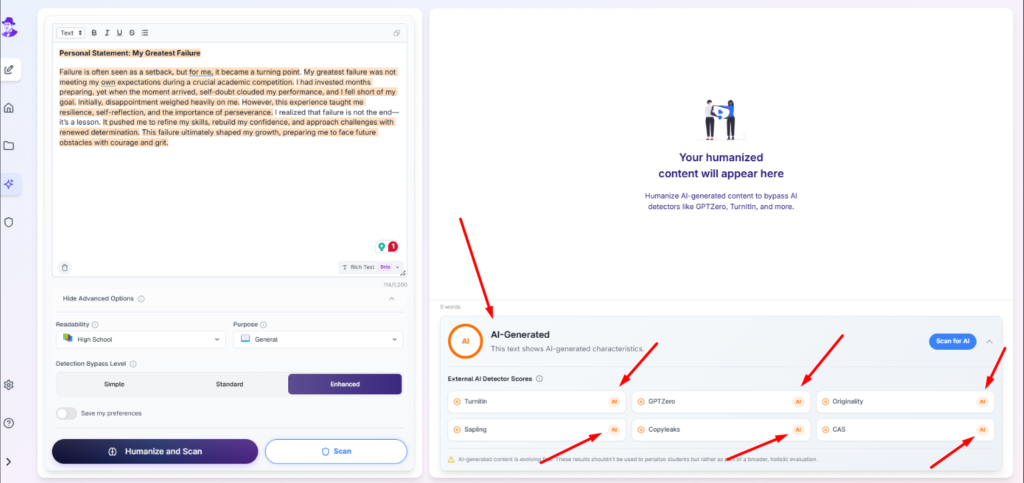
Next, we’ll use Walter Writes AI Humanizer - one of the top AI humanizers for creating undetectable content:
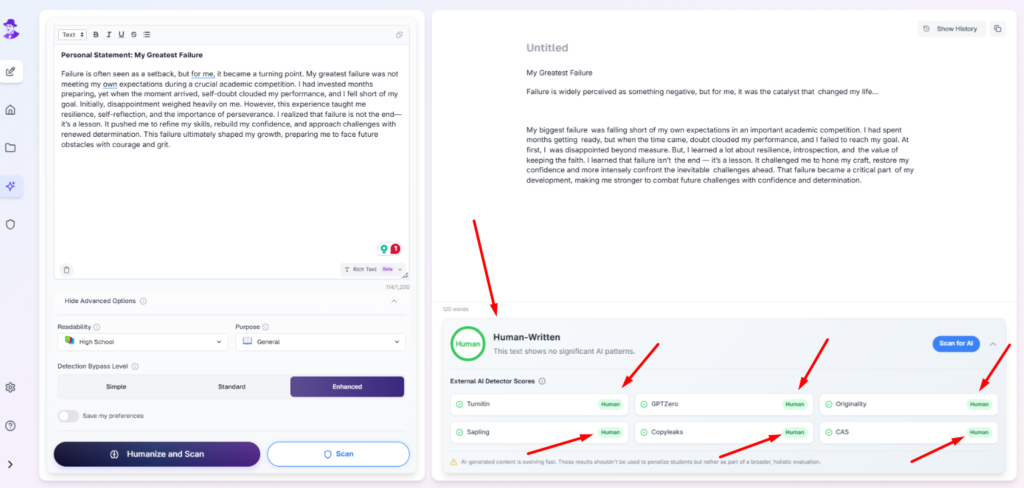
With just one click on the “Humanize and Scan” button, we made that personal statement, generated by ChatGPT more human-like, ensuring it feels authentically yours and ready to bypass any AI detector tools.
You might feel we are biased toward our tool and only showed you one example where we succeeded. Why not try it yourself and prove us wrong?
When and Why Teachers Might Scrutinize PowerPoints for AI Content
Teachers might investigate PowerPoints when the material appears unexpectedly polished, when it doesn’t include personal thoughts, or when it’s written in excessively formal language.
Be wary if the presentation style is not consistent with a student’s usual work. In high-stakes assessments or academic competitions, educators also will review projects with an eye for originality, critical thinking and genuine understanding, especially now that AI tools are easily accessible in education.
Final Thoughts
Teachers and professors can detect AI-generated content in PowerPoints by analyzing linguistic patterns, inconsistencies in style, and over-polished presentations. They also use AI detection tools and direct questioning to assess authenticity.
To make your PowerPoint undetectable, personalize your content, maintain a consistent tone, and avoid overly formal or generic phrasing. Adding original insights, creativity, and personal touches enhances authenticity.
AI humanizer tools can help refine AI-generated slides, ensuring they feel more natural and aligned with your own voice, reducing the risk of detection.
Try Walter Writes AI for free today
For the broader picture on how professors detect AI writing across all formats (essays, presentations, discussion posts), see our 2026 guide.
