




Key Takeaway: You can make ChatGPT sound human, but it takes more than minor edits. The goal isn’t to trick detectors; it’s to rewrite AI output so it genuinely reads like a person wrote it, with varied rhythm, real voice, and specific detail.
- Low perplexity and flat sentence rhythm are the main reasons AI text gets flagged
- Never copy-paste ChatGPT output directly; use it as a rough draft and rewrite everything
- Delete phrases like “furthermore,” “in today’s world,” and “it is important to note”
- Vary sentence length deliberately: short statement, longer explanation, punchy closer
- Manual rewriting produces the most natural results; humanizer tools speed up the process
Yes, you can make ChatGPT sound more human. But it will take more than just clicking on “Regenerate”. I am a student who has utilized AI to meet several deadlines. I learned to reformat an AI’s writing to resemble a human’s writing style, so it could pass through the most advanced AI detection systems, such as GPTZero, Turnitin, and Originality.ai. I have tested and researched all the different ways and tools, and I have made some mistakes, so you do not have to.
Goal of this guide: show you how to humanize AI text so your writing reads natural, clear, and authentically yours…without changing your meaning!
Why I Used ChatGPT (And Got Caught)
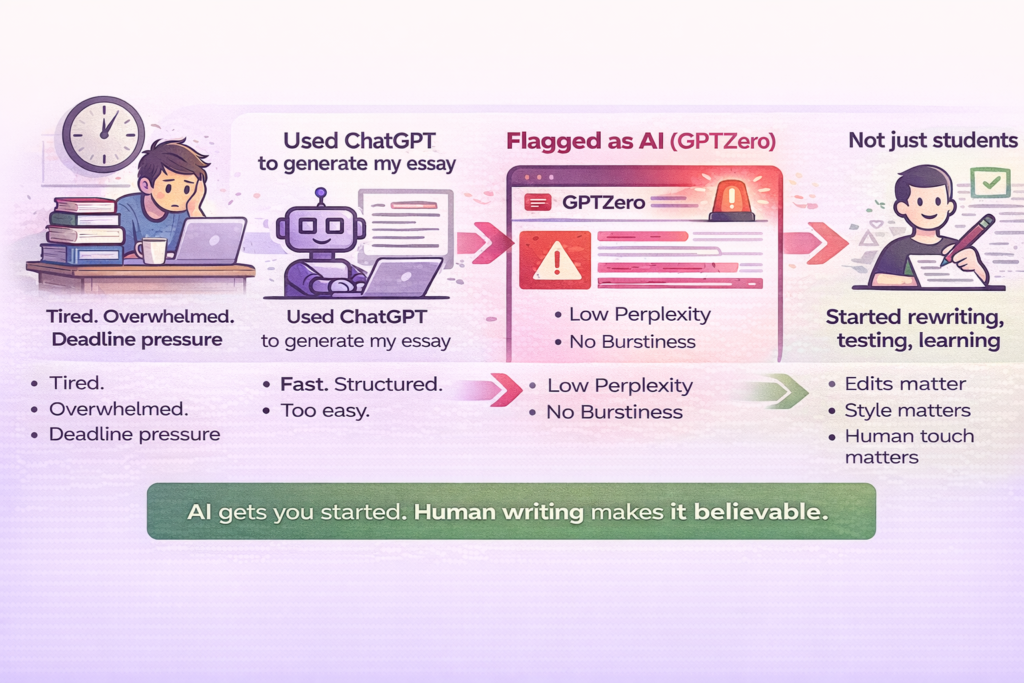
Like most students, I didn’t set out to cheat. I was just… tired. Between working part-time and back-to-back assignments, I hit a wall during midterms. One night, desperate to hit a 1,500-word word count for a politics essay, I turned to ChatGPT.
At first, it felt like magic. It gave me structured paragraphs, references, and even a conclusion. I thought I was set.
Until I pasted the draft into GPTZero, and it lit up like a Christmas tree.
Every section was flagged as AI-written. I didn’t even know what “perplexity” or “burstiness” meant at the time. All I knew was: if I submitted this, I could get reported for academic misconduct.
And I panicked.
But that panic turned into curiosity. I started researching why ChatGPT text gets flagged. I tested edits, rewrites, tools, including an AI to Human Text Converter, and I kept track of what worked and what didn’t.
And honestly, this isn’t just a student problem. Writers, marketers, and freelancers run into the same wall. The AI draft looks fine at first glance, but the moment someone reads it closely or runs it through a detector, it falls apart.
What Does It Mean to Humanize AI?
To humanize AI-generated text means to revise or refine it so it reads like something a real person wrote with natural flow, personality, and nuance.
Large Language Models like ChatGPT or Claude tend to produce content that’s clean but repetitive. Sentences follow predictable patterns. Tone often feels generic or flat. Even when the facts are right, something’s missing.
Humanization fixes that by introducing:
- Sentence variety – mixing short, punchy sentences with longer, flowing ones.
- Transitional phrasing – making the text feel more like a conversation.
- Tone adjustments – shifting from robotic to relatable.
- Light imperfections – that mimic how real people write and think.
And here is what it is not: just swapping words or running it through a paraphraser. True humanization changes the rhythm, the voice, and the feel of the writing, not just the vocabulary.
Think of it this way: AI gives you the raw draft. Humanization is the editing pass that makes it shine.
When done well, a humanized version of AI content will:
- Keep the facts and keywords intact.
- Sounds like it was written by a person, not a bot.
- Include emotional nuance or lived perspective.
- Flow naturally enough that both readers and algorithms trust it.
If you want help with this, tools like Walter Writes are built for exactly that, designed to rewrite AI-generated content in a more human tone, while preserving your original meaning.
What Makes AI Writing Sound Fake?
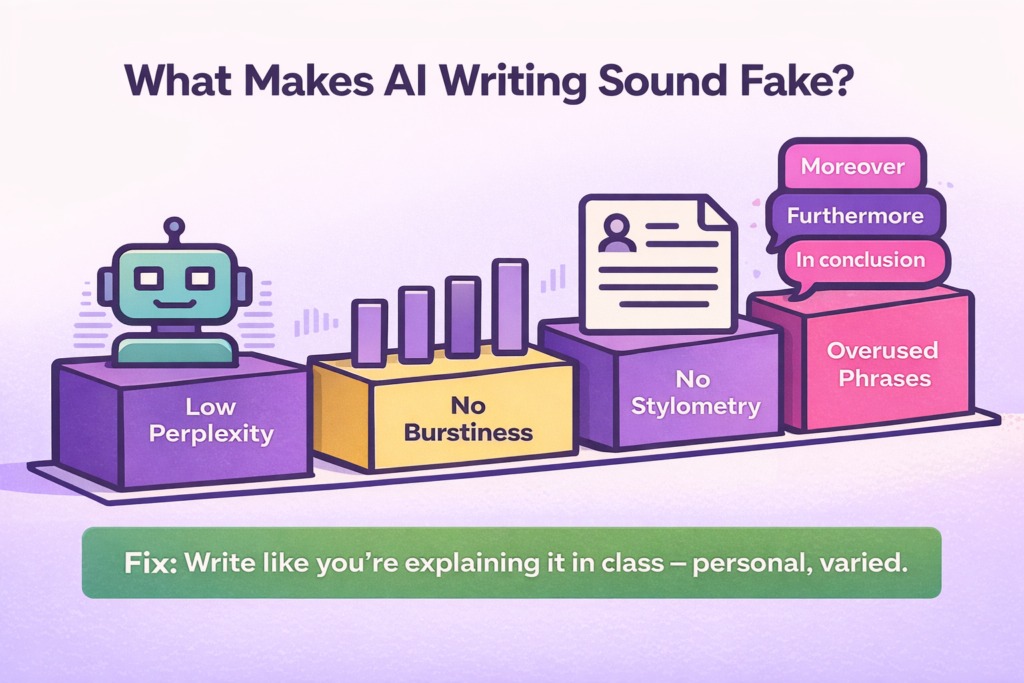
AI doesn’t plagiarize, it predicts. And because of that, its writing has a specific “texture” that feels… off. Professors and AI detectors are trained to catch it.
Here’s what I found after hours of digging and testing:
Low Perplexity (Predictability)
AI tools like GPT-4 predict the most likely next word based on training data. If your sentences are too “expected,” your perplexity score is low, which is actually bad for humans. Low perplexity = predictable = robotic.
Example:
“The economic implications of globalization are significant.”
❌ Sounds safe, generic, AI-ish.
✅ Humanized: “Globalization hasn’t just changed how countries trade, it’s changed how I buy groceries.”
Lack of Burstiness (Flat Rhythm)
Humans naturally mix short and long sentences. AI? Not so much. It tends to keep things neat. That’s what detectors look for.
Try this:
- One sentence short.
- Another longer, with layered thoughts and personal phrasing.
- Then a punchy one again.
That rhythm throws off AI flags and just sounds better.
Stylometry (Writing Fingerprints)
This one surprised me: detectors look at your style. Word choice, sentence rhythm, punctuation habits, and even how often you use semicolons. If your writing doesn’t feel “human,” it gets flagged.
When I compared my ChatGPT draft to an essay I wrote last semester, it was obvious. Mine had personality. ChatGPT didn’t.
Related: ZeroGPT vs GPTZero
Overused Phrases That Set Off Detectors
Here are some phrases I now delete on sight:
- “In today’s society…”
- “It is important to note…”
- “The following essay will discuss…”
- “In conclusion…” (AI loves this one)
- “Furthermore…”
- “Moreover…”
- “It is worth noting…”
- “In today’s world…”
Instead, I try to write how I’d talk if I were explaining the concept in class. That’s what makes it feel real.
Common AI Writing Patterns to Avoid
Beyond individual phrases, AI writing has broader structural patterns that give it away. Editors and detectors have started calling this “AI slop”: content that is technically correct but reads like it was assembled, not written.
Here are the most common patterns to watch for:
Uniform Sentence Length: Every sentence marches at the same pace. No short punchy lines. No long flowing ones. Just one even rhythm, all the way through. It feels robotic because it is.
Stock Transitions: Phrases like “Firstly,” “Secondly,” “Moreover,” and “In conclusion” appear on repeat. They are not wrong, but they signal a pattern no human writer naturally falls into.
Concept Loops: AI tends to repeat the same idea in slightly different wording across a paragraph. If you read a section and feel like it is saying the same thing twice, it probably is.
Overly Clean Structure: Every paragraph is the same size. Every section follows the same flow. It looks polished but feels lifeless. Real writing has rough edges.
Generic Language: Vague phrases replace specific details. “This has a significant impact” instead of what the impact actually is. “Many people believe” instead of who, exactly, believes it. The more generic the language, the more AI it reads.
How I Made ChatGPT Sound Like Me
Let’s be clear, just asking ChatGPT to “make it sound more human” won’t cut it. I tried that. Multiple times. The phrasing got weirder, but it still didn’t feel like me.
So I started building a routine, a kind of ChatGPT detox.
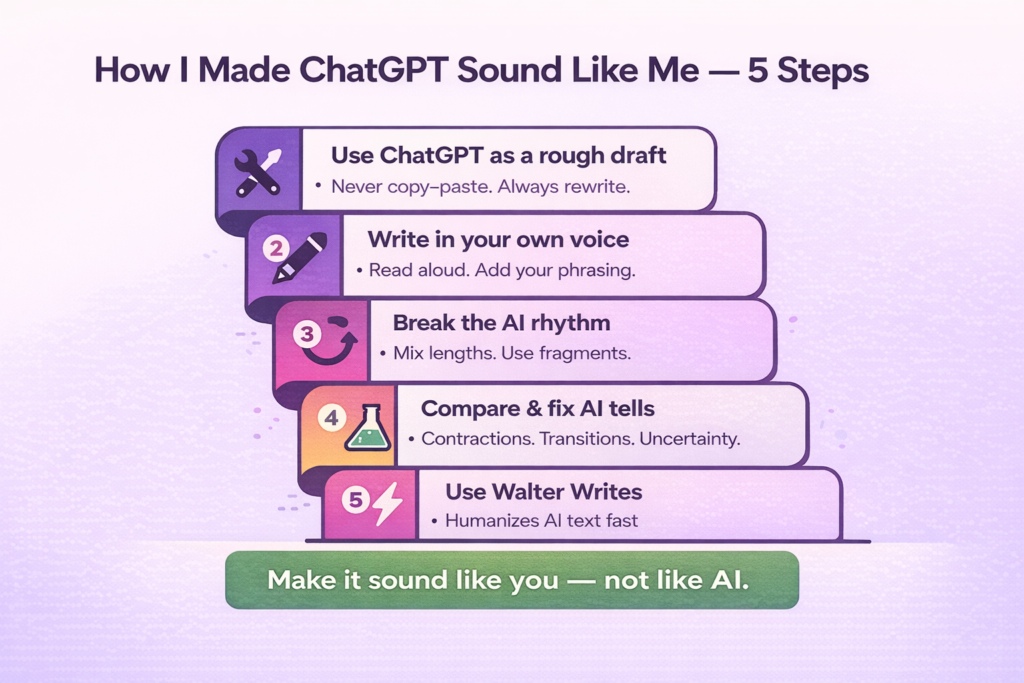
Step 1: Treat ChatGPT Like a Rough Draft Tool
The first thing I changed was my mindset. I stopped using ChatGPT to write the final version. Instead, I used it to:
- Organize ideas
- Outline arguments
- Suggest references
- Draft rough sections I could later rework
The rule is simple: never copy-paste. Use the output as a starting point, then rewrite everything in your own words.
Example:
ChatGPT: “The Great Depression had far-reaching economic impacts across multiple sectors.”
Me: “When the Great Depression hit, it didn’t just crash the stock market, it wrecked jobs, homes, and entire communities.”
Step 2: Use My Voice (Literally)
This was huge. I started reading the text out loud and asking: Would I actually say this?
If not, I’d rewrite it. I added things like:
- Parentheticals (like this)
- Casual transitions (“Here’s the thing…”)
- Real emotion (“Honestly, this part shocked me.”)
I also started paying attention to my own phrasing patterns. The words I naturally reach for. The way I open a sentence. Once you notice those habits, you can deliberately bring them into your rewrites.
It changed everything.
❌ “The data suggests a correlation.”
✅ “Turns out, the stats line up way more than I expected.”
Step 3: Break the Rhythm
AI is obsessed with structure. I broke it by:
- Mixing sentence lengths
- Starting sentences with conjunctions (“And honestly…”)
- Using fragments when it felt natural
For sentence variation, a simple pattern works well: a short statement. A longer sentence that adds context or nuance. Then a punchy closer. Repeat that loosely, and the rhythm immediately feels more human.
This boosted “burstiness” and made the whole thing feel more human.
Step 4: Test and Compare My Writing
I pulled up one of my older essays that passed Turnitin without issue and compared it side-by-side with a ChatGPT draft.
Differences I noticed:
- I used contractions. ChatGPT didn’t.
- My transitions were unpredictable. ChatGPT always said “Furthermore…”
- I made arguments with doubt or nuance. ChatGPT sounded overly confident.
That comparison became a checklist. Every time I edit AI output now, I look for those same tells and fix them one by one. It also helped me understand my own writing habits well enough to replicate them deliberately.
And I started deliberately adding uncertainty into the writing. It felt real.
- “This probably influenced policy…”
- “It’s possible that this trend reflects…”
- “To be fair, there’s another side to this.”
Step 5: Use Walter Writes to Rewrite Fast
I won’t lie: doing this all manually was slow. And when I was juggling three essays in one week, I needed help.
That’s when I found Walter Writes, and it changed everything.
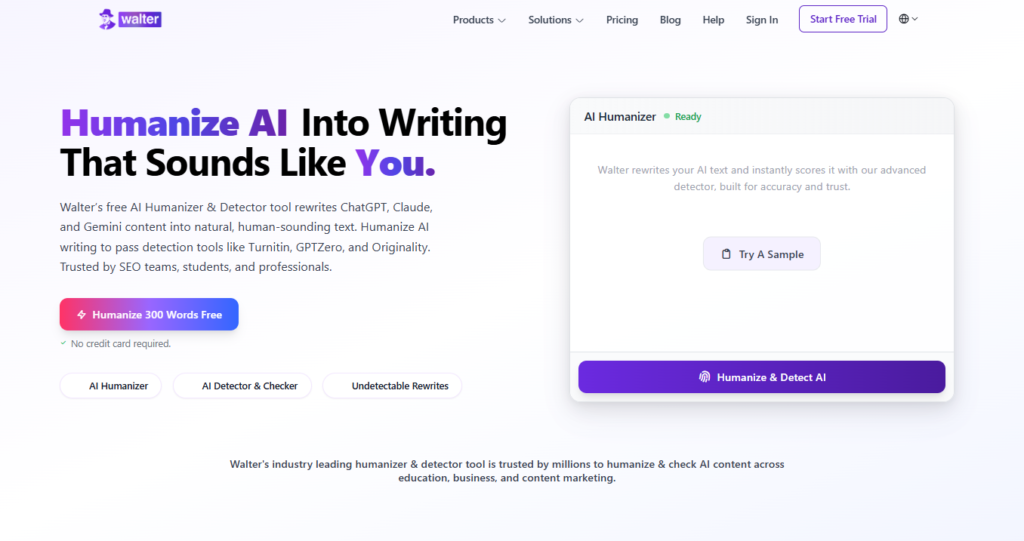
It is built specifically to humanize AI text, not just spin synonyms. It restructures sentence rhythm, adjusts tone, and keeps your original meaning intact.
It’s the only tool I’ve found that:
- Rewrites ChatGPT-style text to sound natural, casual, and original
- Let’s you choose a “Student” tone (not overly formal, not cringey)
- Actually passes AI detection tools like GPTZero, Turnitin AI, and Originality.ai
- Doesn’t butcher the meaning of what you wrote
Here’s what I do now:
- Draft rough content in ChatGPT
- Paste it into Walter Writes
- Select “Human Rewrite”
- Click Reword
- Review and tweak (takes like 10 minutes max)
The result? It sounds like me, not a chatbot.
Try it for yourself: Walter Writes AI Humanizer Tool
Humanize AI Without Changing Meaning
Once you know what makes AI writing sound fake, the fix becomes a repeatable process. Here is an 8-step workflow you can run on any AI draft, whether it is an essay, a blog post, or a business email.
- Read it aloud: Anywhere you stumble or feel bored marks a sentence that needs attention.
- Mix sentence lengths: Follow a long, flowing line with a punchy short one.
- Replace robotic transitions: Swap formulaic connectors for natural speech cues (“That’s why…”, “Here’s the thing…”).
- Add specific detail: Stats, examples, or sensory touches instantly humanize tone.
- Keep minor imperfections: A contraction or rhetorical fragment adds personality.
- Change order or angleL Lead with an example, then explain — it mirrors a real conversation.
- Run a true humanizer tool: Use advanced software like Walter Writes AI that restructures pacing, not just synonyms.
- Cross-check with AI Detectors: As a quality check, use two tools and make changes to every paragraph that is still flat. An internal check, like a leading AI-Generated Content Detector, is a good place to start.
Follow this practical workflow whether you’re polishing essays, blog posts, or business copy. This layered process fixes cadence, diction, and structural monotony while keeping your message intact.
Reducing AI-Likelihood Signals
When composing articles for academic or highly compliant (i.e., universities utilizing plagiarism software, i.e., Turnitin, Copyleaks, GPTZero) environments, the objective is to avoid misrepresenting yourself as a machine, rather than to deceive software.
A successful approach to achieve this is to develop your writing skills beyond surface-level revisions and to develop the rhythmic tone and structure of your writing.
In order to preserve the validity and integrity of your work while reducing AI likelihood, here are some ways to do so professionally:
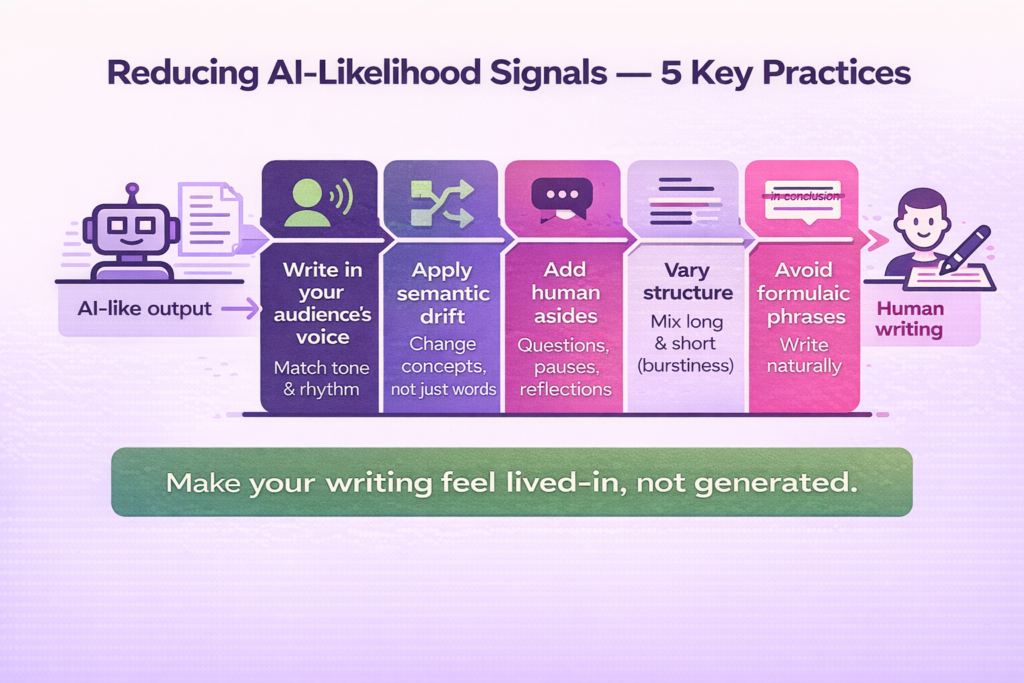
Write in the Voice of Your Audience
Write in a voice that reflects the way your intended audience normally communicates. Academic writing may be written formally, but can also reflect nuance in transition, active verbage, and the occasional comment about the citations referenced. Business writing emphasizes clarity, specificity of outcomes, and brevity. Every audience has its own unique rhythmic pace, and when you match that pace, you will increase your credibility, interest, and authenticity.
Apply Semantic Drift Intentionally
Semantic drift refers to the act of expressing an idea differently, by changing the way it is phrased. Instead of replacing words, you replace concepts with experiences. By creating a different linguistic pathway, you are less likely to have your writing detected by AI, and the original intent remains intact.
Include Short Human Asides
To add a human element to your writing, add a few sentences of subjective matter. Examples of this would include a pause in your writing, a rhetorical question, or simply a moment of self-reflection. The purpose of these human elements is to give your writing a “human” cadence that AI does not mimic.
Vary Paragraph Structure
While a longer section of developed material can be effective, the inclusion of shorter sections that provide emphasis can add variety to your writing. In addition to providing emphasis, varying your section length provides “burstiness,” which is a characteristic that many plagiarism detection systems utilize to identify human authored content.
Avoid Formulaic Tell Words
Replace generic connector words such as “in conclusion” or “additionally” with conversational phrases such as “the key takeaway,” “that’s why,” or “on the other hand.” Both humans and plagiarism detection software tend to respond positively to this type of language.
Once you have made these adjustments to your writing, your next step is to test your revised version, at which time you will see a significant improvement in your human-likeness score — not because you managed to circumvent the algorithms used in plagiarism detection tools, but because your writing reflects the rhythmic and emotional characteristics of legitimate writing.
Before and After Examples
Seeing the difference between AI output and humanized writing makes the whole process click. Here are three examples across different writing contexts.
Academic Example
AI Draft: “Artificial Intelligence is a rapidly evolving technology that has applications in many areas.”
Humanized: “AI already runs hospital diagnostics, powers classroom tutoring apps, and even handles bookkeeping for small firms. Its reach keeps expanding, and understanding it early makes adaptation easier.”
What changed: vague generality replaced with specific real-world examples, and the second sentence adds forward-looking relevance.
Business Example
AI Draft: “Click-through rates outperform industry averages by 15 percent.”
Humanized: “CTR landed about 15 percent above the industry average, a healthy jump for a single campaign.”
What changed: the flat stat becomes a result with context, making it feel like a person reporting back rather than a tool generating output.
Creative Example
AI Draft: “She walked through the forest, the moonlight eerily illuminating her way.”
Humanized: “She slipped between the trees, crunching leaves underfoot while moonlight spilled across the path, cold and silver.”
What changed: generic description replaced with sensory detail and movement, giving the scene texture and pace.
The same logic applies when you’re working from a draft produced by AI story generators like Sudowrite or NovelAI: the raw output tends to be flat and genre-patterned, and a humanization pass is what closes the gap between generated prose and something that reads like you actually wrote it.
Humanization and SEO: The Connection
Most people humanize AI text to pass detectors. But there is a bigger reason to do it: humanized content simply performs better.
Google’s ranking systems, including its Helpful Content and E-E-A-T frameworks, measure reader satisfaction through engagement metrics such as dwell time, interaction, and repeat visits. When your writing feels genuine and emotionally aware, readers stay longer, engage deeper, and share more frequently, all of which send strong positive signals to search engines.
Simply put, SEO-friendly AI content is not about stuffing keywords. It’s about writing that feels human while still being clear, useful, and optimized. When you humanize AI-generated text, you improve both readability and rankability. Readers connect more with authentic rhythm and tone, and algorithms recognize that connection as quality.
That’s why professional marketers and content strategists now combine AI writing tools with AI humanizers. Here is the list of the best 12 AI humanizers based on real testing. They use automation for speed and scale, but rely on humanization passes to refine rhythm, tone, and voice. The result is content that achieves what AI alone can’t: emotional depth and measurable SEO performance.
Real Tests: Did I Beat AI Detectors?
After rewriting my text with Walter Writes, I ran it through some of the best AI detector tools. The goal wasn’t to trick the detectors. It was to see whether writing that felt genuinely human would score that way, too. And yep, I documented everything.
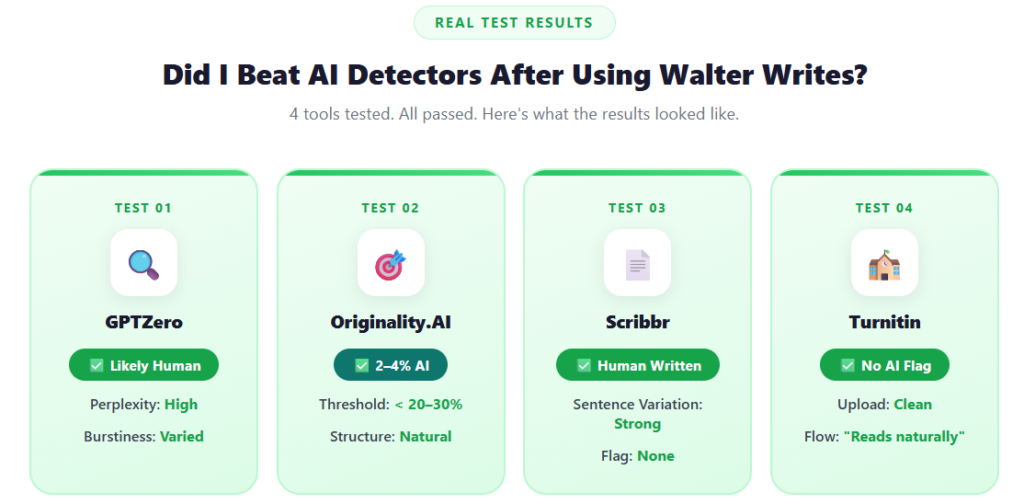
Test 1: GPTZero
This was the first tool that ever flagged my writing, even when I felt it “sounded human.” But when I ran my Walter-rewritten version through GPTZero?
Result: “Likely Human Written”
- Perplexity: Higher (good)
- Burstiness: Varied (also good)
- No sentence-level flags
Test 2: Originality.AI
Originality.AI is tough. It catches a lot of other tools. But surprisingly, Walter’s rewrite consistently scored below the detection threshold.
Result: ~2–4% AI probability
- Well under their usual flag of concern (~20–30%)
- Sentence structure looked more “natural”
Test 3: Scribbr AI Detector
This tool is widely used in Europe. Scribbr flagged my unedited ChatGPT version instantly. But my Walter rewrite?
Result: “Human Written”
It even complemented the variation in sentence structure, which I didn’t expect from a detector.
Test 4: Turnitin AI Detector
Unfortunately, Turnitin doesn’t let you use its AI detection tool independently, you need to be part of a school system. But I got lucky and had access through a friend’s university account.
Result: No AI flag triggered
- Walter’s rewritten essay uploaded cleanly
- Professor’s comment: “This is well written, flows naturally.”
Related: Can Turnitin detect Quilbot?
What Worked (and What Didn’t)
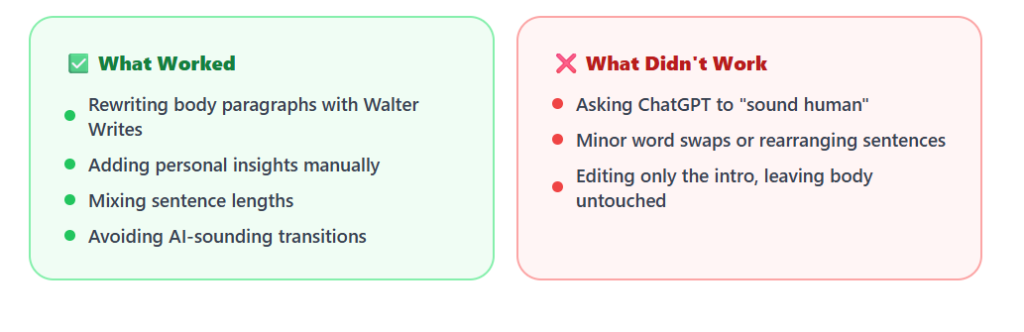
What worked wasn’t about outsmarting the tools. It was about making the writing genuinely better.
Worked:
- Using Walter to rewrite all body paragraphs
- Adding personal insights manually afterwards
- Mixing sentence lengths
- Avoiding “AI-sounding” transitions (“therefore,” “moreover,” etc.)
Didn’t Work:
- Asking ChatGPT to “rewrite to sound human”
- Minor edits (changing a few words or rearranging sentences)
- Just changing the intro and leaving the body untouched
Quick Tips for Students and Writers Using AI Safely
After weeks of testing, rewriting, and praying I wouldn’t get flagged, here’s what I’d tell any student or writer trying to use ChatGPT without getting caught.
✅ Do:
- Use ChatGPT for structure, not final copy
- Rewrite everything in your own voice
- Vary sentence length to increase burstiness
- Add real thoughts, analogies, or jokes
- Use Walter Writes to humanize and pass detection
- Test your output with GPTZero or Originality.AI before submission or publishing
❌ Don’t
- Submit ChatGPT text directly, even with minor edits
- Use intros like “In today’s world…”
- Over-polish your grammar, it looks unnatural
- Forgot to check for flagged phrasing
- Assume your teacher won’t notice, they will
???? Remember: sounding too perfect is a red flag. Sounds like you.
Try Walter Writes: Your AI Humanizer
I don’t use ChatGPT without Walter anymore.
Whether I’m working on essays, presentations, or even discussion posts, Walter Writes helps me rewrite faster, better, and in a voice that sounds like me.
It’s student-friendly. It passes detectors. It works.
Use Walter Writes AI Humanizer Now
To sign-up needed. Just paste, select tone, and reword.
FAQs About Humanizing ChatGPT
How to Make AI Text Undetectable?
The most reliable way is to rewrite it so it genuinely reads as if a human wrote it. Use varying sentence length. Instead of using transitional phrases, replace them with something more specific. Add your voice. Structural changes can have a much greater impact than just making surface-level edits. Most editing is surface-level. The writing needs to feel different at a structural level. Tools such as Walter Writes are helpful as they will alter the rhythm and tone of the writing as opposed to simply replacing words, which is how detectors recognize.
How to Make ChatGPT Undetectable?
Rewrite every sentence in your own words. Do not continue to use ChatGPT’s paragraph structure. Break up the uniform sentence rhythm and remove all phrases like “furthermore” or “it is important to note.” Adding personal insight or a casual aside makes a big difference. A humanizer tool will help you faster, but the most natural results will be from actually engaging with the content and making it your own.
How to Humanize AI Content for Free?
Revise it by hand. Read the first draft out loud and revise everything that sounds generic or uninteresting. Vary your sentence length. Replace the overly mechanical transitions. Add in your own examples. The following are two of the many free detector tools to use to identify such areas: GPTZero & Scribbr. There is a free trial with Walter Writes, too, so you can get going faster. Test as you go through layers of revisions, don’t rely solely on one pass.
How to Make AI-Generated Text Undetectable?
Remove the patterns detectors flags: sentence structure uniformity, predictable transitions, repetition of concepts, and generic phrasing. Change to a variety of rhythms. Use more descriptive, precise language. Write in your own voice consistently. Don’t simply rephrase, rather rearrange your ideas. Lead with an example and add comments as needed. If you write well, the detection scores will likely improve.
How to Make Something Not AI Detectable?
Rewrite the content thoroughly so that you can’t tell that it came out of an AI. Change your sentence structure, avoid using a patterned opening, and include real-world examples in the content. Do not use minor changes or simply substitute one word for another. Think of every paragraph as if you’re going to start over with the concept. It’s your own voice and perspective that will give your writing a sense of being written by a person.
Can AI Detectors Tell If You Rewrote ChatGPT Text Manually?
It depends on how thoroughly you rewrote it. Rewriting a couple of words and rearranging the order of the sentences is rarely sufficient. But rewriting the content in your own voice and adding your own insight into it and varying the rhythm can actually help. Tools such as GPTZero and Originality look at structural patterns. They don’t necessarily rely on the vocabulary. Usually, a deep rewrite that varies the sentence structures and pacing is sufficient.
What Words Should You Tell ChatGPT to Avoid?
Stay away from all of these transition words that have become default for AI, like “In today’s world,” “It is important to note,” “Furthermore,” “Moreover,” and “In conclusion.” All of those are openers & transitions. So give it an instruction in your prompt: “Write conversationally…avoid formal academic transitions & generic openers.” This will not provide you with a human-sounding result. It should produce a cleaner draft as a starting point.
Does Adding “Write Like a Human” to Your Prompt Actually Work?
Partially. It may produce slightly less stiff text, but it will rarely create something that could pass a detector test. The model will adjust your “surface level” tone and is going to follow the same predictable structural patterns as before. In many ways, you can think of this as a method to obtain a much better first draft than if you were using the previous version, but it is far from being a finished product.
How Do You Set Up ChatGPT Custom Instructions for a Consistent Writing Style?
Go to Settings and click on Custom Instructions. In that box, tell the tool about your writing style. Describe how you like to write in terms of tone, sentence structure, natural transitions, and words or phrases you tend to avoid. Example: “Write conversationally, mix short and long sentences, avoid formal transitions, and use contractions.” The more specific you are, the closer the output will be to your voice. It does not eliminate the need to edit, but it makes the starting draft much easier to work with.
What’s the Difference Between Perplexity and Burstiness in AI Writing?
Perplexity measures how predictable the word choices in a piece of writing are. The lower your perplexity score, the more predictable your word choice will seem and the more likely it will look like an AI’s writing. Burstiness refers to whether you have a variety of sentence lengths. A writer will typically combine short sentences and long sentences. An AI will continue to write each sentence at the same length. When detectors analyze both your perplexity and burstiness, they will assume it is written by a human if your writing is high on both.
Can You Train ChatGPT on Your Own Writing Samples?
Not exactly, but you could guide its style strongly enough to provide an example of your own writing as part of the question and have it try to emulate that style. You can also include details about your voice in the custom instructions section, and some other third-party applications will allow you to upload examples of your writing so they can create an even closer tone match. Using a combination of both sample-based prompting and manual edits will get you very close to output that is truly written in your voice.
Do AI Humanizer Tools Change The Meaning of Your Text?
A good humanizer should not change your meaning. Tools like Walter Writes restructure rhythm, tone, and phrasing while keeping the original intent intact. Changes happen at the level of sentence structure, not ideas. Humanizers are designed to alter the style of your writing, like sentence structure, not the content. To know more about “what is an AI humanizer” and how it works, you should definitely give this guide a read.
How Do You Make ChatGPT Write in a Conversational Tone for Academic Essays?
Prompt it to write as if explaining the topic to a classmate rather than submitting a formal paper. Avoid using jargon or overly technical terms. Write as if you’re going to have someone ask you questions about your paper, and respond with answers that support what you’ve written. Read through the paper and remove any lines that seem unnatural. Rewrite lines that are too long. Try to capture your own personality.
What are Micro-Prompts, and How Do They Change ChatGPT’s Output?
Micro-prompts are very short prompts given to the Chatbot to allow you to ask it to adjust certain parts of the draft. Instead of asking the AI to completely redo your work, ask it to make a small adjustment to something specific. Examples of micro-prompts would include “Make this paragraph shorter”, or “Rewrite this sentence to sound less formal.” This will give you much better control over what is happening with the writing than if you had asked the AI to revise everything.
Is it Better to Edit Output Manually or Use a Humanizer Tool?
Manual editing allows for the highest degree of author control and will produce the most genuine results. Tools that can be used to “humanize” such as Walter Writes, provide a fast method of creating structural rhythm and can assist greatly when reviewing a draft personally afterwards. A combination of both methods will produce the best results: apply a humanizing element to your draft and then review it personally to add the tone and nuances of your own voice that were overlooked by the automated process.
Can ChatGPT Sound Human?
Yes, but only if you use it as a base for rewriting. There is just too much structure to the writing itself and predictability of the language. If you rewrite what ChatGPT says using tools such as Walter Writes, the output will have a far more natural tone and be safer from being caught by an AI Detector. One can also learn prompting to make ChatGPT more human.
How Do I Avoid Getting Flagged by AI Detectors?
You should use ChatGPT for developing ideas and providing a structure for your essay. Do not simply copy and paste its work. Whenever you rewrite, do so in your own words. For added protection while writing, use an AI humanizer for Essay such as Walter Writes, which will add additional layers of naturalness and randomness to your rewritten work. Always run your final essay through a reliable AI Detector prior to submitting your work.
Is Using ChatGPT for Essays Cheating?
It may depend upon how your school defines plagiarism. But producing work that sounds like AI is still a risk. As a result, it is recommended to rewrite what you produce with ChatGPT, personalize it to fit your voice, include proper citations to your sources, and utilize tools such as Walter Writes to assist you in doing so in a way that is ethical.
Does Walter Writes Pass Turnitin and GPTZero?
I have run Walter Writes on several versions for each project. Walter’s rewrites passed GPTZero,Originality.AI, and even Turnitin’s AI checker (via university account). Screenshots included above.
What’s the Difference Between Walter and Other Rewriters?
Most rewriters just spin text. Walter Writes actually humanizes it: sentence rhythm, tone, transitions, and gives you control over how “student” it sounds.
What tools can help humanize AI text?
There are five main tool types. Sentence structure converters rewrite sentences while preserving keywords and SEO integrity. AI rewriters tackle repetitive sections and improve flow. AI humanizers go deeper, rebuilding tone, rhythm, and pacing rather than just swapping words. AI detectors like GPTZero, Turnitin, and Originality.ai identify what still reads robotic so you know where to focus. Paraphrasing tools are best for small surface edits and work best alongside a humanizer, not instead of one. The most reliable sequence is: Draft → Humanizer pass → Add your voice → Detect → Final proof.
How do I get better output from ChatGPT or Claude before humanizing?
Don’t accept the first draft. Ask follow-up prompts with specific context, like “write this as if you’ve actually experienced it” or “make this conversational enough for LinkedIn.” Then layer in your own anecdotes, brand-specific phrasing, or subtle humor. One personal story can shift generic AI output into something E-E-A-T compliant. Also try reordering ideas: lead with a question or a surprising statement instead of the AI’s default linear structure. That alone makes the rhythm feel more human immediately.
Is AI humanization just a short-term workaround, or does it have a longer-term role?
It’s becoming a core skill. As AI-generated content keeps flooding the web, audiences and search engines will increasingly reward writing that feels authentic and emotionally aware. The writers who will stand out are those who learn to merge machine efficiency with human judgment. Using an AI humanizer isn’t a shortcut in that context, it’s part of the craft of producing content that ranks, resonates, and reads like a person wrote it.
Final Thoughts: Make AI Work for You: Not Against You
ChatGPT can save you time, no question. But if your writing still sounds like AI, you’re risking flags, bad grades, or worse..getting reported.
The fix is not to ditch AI. It is to treat it as the starting point and bring the quality yourself.
Walter Writes made that part easy. I don’t just use it because I want to pass detectors, I use it because it makes me a better writer. Faster. More natural. More me.
AI gives you speed. Human editing gives you quality. You need both.
So if you’re using ChatGPT and want your content to sound human? Rewriting is essential.