





TL;DR: An MCP server is a background process that allows any AI application speaking the Model Context Protocol to expose tools, data sources, and prompt templates. This lets a host such as Claude Desktop or Claude Code call your code (read a database, hit an API, run a browser) without requiring a custom integration for each host.
- Walter Writes MCP server exposes a humanize tool and a detect tool directly inside Claude
- GitHub MCP gives Claude access to repos, issues, pull requests, and files
- Postgres MCP enables read or read/write SQL access to your database
- Stripe MCP exposes customer, charge, and subscription data
- Slack MCP provides message history, search, and posting capabilities
- Playwright MCP enables full browser automation from inside Claude
If you’ve worked on an AI developer tool within the last year, you’ve probably heard some mention of “MCP server.” Cursor has added MCP server capabilities. Claude Code was built with them. GitHub, Stripe, Linear, Postgres, Slack, and many other companies have already implemented MCP servers. However, while there are numerous examples explaining how to implement an MCP server from a development perspective, most are missing one key aspect of MCP: what does an MCP server do and when would you choose to build one rather than simply building an API?
This article will fill that void.
The Problem MCP Solves
Prior to Anthropic’s release of the Model Context Protocol in November 2024, every AI application that wanted to give a large language model access to external tools had to create a custom integration for each tool individually. Want Claude to read your Postgres database? Custom integration. Want it to file GitHub issues? Another one. Want both of those tools available inside Cursor, Claude Desktop, and your internal chatbot? Build them all again, just slightly different.
This is the “M times N” problem. M applications each needing N tools means M × N custom integrations. Using 20 applications and 50 tools results in 1,000 brittle, mostly redundant glue layers.
The Model Context Protocol collapses that number down to M + N. Each application speaks the protocol. Each tool exposes itself as an MCP server. The two connect via a standard wire protocol, and any client can connect to any server without additional glue.
What Is the Model Context Protocol (MCP)?
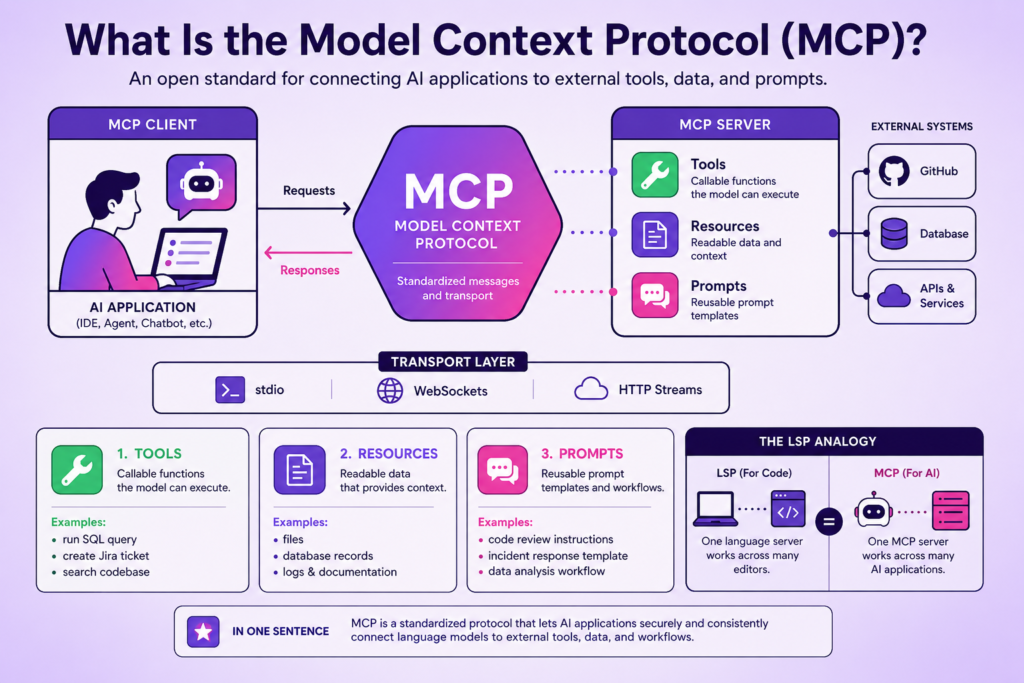
The Model Context Protocol is an open specification developed and currently managed by Anthropic. It defines how an AI application (the client) can communicate with an external system (the server) so that the AI application can give its language model access to tools, data, and prompts.
The official MCP site describes it as “a method of connecting LLMs with their necessary data and tools.” That understates the fullness of the design. MCP isn’t simply an integration layer. It’s a protocol with a defined message type and a transport layer for communication. It also has explicit primitives for each of the three things most LLM applications require: callable functions, readable resources, and reusable prompt templates.
MCP was designed with intentional similarity in spirit to the Language Server Protocol (LSP). LSP provides a standard that lets one IDE plug into every language’s tooling (Rust, Python, Go, and others) without custom integrations per editor. Similarly to how LSP made tooling portable between editors, MCP seeks to make tooling portable between AI applications.
How MCP Differs from Function Calling
If you’ve used OpenAI’s function calling or Anthropic’s tool use, you might wonder how MCP fits in. Function calling is what the model does. When a model decides to use a tool during execution, it emits a structured JSON payload. MCP is what the application does: it’s the process that lets an application discover and use tools provided by compliant servers and present them to the model.
To be precise: function calling happens between the model and the application. MCP happens between the application and the tool provider. They operate at separate layers and don’t compete.
What Is an MCP Server, Specifically?
An MCP server is typically a long-running process that exposes a specific collection of capabilities (tools, resources, and prompts) to any MCP-compliant client using a pre-defined transport mechanism. Once a client has established communication with the server, the client inquires about the exposed services and forwards user or model requests to the server when needed. The MCP server then performs the actual tasks: querying a database, making an API call, or reading a file.
MCP Servers vs. MCP Clients vs. MCP Hosts
These three roles get conflated in a lot of documentation. It’s worth understanding each clearly.
A server exposes capabilities. This includes tools, resources, and prompts made available to MCP clients. For example, the Walter Writes humanizer MCP server exposes both a humanize tool and a detect tool.
A client is a lightweight component within a host application. Each client maintains a single, stateful connection to a server and communicates directly with only one server.
A host is the application that end users interact with directly. Examples include Claude Desktop, Claude Code, and Cursor. Hosts provide the environment where multiple client connections exist concurrently to access various servers and use the capabilities those servers provide. The host determines which tools and resources are made visible to the model based on permission settings, and presents the resulting output to the user.
A single host may simultaneously connect to a GitHub MCP server, a Postgres MCP server, and a humanizer MCP server. All of those communications occur independently via separate client connections.
What an MCP Server Exposes
A compliant MCP server exposes three primitives:
Tools are callable functions invoked by models or users with input parameters that return output values. Best analogy: an RPC method.
Resources are readable data sources. The model or user requests the contents of a resource via URI. Best analogy: a file or an HTTP GET.
Prompts are parameterized prompt templates the server offers to the host. Users select prompts from a slash-command menu in their AI app. Best analogy: a stored procedure, but for prompts.
Most MCP servers in the wild expose only tools. Resources and prompts are powerful but less commonly used.
How MCP Servers Work Under the Hood
The MCP protocol uses JSON-RPC 2.0. All communication from client to server occurs via JSON-RPC requests, responses, and notifications.
JSON-RPC and the Transport Layer
JSON-RPC is the message format. The transport is the method through which those messages travel. MCP currently defines two transports:
stdio (standard input/output). The host creates the server as a child process and pipes JSON-RPC messages to and from the parent process. This is one of the primary transports used today for local developer tools. Because this transport uses standard IO, it provides inherent security (no network exposure) and high performance.
HTTP with Server-Sent Events (SSE), now evolving toward Streamable HTTP. The server can run remotely as a separate process while clients connect over HTTP. This allows multiple users to access an MCP server provided as a SaaS service.
WebSocket transport is being discussed in the MCP community as a potential official transport but isn’t a stable standard at the time of writing.
A Request Lifecycle, End to End
Here’s what happens when a user says “humanize the last paragraph of my draft” to Claude Desktop with the Walter Writes MCP server running.
- At startup, Claude Desktop establishes a client connection to the humanizer server using stdio as a transport.
- Before calling the humanize function, Claude Desktop calls tools/list and stores information about each available tool.
- Upon receiving the tool definitions as part of its context, the model determines that it wants to call humanize with the paragraph as an argument.
- The model passes those arguments to Claude Desktop, which initiates a JSON-RPC tools/call request to the humanizer server over stdin.
- The humanizer server processes the request, contacts the Walter Writes API, retrieves the rewritten text, generates a JSON-RPC response, and transmits it to Claude Desktop over stdout.
- Claude Desktop receives the response and feeds the rewritten text back to the model, which presents it to the user.
That’s the complete cycle. Between three and five round trips between client and server, with no additional code written by the host.
Real MCP Servers You Can Use Today
The ecosystem moved fast. Anthropic published a handful of reference servers (filesystem, GitHub, Postgres, Slack, Google Drive, Puppeteer) at launch. The community and major vendors filled in the rest within months.
| Server | What it gives Claude access to |
| Filesystem | Read and write local files within a sandboxed path |
| GitHub | Repos, issues, pull requests, files |
| Postgres | Read-only or read/write SQL access to your database |
| Stripe | Customer, charge, subscription data |
| Slack | Message history, search, posting |
| Linear | Issues, projects, comments |
| Sentry | Errors, releases, performance data |
| Figma | Design files, components |
| Walter Writes | Humanize and detect AI-generated text |
| Playwright | Browser automation |
| Sequential Thinking | A reasoning scaffold that helps the model plan |
If you’re looking to explore more, dozens of additional MCP servers are listed in unofficial directories like mcp.so and the awesome-mcp-servers GitHub repository.
When Should You Use an MCP Server vs. Just Calling an API?
That’s a fair question, because many MCP servers are simply thin wrappers over REST APIs. Here are three rules of thumb.
Use an MCP server when the LLM should decide when to make a request. If you want the LLM to choose what action to take among multiple possible actions, an MCP server is the right choice. The LLM knows about all discoverable tools and the structure of the arguments used to invoke them, and the host takes care of the rest.
Use a direct API call when you know exactly when the model should act. In cases where you want to trigger a specific operation as part of your own application flow, the REST API is simpler. There’s no value in adding layers of complexity to that process.
Use both when your users need to install tools themselves. If you want users of a host application (Claude Desktop, Cursor, and others) to be able to self-install your tool, shipping an MCP server is the only way to make that possible today. The Walter Writes API, for instance, includes both: a REST API that developers use to integrate into their own applications, and an MCP server that lets users of Claude pick up humanization features as part of their direct interaction with Claude.
How to Use an MCP Server with Claude
How you set up an MCP server depends on which Claude client you’re using.
For Claude Code, the canonical command is claude mcp add followed by your server configuration. Project-scoped MCP files go in the .mcp.json file at the root of your repository. User-scoped servers go in your global configuration. A step-by-step guide is available here: How to Add MCP Servers to Claude Code.
For Claude Desktop, you edit a configuration file called claude_desktop_config.json. The exact location depends on your operating system. Once you’ve made changes to the file, close and reopen Claude Desktop. A step-by-step guide is available here: How to Add MCP Servers to Claude Desktop.
For Claude on mobile, MCP support is still evolving. Configuration typically occurs on the server side rather than the client side.
How to Build Your Own MCP Server
Anthropic provides SDKs in Python and TypeScript that handle the underlying details: JSON-RPC handling, transport management, and lifecycle. A basic “hello world” MCP server takes roughly 30 lines of code. Adding authentication, rate limiting, and observability increases the work but remains manageable.
A typical workflow for building an MCP server:
- Install the SDK: pip install mcp or npm install @modelcontextprotocol/sdk
- Define your tools as decorated functions or registered handlers
- Choose a transport: stdio for development, HTTP for hosted environments
- Run the server and point a host at it
To learn more, including Python and TypeScript implementations and an example that goes beyond hello world, see How to Build an MCP Server.
Frequently Asked Questions
Is MCP only for Claude?
No. MCP is an open protocol. Cursor, Cline, Continue, Zed, and a rapidly expanding group of other AI applications can take advantage of it. Any application that wants to expose an MCP interface to its LLM client can implement the protocol.
Is MCP open source?
Yes. The specification, reference servers, and SDKs are all open source. Governance is transitioning toward a community-governance model.
Will MCP replace OpenAPI?
No. OpenAPI defines how humans use APIs over HTTP. MCP defines how tools talk to LLM-driven hosts. Both can coexist. There’s no reason you can’t define an OpenAPI description of your REST API and also ship an MCP server that wraps it.
What languages can I build an MCP server in?
Any language with a JSON-RPC library, which is most of them. Anthropic provides first-party SDKs in Python and TypeScript. Community SDKs exist for Go, Rust, Java, C#, and others.
Do MCP servers run in the cloud or locally?
Either. Stdio servers run locally as a child process of the host. An HTTP server can run anywhere accessible by the internet. Local is typically simpler and more private. Cloud-deployed servers are easier to share with multiple users.
Is there an official registry of MCP servers?
Several unofficial registries exist today (mcp.so, awesome-mcp-servers on GitHub). Anthropic has indicated plans to release an official registry in the future.
Conclusion
An MCP server is a continuously running process that offers tools, resources, and prompt templates to any MCP-compliant AI application using JSON-RPC. It solves the “each host has to implement each tool individually” problem by collapsing M × N custom integrations into M + N standard connections.
If you’re a developer building with Claude or another MCP-capable host, you have three ways to proceed:
- Use a pre-existing MCP server. Choose one from the list above, follow the Claude Code or Claude Desktop setup guides, and start developing in minutes.
- Build your own MCP server. A few hours of work is enough to get something functional. A few more days gets you to production-ready.
- Use a hosted MCP server. Many vendors (including Walter Writes for AI humanization) offer ready-made MCP servers. Point Claude at one and forget about it.
The protocol is still young, but the direction is clear. MCP is becoming the lingua franca of AI tool integration, the way LSP became the lingua franca of language tooling. Learn it now.
