





Key Takeaway: Jenni AI is a genuinely useful drafting tool for students who struggle with writer’s block and need inline citation support, but its free plan is too limited for real writing sessions, auto-suggested citations frequently need manual verification, and all output carries detection risk if submitted unrevised.
- Autocomplete works well for breaking writer’s block but drifts on longer documents
- Library-linked citations are reliable. Auto-search citations need manual verification every time
- “Strengthen argument” adds confident language, not actual reasoning or evidence
- Free plan caps at 200 words per day, too limited for any real assignment
- Paid plans start at $12/month annually, with pay parity pricing that varies by region
- Walter Writes is recommended as the final step for humanization and detection checks
Every couple of months, another AI writing solution appears, claiming you will never have to pull an all-nighter again due to a looming paper. Jenni AI was one of the first of this new breed of solutions.
Jenni includes citation support, auto-complete features, and a sleek interface. It also has users who swear on their lives that they could not write without it. But can Jenni AI produce the results you want when there is a deadline to meet, and you already know that your instructors will check every piece of work submitted using Turnitin?
To find out the answer, we tested it, broke down the hype, and here is our honest Jenni AI review. Below are the things that both students and marketers will need to know about Jenni in 2026.
Quick Verdict of Jenni AI Review: Who It Is For and Who Should Skip It
For Students
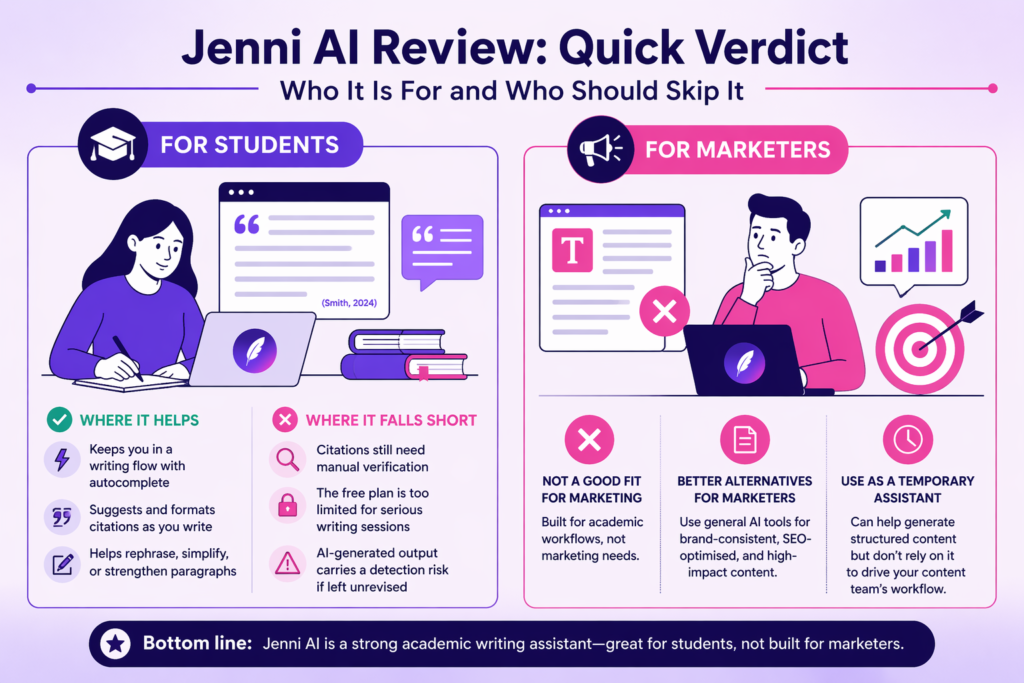
Jenni can be helpful as a drafting and editing tool when developing and revising essays, literature reviews, and other forms of research-based content with in-line citations.
Where it helps
- Keeps you in a writing flow with sentence-level autocomplete
- Suggests and formats citations while you write
- Helps rephrase, simplify, or strengthen paragraphs on command
Where it falls short
- Citations still need manual verification
- The free plan is too limited for serious writing sessions
- AI-generated output carries a detection risk if left unrevised
If you’re creating work with the use of an AI writing tool such as Jenni, then prior to submission, all drafts created with Jenni must go through a reliable AI detector for students to assess if there exists an AI risk.
For Marketers
Jenni does not fit well as a marketing tool. It was created with academic workflows in mind, which will be evident when using it.
If your goal is brand-consistent blog content, punchy copy, or SEO-optimised drafts, then general tools will provide you with what you need. Jenni could be used as a temporary solution to assist with generating structured content, but do not rely on it to drive your content team’s workflow.
What Is Jenni AI (and What It’s Trying to Be in 2026)?
Jenni AI began as a tool for SEO writing. Later, it evolved into general AI writing and ultimately was able to identify academic writing as its central focus. The original direction of Jenni AI has a lasting impact on the current version of the tool, and this creates ambiguity concerning exactly whom the tool is designed for.
At its core, Jenni is three things in one editor:
- AI autocomplete: Suggests the next sentence or paragraph as you write, so you never stare at a blank page
- In-editor research and chat: Lets you ask questions, summarise sources, and get feedback without leaving the document
- Citation assist: Pulls relevant academic sources while you write and formats them in your chosen citation style
Unlike ChatGPT, Jenni works sentence by sentence alongside you rather than generating a full draft at once. This method allows you to stay in complete control of the content you are adding to your document.
The source database for citations that Jenni utilizes contains more than 250 million academic articles from OpenAlex. While the volume of data provides a solid foundation for finding accurate information, there is no absolute certainty that all citations are correct.
Use Jenni as a co-writer when needed, and never rely upon Jenni alone to create your entire work.
Feature Breakdown: What Jenni AI Does Well (and What’s Overstated)
AI Autocomplete and Continue Writing Feature
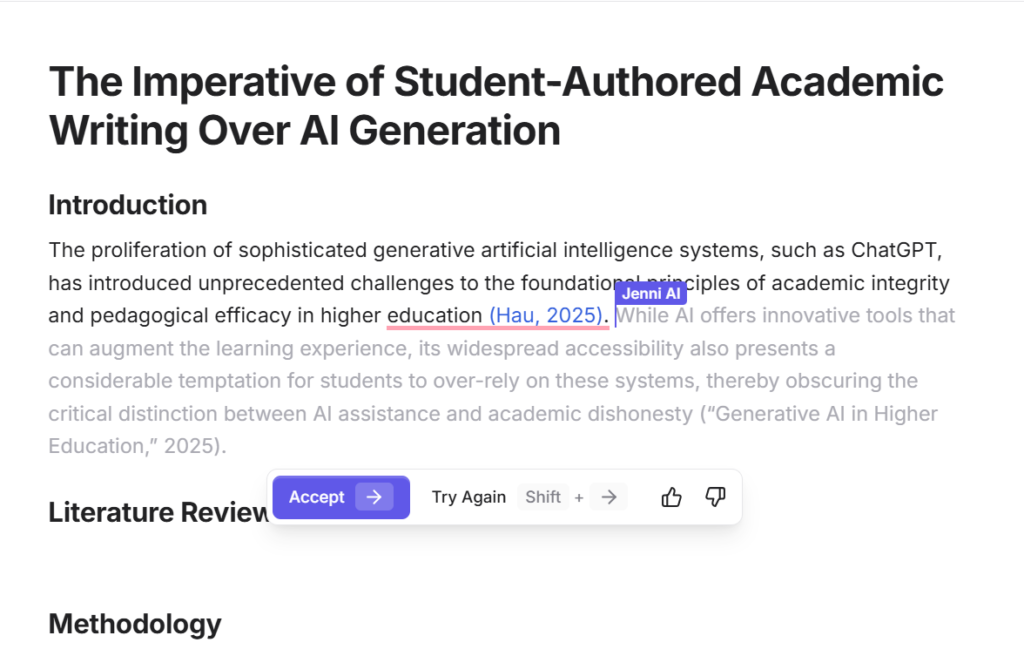
This is Jenni’s most useful feature and the one most students actually come for.
When you are mid-sentence and stuck, Jenni suggests how to finish your thought. You can use the tab key to agree with it, reject it completely, or modify it. It is very close to having a writing partner who is smarter than a basic generation engine.
Where it genuinely helps:
- Breaking through writer’s block on the first draft
- Keeping momentum when you know what to say but not how
- Filling in transitional sentences between arguments
Where it struggles:
- Following a specific brief or angle without drifting
- Staying consistent with your voice over a long document
- Picking up context from an outline you set up earlier
When you provide good starting ideas, this will work well. But if you give it vague prompts, then it will be all over the place.
In-Editor Chat and Manuscript Feedback
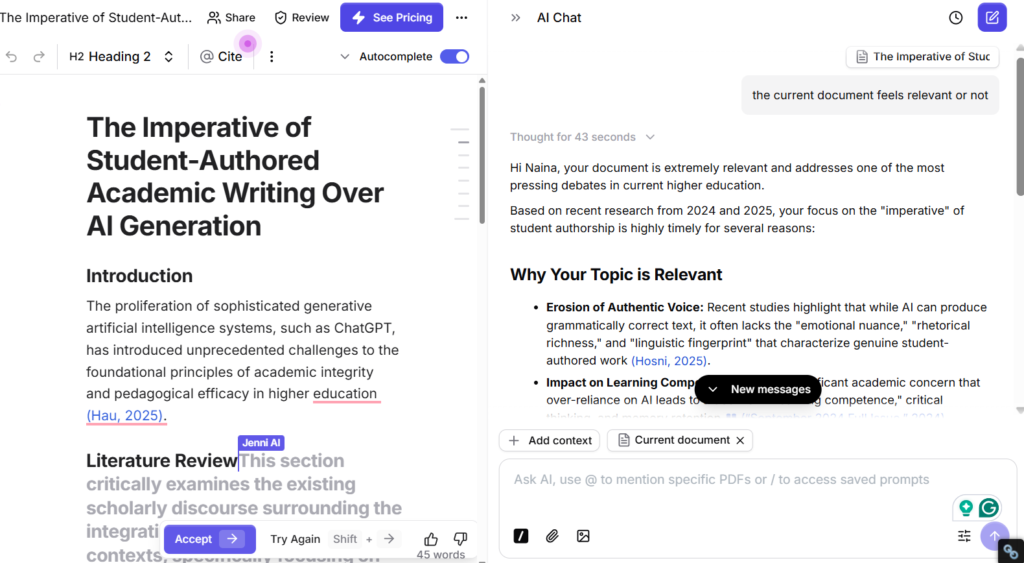
Jenni has a built-in chat panel that lets you ask questions about your document or request feedback without switching tabs.
When you have questions like the following ones, it answers fairly well.
- “Does this paragraph support my thesis?”
- “What sources might I need here?”
- “Summarise this section in two sentences.”
It struggles with deeper analytical questions. Asking Jenni how strong an argument is or to identify any gaps in logic, these types of questions will generally receive some level of superficial response. This would be similar to using a quick sounding board, rather than a peer reviewer.
The in-editor chat also allows you to upload documents in PDF format and ask specific questions related to your source material. This is very helpful when completing literature review-type projects, which require synthesizing many different studies at one time.
AI Edit Granularity
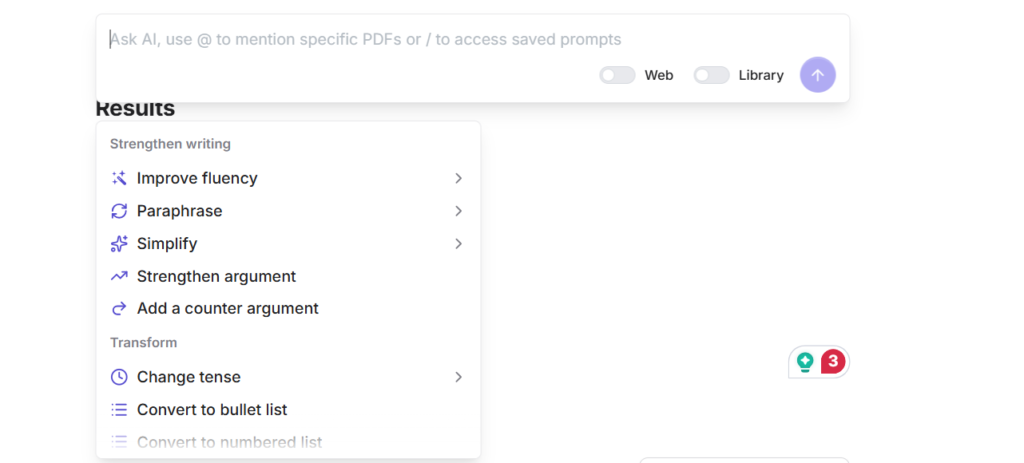
This is another of Jenni’s strengths as a differentiator. Instead of only having a general edit or improve kind of feature, it has specific options for making different types of edits.
- Fluency: Smooths out awkward phrasing without changing meaning
- Paraphrase: Rewrites a passage in different words
- Simplify: Makes dense text more readable
- Strengthen argument: Tries to make your point more persuasive
The first three are quite reliable in their application. The fourth option, which is to strengthen your argument, will likely result in additional confident-sounding statements being added. It does not strengthen the existing part with logical reasoning. While strengthening your argument is very effective for polishing what you have written, it is much less effective for improving the content.
Smart Citations and Reference Handling
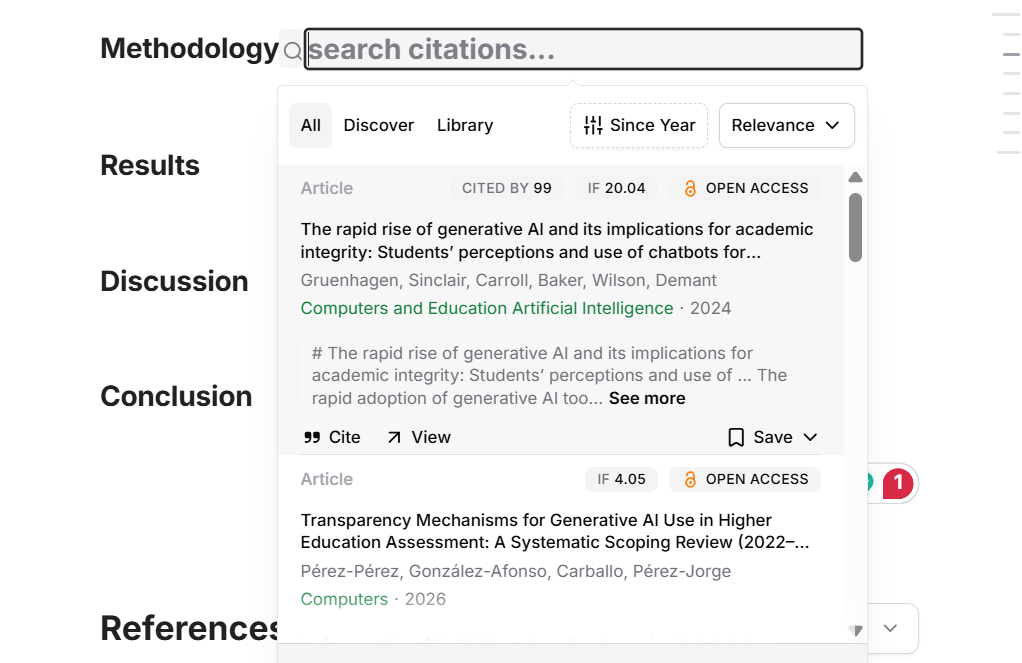
Citations are the primary feature that Jenni offers, so understanding how they work is key.
Here’s how it works:
- You upload your own PDFs to your Jenni library
- As you write, it suggests citations pulled directly from those papers
- It formats them inline and builds a reference list automatically
How it goes wrong:
- When relying on web or auto-search citations rather than your uploaded library, accuracy drops significantly
- Some suggested sources exist, but say something different from what Jenni implies
- Always check the DOI, open the original paper, and confirm the quote or claim matches
If the citations are linked through your library, it is likely that this would be viewed as a more trustworthy reference than the auto-generated citations provided by Jenni. All auto-linked citations should be looked at as leads to investigate each item. Prior to using the referenced material in your research, verify it with its original source.
Performance Tests That Matter for Students (Real Assignments, Not Demos)
Marketing demos always show the best case. Below are the tests that demonstrate how Jenni performs on three common weekly student tasks.
Test 1: Explain a concept and cite two sources
When you have relevant PDFs in your library, it does fairly well on this test. First, it presents a definition, then it provides two citations, and it will also format them as inline citations.
The failure mode:
If you have not added the sources to your library and allowed auto-search for the paper, the citations could be referencing actual papers that were found through search, but may not represent or support the claim made by Jenni. Always open and check the source to confirm.
Test 2: Rewrite a paragraph while preserving meaning and citations
This is where Jenni’s paraphrase and fluency edits shine. The rewriting is very clean, and for the most part, it retained the original meaning.
Watch out for:
- Citations occasionally drop out of the rewritten version
- Subtle meaning shifts in complex arguments
- Over-smoothing that removes your original voice entirely
Test 3: Strengthen an argument without adding unsupported claims
This is the hardest test and the one Jenni fails most visibly. Most of what is added to the paragraphs in this test are assertive-sounding words, rather than the underlying reasoning or supporting evidence that would be needed for a claim to be truly supported. It sounds much more confident in the things it says, but it is not correct every time.
Expected failure modes across all three tests:
- Hallucinated or misattributed citations on auto-search
- Shallow argumentation that reads well but proves little
- Context drift on longer documents, where Jenni loses track of your original angle
- Formatting inconsistencies when exporting to Word or Google Docs
The takeaway: Jenni performs well on mechanical tasks. It performs poorly when the task requires genuine analytical depth.
That choice of detector matters more than most students realize. Our JustDone AI review found it flagged every single human-written sample as AI in controlled testing.
Jenni AI Review: Free Plan vs Paid Plan (What You Really Get)
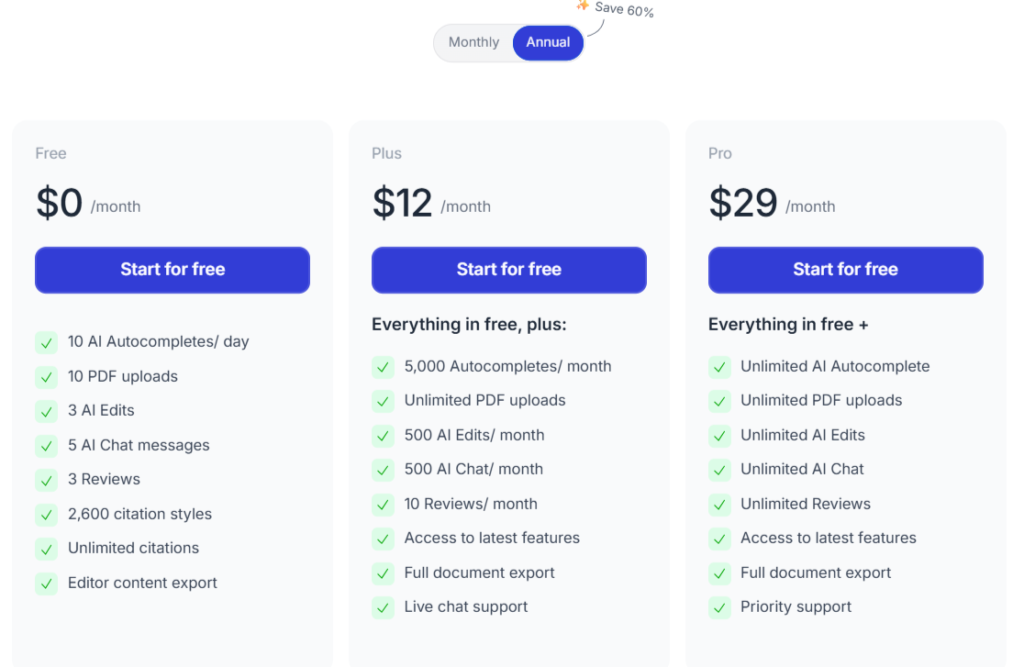
Jenni offers three tiers. Here is what each one actually means for your workflow.
| Plan | Price | What you get |
| Free | $0 | 10 AI autocompletes/day, 3 AI edits, 10 PDF uploads, and unlimited citations |
| Plus | $12/month (annually) | 5000 autocompletes/month, 500 AI edits, 500 AI chat, PDF uploads, and document export |
| Pro | $29/month (annually) | Everything in Plus and unlimited, latest features, priority support, and full document export |
| Team/Enterprise | Custom pricing | Multi-seat access, analytics, dedicated support, and institutional billing |
The free plan is a trial, not a working tool: At 200 words per day, you will hit the limit mid-paragraph on any real assignment. It is useful for testing the interface before committing.
Which plan matches which user:
- Occasional undergrad (1 to 2 essays per semester): Free plan to test, then consider a one-month paid subscription around deadline season rather than paying year-round
- Active student or thesis writer: Plus plan at annual billing is the most cost-effective option if you are using Jenni regularly
- Marketer or content team: Hard to justify at any tier. Generalist tools offer more flexibility at a similar or lower cost
- Research institution or university: Enterprise pricing with team access and analytics makes sense at scale
An important thing to know about Jenni is that it may utilize pay parity pricing. This means that prices might vary by region. To get an idea of what the cost actually is for your area, you can log into the dashboard to view the actual cost before making assumptions as to how much money you would have to spend.
If you want additional information about creating a smart student tool kit with tools such as this, go to student resources and look at AI tools and workflows, which can help you in your day-to-day academic writing.
Pros and Cons of Jenny AI Writing Assistant
Below is what Jenny really does well, and where it continues to fall short in actual use.
Pros
- Clean, distraction-free writing interface that keeps you in flow
- Sentence-level autocomplete that works well on focused drafts
- Granular AI edits (fluency, paraphrase, simplify, strengthen) give you more control than a single “improve” button
- PDF upload and library-linked Smart Citations are genuinely reliable when set up correctly
- In-editor chat lets you query your sources without switching tabs
- Pay parity pricing makes it more accessible in lower-income regions
- Supports multiple citation styles, including APA, MLA, Chicago, and Harvard
Cons
- The free plan is too limited for real writing sessions (200 words per day)
- Auto-suggested citations frequently need manual verification and occasionally hallucinate
- Argument strengthening is surface-level, adding confident language rather than actual depth
- Context drift on longer documents causes the tool to lose track of your original angle
- Limited word-processor functionality makes it less suitable for journal submission formatting
- Support is primarily email-based, which can mean slow responses when you are on a deadline
- Subscription cost is hard to justify for marketers or light users when generalist tools offer more flexibility
You should take serious heed of Jenni’s citations cons. For that reason alone, if you are unsure where to draw the line between using AI responsibly and placing yourself at academic risk, this guide about ethical AI use in academic writing is a great starting point for the same.
Is Jenni AI Worth It?
Worth It for Undergrads Writing Essays?
Yes, with conditions. If you have trouble starting on your first draft of an essay, then using the auto-complete feature along with inline citations as provided by Jenni is a significant time-saver. But be sure that you are using library-linked citations and verifying information prior to submission. Always revise in your own writing voice.
Not worth it if you typically write only 1-2 essays per semester. Use a free plan only if your requirement is less.
Worth It for Researchers and Thesis Writers?
Partially. Jenni’s PDF upload and smart citation workflow are very helpful in the literature review phase. But they are no substitute for a full-featured reference manager such as Zotero. Moreover, it does not offer enough analysis to be an appropriate tool for authors at the level of academic thesis writing.
Use it as a draft layer, not as your primary source of information.
Worth It for Marketers and Content Teams?
No. Jenni was built for academic workflows, and the interface, citation focus, and tone reflect that. For brand content, blog drafts, or SEO writing, you will get more flexibility and speed from generalist tools. Marketers can find better-fit options in our Jasper AI review and alternatives for marketers roundup.
Does Jenni AI Get Detected by Turnitin or AI Detectors?
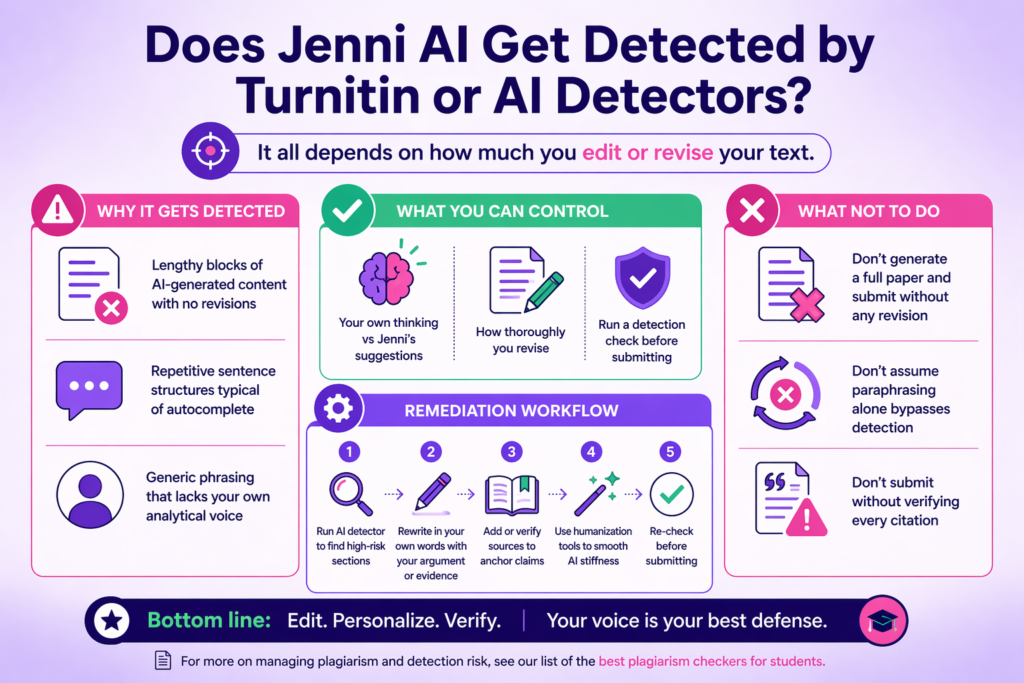
It all depends on how much you edit or revise your text before submission.
When you generate a document using an AI writing tool like Jenni, it will be flagged as such when submitted to an AI detector, including Turnitin, when submitted as is. The detection risk increases based upon:
- Lengthy blocks of AI-generated content with no revisions
- Repetitive sentence structures typical of autocomplete
- Generic phrasing that lacks your own analytical voice
What you can control:
- How much of the draft is your own thinking vs Jenni’s suggestions
- How thoroughly you revise before submitting
- Whether you run a detection check before the final version leaves your hands
The remediation workflow if you get flagged:
- Run your draft through an AI detector to identify the high-risk sections
- Rewrite those sections in your own words, adding your own argument or evidence
- Add or verify sources to anchor the claims
- Use a humanization tool to smooth out any remaining AI stiffness in the phrasing
- Re-check before submitting
What not to do:
- Do not generate a full paper and submit it without any revision
- Do not assume paraphrasing alone bypasses detection
- Do not submit without verifying every citation first
For more on managing plagiarism and detection risk, see our list of the best plagiarism checkers for students.
Supporting Tools: Build a Safer Workflow Around Jenni (or Replace It)
The middle of a workflow is the actual part where Jenni excels. It is weaker at the start, such as during source gathering, and at the end, during detection checks and final polish. These tools fill the weak spots.
| Tool | What it adds | When to use it | Watch-outs |
| Walter Writes | Humanization + AI detection + rewriting editor in one place | Final pass before submitting or publishing | Not a reference manager |
| Proofademic | Academic-focused sentence-level AI detection | When your institution uses strict detection tools | Newer tool |
| Paperpal | Academic editing, grammar, and phased research workflow | Editing and pre-submission polish | Self-interested alternatives section in their content |
| Grammarly | Grammar, clarity, and style baseline | Any stage of writing | Flag style, not citation accuracy |
| Zotero | Reference management and PDF library | Before you start writing, build your source library | Requires manual setup |
| Turnitin / Institutional checker | Plagiarism and AI detection before submission | Final check if your institution provides access | Results vary by institution settings |
For a broader comparison of writing tools, see our guide to the best AI writing tools for students, and if you write academic papers, the Writefull AI review is worth a look for you.
Two Realistic Tech Stacks: One for Students, One for Marketers
The Student Writer’s Stack
Good For: Students at an undergraduate level, thesis writers, and researchers who wish to have a sense of security when writing, citing, and submitting their work.
Tools:
- Zotero (Free): Reference manager and PDF library builder
- Jenni AI (Free / $12 per month): Drafting and inline citation assist from your own library
- Proofademic (Free trial available): Sentence-level academic AI detection scan
- Walter Writes (Free Trial or $8 per month): Final humanization and detection re-check before submission
- Your institution’s plagiarism checker (Free via institution): Last check before you hand anything in
Cost Per Month: $12 to $20 if on Jenni’s paid plan, otherwise free to start
Limitation: This stack only works if you load your own PDFs into Jenni before drafting. When using auto-citation search features in the stack, you will bypass the main part of your process and create additional verification steps after completing your draft.
The Content Marketer’s Stack
Good For: Marketers, content teams, and freelance writers who require fast, consistent, ready-to-publish content
Tools:
- Google Docs or Notion (Free): Brief and outline before you start
- Jenni AI (Optional, $12 per month): Drafting structured content blocks, though generalist tools may work better here
- Grammarly (Free / $12 per month): Grammar, clarity, and style baseline
- Walter Writes (Free Trial or $8 per month): Tone smoothing, AI stiffness reduction, and detection check before publishing
Cost Per Month: $12 to $30, depending on which paid tools you use
Limitation: Jenni can be excluded from the use in this stack. A generalist AI tool may provide additional flexibility to produce content that reflects a unique voice and is brand-heavy. Walter Writes is the non-negotiable layer for anything going live.
Final Note
Jenni AI can help students draft quickly if used properly. It will save time by completing the mechanical elements of writing, and it has citation options available when your library account is linked appropriately. It helps keep you focused and in the flow when a blank sheet of paper is staring at you.
But it is not a complete system in itself. If you need to submit your work and want to feel confident about its quality and publication-ready status, then add another tool to your workflow that can handle the areas where Jenni AI has limitations. Walter Writes provides all three elements of humanization, detection, and refinement in one location so you can complete your draft and not question anything.
Done drafting with Jenni? Humanize your final draft with Walter Writes before you publish or submit your final piece of writing.
FAQ
Is Jenni AI Free To Use?
Yes. The free plan gives you around 200 AI-generated words per day, 10 documents, and 10 total chat messages. It is enough to test the tool, but not enough for active writing sessions.
How Accurate Are Jenni AI’s Citations?
It depends on the source. Citations pulled from your uploaded PDF library are reliable. Auto-suggested citations from web searches are less consistent and should always be verified against the original paper before use.
Does Jenni AI Get Detected by Turnitin or Other AI Detectors?
It can. If you do nothing to edit the AI output, it will likely be detectable. The more you revise, include your own thoughts, and run a humanize process on the output, the less chance you have of being caught using an AI detector. Never submit your work without checking first.
How Does Jenni AI Compare to ChatGPT for Academic Writing?
Jenni is more structured for academic use, with inline citations and a dedicated writing editor. ChatGPT is more flexible but requires more manual work to format and cite correctly. Neither should be used without revision.
What Citation Styles Does Jenni AI Support?
Jenni supports APA, MLA, Chicago, Harvard, and several other common academic citation formats. Check the in-app settings for the full current list.
Is Jenni AI Safe for Academic Integrity?
Yes, but only when used responsibly. Use Jenni AI to help draft your work, ensure all of your sources are properly cited, write your paper in your own words, and make sure to read your school’s policy regarding the use of AI before submitting any content created with it.
Can Jenni AI Write an Entire Research Paper for You?
Yes, it can write, but practically, you should not let it write on your behalf. While full AI-generated papers could be submitted, there would be extremely high risks of detection. Many of the references or citations may be fabricated, and fully AI-generated papers lack depth markers that professors use to evaluate written work.
Does Jenni AI Work for Non-English Speakers?
Jenni supports several languages beyond English, though coverage is more limited than dedicated multilingual tools. It works best in English for academic writing tasks.
What Are the Best Jenni AI Alternatives for Students?
Paperpal for academic editing, Writefull for language polish, and Walter Writes for a combined writing, humanization, and detection workflow. See our full guide to the best AI writing tools for students for a complete breakdown.
Can You Upload Your Own PDFs to Jenni AI?
Yes. Uploading your own PDFs is one of Jenni’s strongest features. It lets you generate citations directly from your source library, which is far more reliable than auto-search citations.
Does Jenni AI Output Get Flagged by AI Detectors, and How Do You Fix It?
Yes, it can be flagged if submitted unedited. Rewrite high-risk parts of your submission in your own writing, add new insights or analysis, run your content through a humanizing tool, and then check again using an AI detector prior to submission.
Tired of getting flagged? Our humanize AI text rewrites AI-generated drafts so they read naturally and pass detectors like GPTZero, Turnitin, and Originality.ai.