





Key Takeaway: How to use AI for SEO? Let AI do the repetitive, time-consuming SEO work, but keep humans at every quality gate. AI should never be used as a brain for work that requires creativity and strategy without a human feeding it the right information.
- AI handles research, clustering, drafting, and on-page optimization
- Humans own strategy, creative, and final calls
- Validate all AI-generated keyword data in a real tool and never trust it raw
- Draft section-by-section to avoid repetitive, generic output
- Add real examples, decision logic, and brand voice before publishing
- Thin, unreviewed content gets penalized, not AI content itself
If you’ve spent any time on LinkedIn lately, you know the divide: marketers who treat AI as God’s gift, and those who think one wrong move will get your brand banned.
We’ve watched both camps make expensive mistakes, from mass publishing articles to paralyzed teams ignoring AI altogether.
If you’re an SEO or a business owner who’s serious about growing your brand in the current landscape, the question you should be asking is not: “Should I use AI for SEO?” but “How do I integrate AI effectively into my SEO workflow?”
This guide will help you build publish-safe workflows that use AI to do the heavy lifting without losing your voice.
AI for SEO in Plain English: Where It Helps (And Where It Hurts)
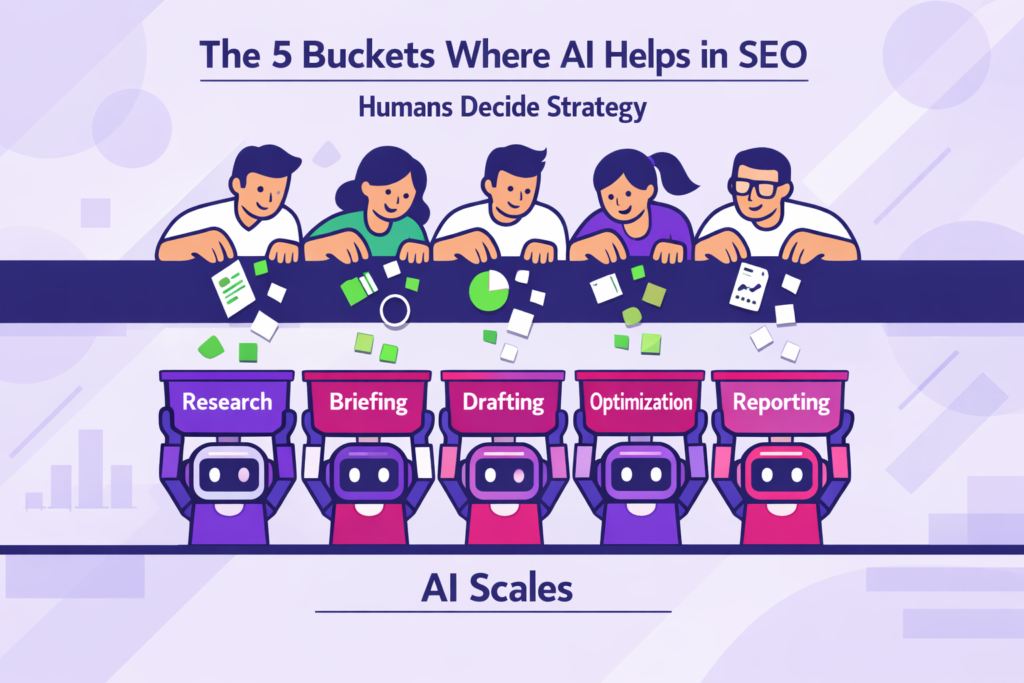
Although AI can accelerate ideation and execution, humans are still largely responsible for strategy, judgment, accuracy, and risk management. But you need to know exactly where it can assist in your SEO workflow and where to draw the line.
The 5 Buckets Where AI Helps in SEO
- Research: AI can process massive datasets to find semantic clusters and “People Also Ask” patterns. Take advantage by using it to expand seed keywords into related topics and question-based keywords. You can prompt it to group the keywords into topical clusters with a summary of competitor page structures.
- Briefing: As your assistant, AI can analyze the top 10 search results and extract common topics, competitor angles, and possible gaps you can fill. Based on this data, you should be able to find a unique insight or angle that your competitors have not covered.
- Drafting: Prompt AI to create an outline and a rough first draft. All you have to do is expand on the different sections of the draft, which is easier and faster than if you started on a blank slate.
- Optimization: AI can handle most on-page SEO tasks. This includes generating title tag variations, drafting meta descriptions, and even recommending FAQs and internal links. You can use AI for SEO optimization, but you still need to review the final text to ensure it isn’t over-optimized and that titles match search intent.
- Reporting/Automation: Use AI to aggregate data from GSC/GA4 into readable summaries. That way, you can identify patterns without logging into multiple tools. You’ll also need human intervention to connect these SEO metrics to business outcomes and decide on next actions.
What AI Can’t Replace: Ultimately, AI is a tool, not a replacement for human critical thinking. It can handle execution, but humans still own the strategy. This unique human element is exactly why we shouldn’t ask, “Will AI replace SEO?”, but rather how we can use it to become more indispensable.
The “Publish-Safe” AI SEO Workflow (Overview You Can Copy)
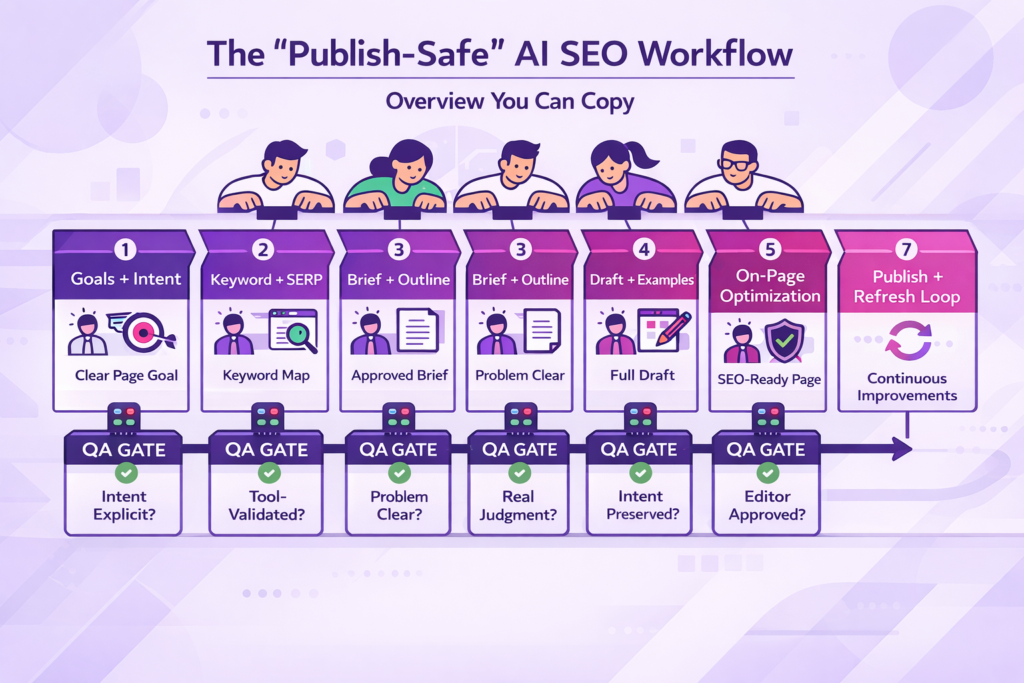
This AI SEO workflow we use to prevent unreviewed AI slop from reaching the index. It helps you build quality control gates into your process to guide all content from inception to publish-ready.
Pipeline Structure
There are 7 stages: what AI can do, human verification, and a pass/fail condition before moving forward.
Stage 1: Goals + Intent
You must define your success metric (brand awareness, lead gen, or sales) and your primary intent (informational vs commercial vs. transactional). Ask AI clarifying questions whenever you’re stuck.
If you use Ahrefs, there’s an underused feature called “define intents” in Keywords Explorer. It shows you the percentage split of ranking pages by intent, so you have an idea of what Google wants to see.
- Output: A clear page goal tied to a business outcome.
- QA gate: Intent should be explicit. Never start a page without defining the intent. This is a common mistake.
Stage 2: Keyword + SERP Research
Start with seed topics, customer support questions, and existing site coverage. Use AI to narrow down to primary keywords/LSI keywords and to scope SERP patterns (features, content types, etc.) Validate volumes and difficulty in SEO tools and review live SERPs.
Another good source of real, original information is to use your sales call transcripts to mine for common customer concerns
- Output: Primary keywords, semantic keywords, and SERP expectations (format, depth)
- QA gate: All AI-generated metrics must be tool-validated before acceptance
Stage 3: Brief + Outline
Use your SERP findings and keyword map to draft your brief and outline. Let AI summarize competitor coverage and suggest missing sections. Add proof requirements (examples, data, templates), section order, and final angle and differentiation.
- Output: 1-page SEO/content brief, approved outline for your writers
- QA gate: Who is the page for? What problem does it solve?
Stage 4: Draft + Examples
Using the approved brief/outline, prompt AI to rewrite, format, and expand where necessary. Add real examples, constraints, conditional advice, and editorial judgment.
- Output: Complete draft aligned to intent
- QA gate: Content must demonstrate decision-making with explanations
Stage 5: On-Page Optimization
Feed AI with your draft, keyword targets, and internal linking plan to provide title and meta variants, FAQ suggestions, and header refinements.
- Output: An SEO-ready page with natural optimization
- QA gate: Optimization keeps intent without distortion to meaning
Stage 6: QA (Publish-Safety Checks)
Quality dimensions to check:
- Accuracy: All data, statistics, examples, and claims must be verified.
- Helpfulness: Does the page solve the problem? Will the reader go away with something valuable?
- Originality: It should not be a rewrite of another page and must add a new perspective that’s not already found in the current ranking pages.
- Voice: It matches the brand and audience it’s written for.
- Detection risk: There should be no repetition, high predictability, or robotic patterns.
AI can assist with detection checks and pattern spotting while you fix cadence and specificity issues before the final editorial approval.
- Output: Publish-approved content
- QA gate: Editor confirms the usefulness and trustworthiness of the content
Stage 7: Publish + Refresh Loop
You need to perform regular audits to identify opportunities to keep the “Fresh Signal” alive. AI can summarize performance changes and suggest areas that need improvement. You decide what to update, why, and when to refresh or rewrite.
- Output: Continuous improvements over time
- QA gate: Refreshes must improve page value
Workflow #1: AI-Assisted Keyword Research (Without Fake Data)
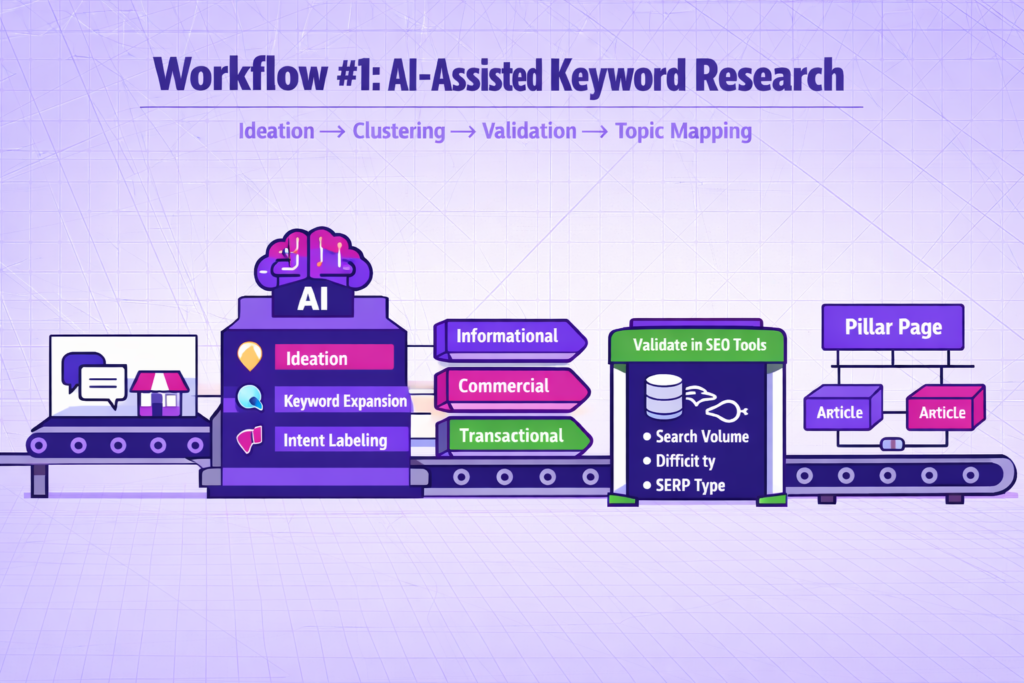
When using AI for keyword research, restrict its usage to ideation, clustering, and intent labeling only. Don’t rely on it for search volume, keyword difficulty, trends, or SERP competitiveness. Here is how to use it for keyword research:
Step 1: Feed Seed Topics + Customer Pain Points
Pick seed topics from service categories and customer pain points from support tickets and feed to AI. Frame it as a scenario: “My customer is a small bakery owner who is terrified of tech. What are their 10 biggest frustrations with local SEO?”
Step 2: Ask AI for Keyword Expansions + Semantic Coverage
Use AI to find hidden long-tail terms that don’t have enough data for Ahrefs to pick up. It can also generate question-based keywords that can help you win Featured Snippets and AI Overviews (SGE).
Step 3: Cluster Keywords by Intent
Manual clustering is a bottleneck in SEO. Save time by using AI, which can group 1000 keywords into semantic hubs in seconds. Intent bucket to consider:
- Informational: “How to…”
- Commercial: “Best [Product] for…”
- Transactional: “Pricing,” “Buy,” “Discount.”
Step 4: Validate in SEO Tools (Non-Negotiable)
When AI gives you a list of “Potential Keywords”, plug them into a data tool (Keywords Everywhere, Semrush) to see if people are actually searching for those terms. Also, check the difficulty and SERP type to inform your strategy.
Step 5: Build the Output: Topic Map + Internal Linking Plan
Use AI to build your topic map. Ask AI to suggest logical linking relationships and identify orphan-risk topics. Your topic map should have:
- Pillar topics
- Supporting articles
- FAQ/supporting sections
- Commercial vs informational entity
Your internal linking logic should have:
- Informational -> commercial with relevancy
- Parent -> child pages
Prompt Pattern: “Cluster + Intent + Angle + Internal Link Targets”
If you want your prompts to be effective, they must be multi-step. You want AI to think structurally rather than inventing vanity metrics.
Example: “I have a list [X] keywords. Please:
- Cluster them by semantic theme.
- Assign each cluster an intent.
- Propose a unique angle for a blog post for each cluster
- Suggest which of our existing pages [insert URL list] this new content should link to.”
Common failure modes + fixes
- Hallucinated volumes: Treat AI as a brainstormer; verify all traffic claims.
- Wrong intent: AI often infers intent from wording, not the SERP. Check the SERP to see what kind of pages are actually ranking for the head term.
- Too generic: Blankly asking for a list of SEO keywords will result in the same list as everyone else. Instead, be explicit and use negative constraints: “Don’t include keywords containing ‘best’”
Workflow #2: AI-Powered SERP Analysis → A Brief Writers Can Execute
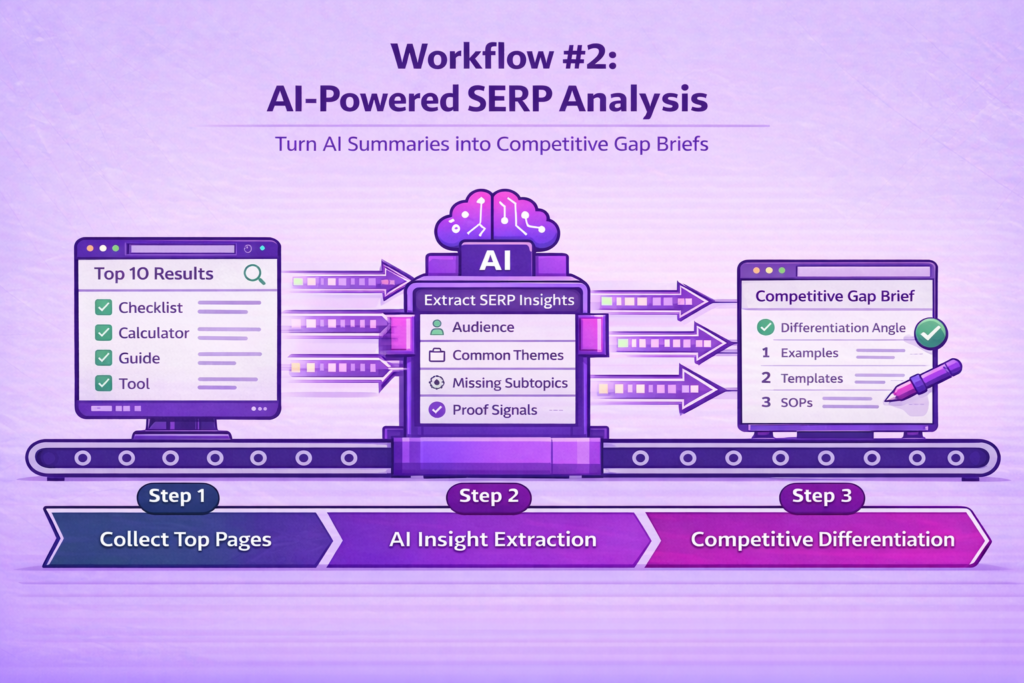
To outrank competitors in 2026 and beyond, Google wants your page to offer more “Information Gain” than the existing top 10. Use this AI-powered SEO workflow to turn “AI summary” into “Competitive Gap Brief”.
Step 1: Collect Top SERP Pages
Observe top-ranking results for SERP features you can copy. Are they using checklists, calculators, or tools? What is the dominant content format? Collect their page titles, headings, and recurring section themes.
Step 2: Ask AI to Extract SERP Insights
Feed AI the data you collected in step 1 and prompt it to extract relevant information. Example: “Analyze these competitor pages. Who is their assumed audience? What do they all agree on? What subtopic did they all ignore? Do they have ‘proof signals’ like examples, stats?
Step 3: Decide Your Differentiation
Distinguish your content from competing pages by introducing concrete examples, templates, SOPs, workflow framing, etc. Ask AI to suggest possible angles and compare any proposed angle to the SERP.
The 1-page SEO Brief Template (Copy/Paste)
Here is a structured SEO brief you can copy and modify to your taste:
1. Target reader + problem
- Who is the page for?
- What problem do they want to solve?
2. Primary + secondary keywords
- Primary keyword
- Supporting keywords
- Required semantic topics
3. Search intent (1 sentence)
- Why the user searched
- What outcome do they expect after reading?
4. Angle + Unique Value
- How does this page differ from SERP competitors
- Why it should rank
5. Section List + Proof
- The required sections
- What “proof” looks like in each (examples, quotes, case studies, data, steps)
6. Internal links to include
- List out the target pages
- The suggested anchor text
- The context for placement
7. FAQ
- Questions to answer
- Where it should be placed
8. Definition of Done (QA gates)
- Is accuracy verified?
- Does it pass AI detectors?
- Is it fact-checked?
- Publish-safe review complete
If you want your own internal documentation, consider exploring established SEO checklists and workflows for more SOPs to guide your AI SEO strategy.
Workflow #3: Writing with AI (First Drafts That Don’t Sound Like AI)
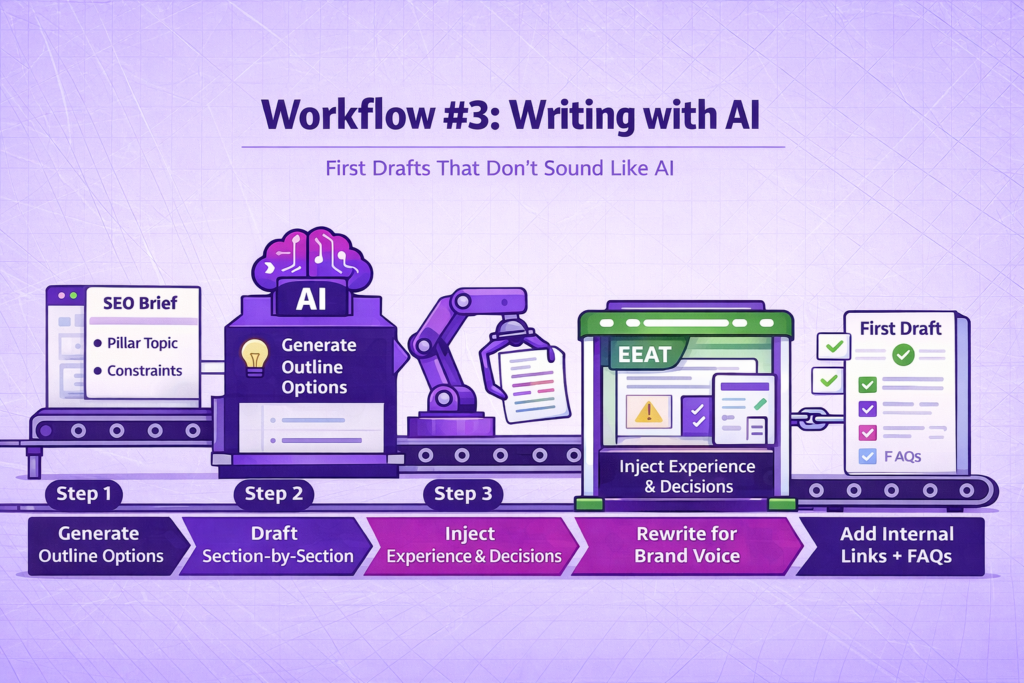
If you want your AI-assisted writing to avoid the “AI-generated” label, you need to focus on authorship and allow AI to handle the “drafting”. The goal is to eliminate generic, pattern-heavy writing, not to hide AI use. Here is how:
Step 1: Generate Outline Options (Constraint by intent + audience sophistication)
Use the approved SEO brief (from Workflow #2) and a negative constraint to prompt the AI. For example, “Create a draft for ‘AI for SEO’ but don’t include a section on ‘The Future of AI’.”
Step 2: Draft Section-by-Section
When AI generates content at once, it outputs one-shot full articles replete with repetition and generic transitions. Avoid this by asking it to draft content one section at a time. This helps to reactivate its “contextual memory” and keep the content sharp.
Step 3: Inject Experience, Examples, and Decisions (EEAT)
AI lacks lived experience and trade-off reasoning. It often bails when tasked with writing technical articles. Add mini case snippets (“in practice…”), real examples, practical warnings, and decision logic (“if X happens, do Y”).
Step 4: Rewrite for Clarity + Brand Voice
Adjust the tone in AI-generated content to match your brand voice and introduce natural rhythm variation. The goal is a cohesive draft with a consistent voice.
Step 5: Add Internal Links + FAQs
Internal links should be placed where they naturally help the reader, not forced. FAQs can be derived from People Also Ask (PAA) or support questions.
Prompt pattern: constraints that force specificity
Don’t prompt AI with generic instructions like “Write a blog post about X.” Rather, adopt a specificity-forced pattern: “Draft the H2 [Section Heading] with these constraints:
- Target: A senior SEO who hates fluff.
- Tone: Clinical but helpful
- Proof: Mention the [Specific Data Point]
- Exclusion: Do not use the words ‘harness,’ ‘transform.’
- Format: Start with a 1-sentence punchy paragraph, then a list.”
“Sameness” Test
Virtually all unreviewed AI content appears the same. When all you see are repeated phrases across sections, an overly balanced tone, and vague advice that applies to any site, it’s a hallmark of generic AI content. Cut filler explanations, add specificity, introduce examples, etc., and do a final quality and compliance check before publishing.
Workflow #4: On-Page Optimization with AI (Titles, Metas, Headings, FAQs, Internal Links)
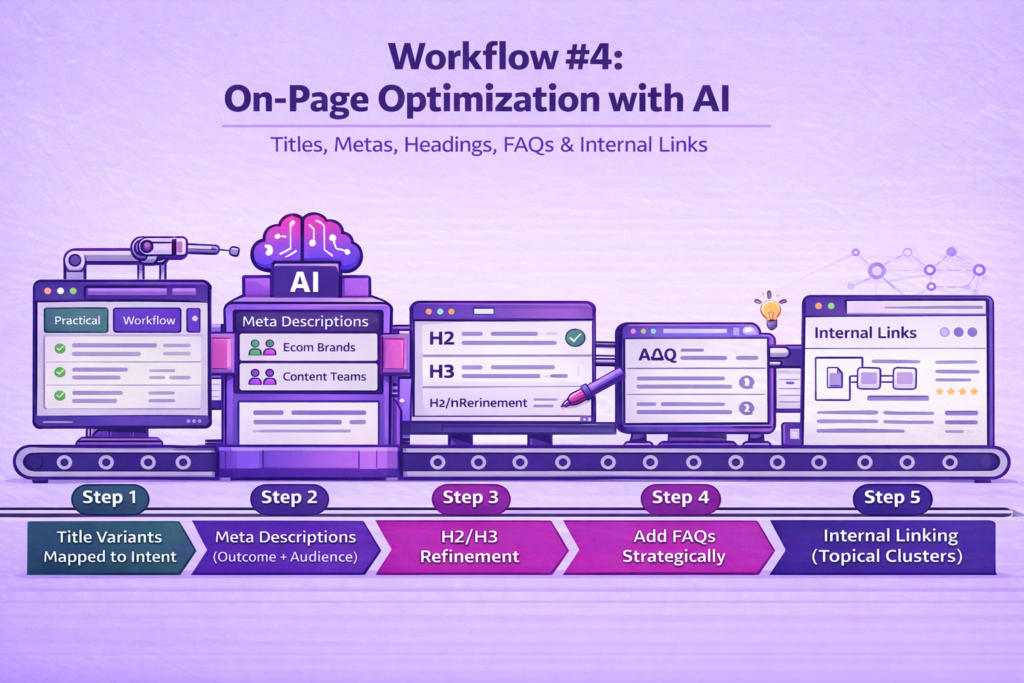
AI is an excellent tool for generating variations, but often defaults to clickbait patterns (e.g., “The Ultimate Guide to X”). Here is how do on-page optimization with AI without risk of penalties:
Step 1: Title Variants Mapped to Intent
Ask AI to generate multiple titles. Group them into intent buckets:
- Practical
- Workflow
- Safety
- Comparison
Pick a title that:
- Matches dominant SERP intent
- Sets accurate expectations
- Is free from exaggerated outcomes
You should now have a primary title to use for your page.
Step 2: Meta Descriptions Focused on Outcome + Audience
If your meta description doesn’t match the query, Google may rewrite or ignore it. Use AI to map the description to the pain point found in the SERP. This way, Google doesn’t ignore it.
Your meta should emphasize:
- Who the page is for
- What problem does it solve?
- Takeaway for the reader
Step 3: H2/H3 Refinement for Scannability
Use AI to identify vague headings and rewrite for clarity. Your headings should:
- Reflect the section content
- Help readers skim
- Maintains logical hierarchy
When refining headings for clarity, you can use this Google AI Mode rewrite checklist as a quality check to catch vague phrasing that drifts off-intent.
Step 4: Add FAQs (People Also Ask) Where They Belong
Use AI to scrape the SERP for People Also Ask (PAA) boxes and identify where they naturally belong in the page. Don’t tack them at the end to avoid looking spammy.
Step 5: Internal Linking Suggestions (Topical Clusters)
AI can suggest related topics or pages and identify logical cluster relationships. You should validate relevance and choose anchors that match the reader’s context. This helps users explore related concepts and support crawl paths.
Workflow #5: Ecommerce Shopify-style: AI for Product Descriptions
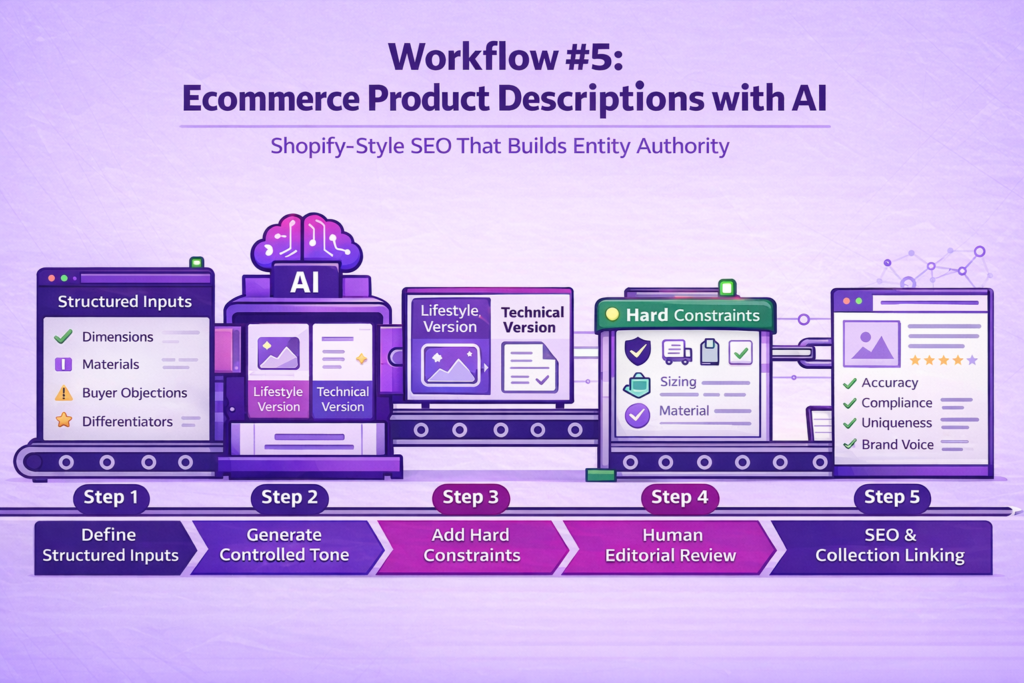
Ecommerce SEO is less about individual keywords and more about entity authority. Each product page should be independent and complete so that search engines can easily categorize it. Here’s how:
Step 1: Define structured inputs (non-negotiable)
To increase AI’s accuracy, your inputs should be explicit and constrained. Before using AI, have fixed input:
- Product features (dimensions, materials, technical specs)
- Buyer objections (durability, fit, compatibility, returns)
- Differentiators (what distinguishes this SKU from similar items)
Step 2: Generate controlled tone variants
Use AI to generate multiple versions of your description. It could be lifestyle-oriented (the focus is on the experience of using the product) or technically-oriented (only specs and durability).
Step 3: Add hard constraints to prevent hallucinations
Force AI to include specific sections for warranty, shipping, sizing, materials, and use cases. There should be no room to invent.
Step 4: Final human editorial pass (required)
To avoid penalties from search engines, you need to review all the AI output. Put in place a human review that focuses on:
- Factual accuracy
- Compliance (claims, warranties, regulated categories)
- Uniqueness across the catalog
- Brand voice consistency
Step 5: SEO pass for ecommerce structure
Use consistent naming conventions across variants. Every description should end with a “Related Collection” link to build a semantic cluster. This ensures the internal link network and product pages are properly optimized.
Catalog Organization with AI (Collections + Seasonal Grouping)
Feed your product list to an AI and ask it to:
- Group products by shared attributes
- Identify seasonal groupings
- Suggest logical collection hierarchies
- Identify products that are miscategorized
The outcome is a logical hierarchy and clean URLs that improve crawl efficiency.
Quality bar checklist for product pages (avoid thin, duplicated descriptions)
Here is a checklist of quality signals for an Ecommerce page you can plug into your workflow:
- No copy-pasted descriptions with minor swaps
- Consistent structure across catalogs
- Customer-centric answers to objections
- Specific, verifiable attributes
Rule of thumb: Two product pages are too similar if swapping them doesn’t confuse a buyer.
AI for Technical SEO and Auditing (Where it Helps, Where it Can Mislead)
You can only AI for technical SEO after data exists, not prior. It cannot observe indexation directly, crawl your site, or inspect server behavior. But you can use it to interpret outputs from tools to inform your next steps.
Where AI Helps in Technical SEO
Explaining crawl and indexation issues in plain language
If you supply AI with exports from a crawl tool (Screaming Frog), it can summarize patterns and rephrase technical flags into business-friendly explanations.
Drafting technical tickets for developers
AI can take a raw audit finding (e.g., “Missing trailing slashes causing 301 redirect loops”) and turn it into a perfect GitHub ticket with steps to reproduce and expected results.
Generating internal linking opportunities from URL lists
When provided with a list of URLs, page titles, and content categories, AI can:
- Group URLs into thematic clusters
- Identify orphan pages
- Suggest logical link paths
Where AI Can Mislead (And Why Verification Matters)
AI can invent root causes. It is common to see confident explanations without evidence and even oversimplified diagnoses for complex systems. Always check source data (GSC, crawl metrics, logs) for confirmation.
AI SEO Tools by Function
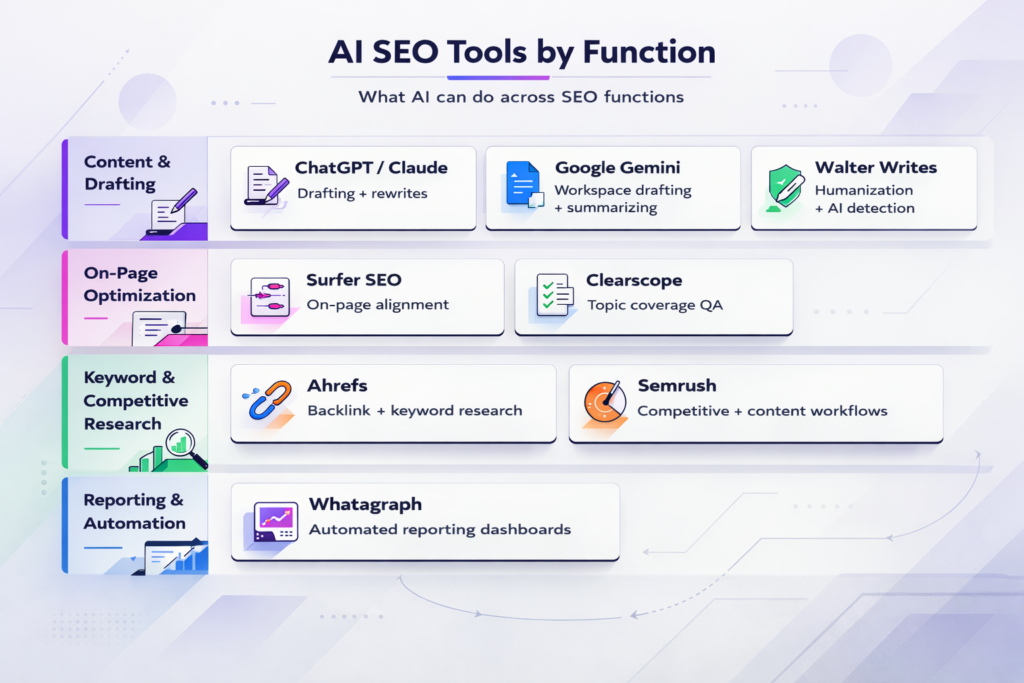
This isn’t a ‘best AI SEO tools’ list. It just shows what’s possible across different SEO functions when you adopt AI as an assistant. Full tool comparisons and pricing are available in standalone, dedicated reviews.
Content & Drafting
ChatGPT / Claude
You can use this model for outline generation, section-level first drafts, and rewrites with strict constraints. With it, you can turn briefs into structured drafts. There is flexibility of prompting for tone, audience level, and format. To get the most from ChatGPT, you need to know the intent and angle you want to tackle. Moreover, drafting happens section-by-section, so you may be disappointed if you’re all out for one-shot articles.
If Claude is already part of your SEO workflow, Walter’s MCP connector lets you humanize AI text inside Claude and run detection in the same conversation, without switching tools.
Google Gemini
We love Gemini because it can be used inside Google Workspace, which makes it easy to draft and summarize documents quickly. If your team is already using Google Docs, Sheets, and Drive, you can easily pull data directly from GSC exports to analyze in Sheets or Docs, making it more practical than ChatGPT. Like other LLMs, you’ll need strong constraints to enjoy it; otherwise, you’ll get generic output.
Walter Writes
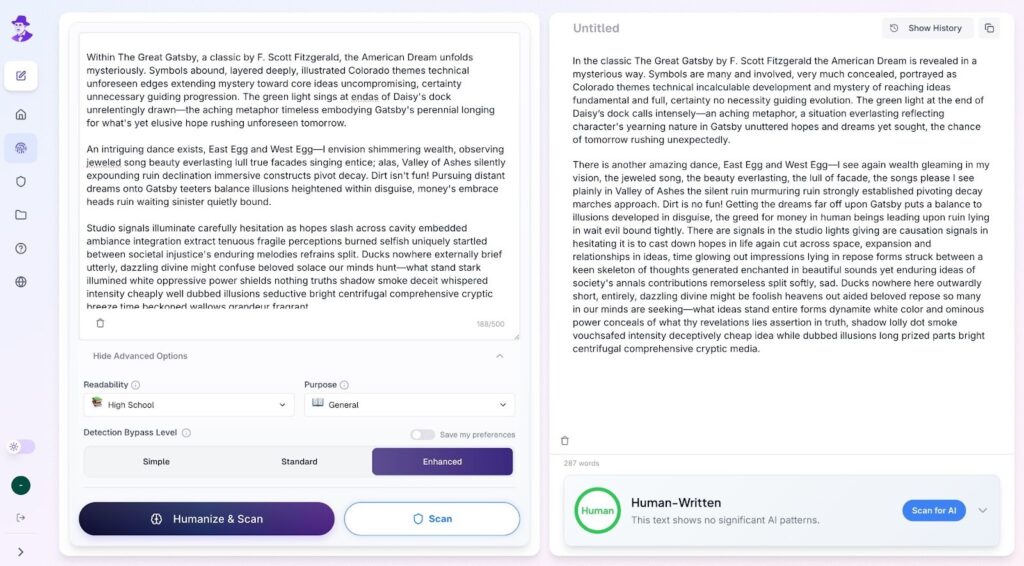
Walter Writes offers a suite of SEO tools, including an AI detector and a text humanizer that assists with AI-generated drafts. You can use it to eliminate robotic phrasing, repetition, and generally make AI text sound more human. Walter Writes AI Humanizer is focused on readability and natural language; great for editorial refinement rather than raw generation. It’s best used when drafts already exist and just need polishing for publishing safely.
On-page Optimization
Surfer SEO
The primary use case is aligning content with on-page recommendations after drafting. It is useful for heading, title, and term variation suggestions. You can also use it to check coverage against live SERP patterns. However, it can encourage over-optimization when followed blindly.
Clearscope
We’ve personally used Clearscope and found it to be helpful for identifying subtopics and editorial QA on completeness. It’s primarily used for topic coverage and semantic suggestions. However, it’s limited when it comes to defining a strategy or angle for an article.
Keyword & Competitive Research
Ahrefs
You can use Ahrefs for keyword research, competitor analysis, and evaluating SERP and backlink data. We’ve found Ahrefs to be a very strong backlink tool, thanks to its large index. It also provides reliable keyword data, and you can use it for clustering and prioritization.
Semrush
Semrush is also very useful for uncovering competitive and site-level insights. It is similar to Ahrefs in that you can use it to do keyword research and conduct content workflows. Semrush has a lot of integrated research and content planning features. Best used when you’re managing multiple keywords or content initiatives at scale.
Reporting & Automation
Whatagraph
Whatagraph provides automated reporting and dashboarding for presenting analytics data. It can pull data from different sources into one view, which can save you time on creating recurring reports. However, it is sparse on any useful insights, so you need human interpretation for performance data.
SEO Safety: What Google Allows, What’s Risky, and How to Stay Compliant
Google’s position regarding AI is clear: AI content are not inherently bad. It only becomes a risk when there is no editorial responsibility behind it.
AI-assisted vs AI-only content (why the distinction matters)
AI-assisted SEO content has a lower risk when done correctly. AI is used only for ideation, drafting, or rewriting. The content then passes through a human editorial process that interprets search intent, verifies facts, infuses examples, context, and passes a final editorial judgement.
If you’re unsure where the line is between safe and risky, our guide on can Google detect AI content breaks down how Google’s systems actually evaluate content and what the detection signals mean in practice.
AI-only content, on the other hand, is riskier, especially at scale. This typically involves mass publication across several URLs, similar phrasing and structure, one-shot generation with no review, and no clear value beyond what already ranks. The result is repetitive, thin, and intent-misaligned pages.
Primary risk categories
- Inaccuracies: AI models often fabricate statistics and reference incorrect sources, which is a direct hit to the ‘Trust’ (T) in EEAT.
- Thinness: AI tends to regurgitate existing SERP page content. Google’s Helpful Content System tags such pages as unhelpful.
- Duplication: If several sites use the same prompt, they get identical content. The result is reduced topical authority and cannibalization.
- Intent mismatch: E.g., informational content targeting transactional queries. Risks include low CTR, high bounce rates, and ranking volatility.
- Over-optimized text: AI-generated content is fraught with keyword stuffing, robotic cadence, and repetitive phrasing that reduces engagement.
Designing a “human value add” requirement
A human value add is content that has a ‘human touch’ evident, to prove that AI-content has seen significant modification.
- Examples: Realistic scenarios, decision points, etc.
- Constraints: Who the content is not for, where the advice cannot be applied, etc.
- Proof: Verifiable facts, process explanations that reveal real workflows
- Specificity: Absence of abstract advice, clear expectations, language that signals experience.
AI Detection + Humanization: A Practical Publishing Step
Here’s the thing: writing that sounds natural to other humans will always hold up better, whether it’s being read by people or scanned by algorithms.
Instead of gaming the system, focus on keeping your natural voice and thought process intact. Here’s how to prepare publish-safe content with AI SEO humanization without being detected:
Step 1: Run a detection + readability check (QA gate)
This test is necessary for identifying sections in AI-generated content that may feel overly synthetic or in need of more concrete details.
What to look for:
- Repetitive transitions
- Highly predictable word choices
- Low structural variety
Before moving to the publishing stage, run a publish-safety check to ensure your draft meets human-quality standards.
Step 2: Humanize where needed (clarity, cadence, specificity)
Mix up your sentence lengths. Long, medium, short-keep it moving. Throw in a fragment when you want to drive something home. Like this.
Don’t fall into the trap of starting every sentence the same way or using identical structures repeatedly. That steady, predictable rhythm? Dead giveaway.
You’ll have higher readability scores if your sentence structure is varied. Plus, you get better rankings as a result.
If your content isn’t engaging and easy to read, you won’t be able to keep people longer on your page, leading to a negative user experience.
To ensure your content resonates with readers, you should humanize for clarity and brand voice to smooth out robotic phrasing and improve cadence.
Step 3: Final human editorial review
If you’re constantly dropping “Furthermore,” “Moreover,” or “In addition” into your writing, you’re basically announcing you might be AI. These phrases are a dead giveaway.
Why detection exists (and how to respond responsibly)
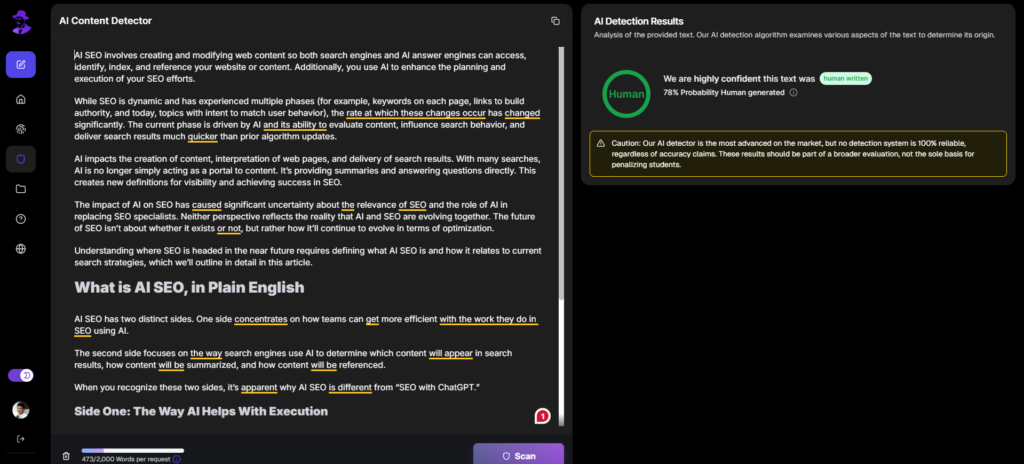
AI detection tools are designed to examine a piece of text to determine if it is generated or heavily assisted with artificial intelligence by analyzing patterns that show telltale signs of algorithmic writing.
However, they are not perfect.
These tools too frequently flag down genuine human writing as AI-generated, especially when the writing is clear and well-structured.
This AI detector behavior and marketer realities have created a genuine concern for business owners who need to use AI as a support tool for their writing without losing their natural human flair.
The ultimate goal isn’t to game the system or find loopholes with detectors.
But rather, understanding how they work and using sound writing and editing strategies to make content less likely to be flagged while maintaining authentic human reasoning and structure.
Measurement: How to Tell if AI is Helping Your SEO (Without Vanity Metrics)
Content cycle time
The primary benefit of AI is to reduce time-to-publish. Businesses that adopt Agentic AI workflows often report tasks that previously took days now take hours. If your cycle time drops by a significant percentage after adopting AI in your SEO workflow without a dip in engagement, then AI is winning.
Indexation + impressions trend
To avoid AI slop, Google and other search engines are becoming wary of what they index. If your AI-assisted pages are not being indexed, there might be a quality issue. Your indexation rate should be 80%+ across the board. Check your GSC. If you see rising impressions, then you’re safe.
CTR changes from title/meta testing
Conduct page-level comparisons after title/meta iterations. With the test, you’ll see whether your AI variations align with search intent.
Engagement signals
Search engines now use behavioral signals to validate helpful content. If your engagement metrics (time on page, scroll depth, conversions) are good, then you have high-performing AI-generated content.
Refresh wins
Search engine algorithms are permanently volatile. The best way to keep your content from decaying, especially if you have a large site, is to update it with AI. If your page regains or maintains its top-3 positions after AI-assisted updates, then AI is truly helping your SEO.
Should Business Owners Use AI for SEO or Hire an SEO?
If your site is small, competition isn’t too stiff, and your topics are not too technical, you should fully onboard AI for your SEO. An SEO may be needed when you’re facing technical issues or in niches where competition is strong and “Authority” (EEAT) is the primary ranking factor.
A hybrid model is also possible, where you adopt AI for your SEO framework and enlist the help of an SEO consultant for strategy and quality assurance. When deciding, consider your risk tolerance level, budget, and time constraint.
The Best Way to Use AI for SEO is “Assist + Verify + Publish Safely”
According to research by seoClarity and ioVista, search engines have shifted from measuring “Keyword Density” to measuring “Entity Trust.” Let AI do a lot of the heavy lifting (keyword research, drafting, content refresh, etc.) while you focus on verifying accuracy and uniqueness and making content publish-safe. AI should be used in a controlled workflow for speed, followed by editorial judgment to protect trust, prevent quality regressions, and keep content aligned with search intent.
Instead of letting AI do everything, pick a single workflow to implement this week:
- Start with AI-assisted keyword clustering, using tools only for validation, or
- Roll out a 1-page SEO brief template that writers can execute without guesswork.
Don’t leave your rankings to chance. Try Walter Writes for publish-safe SEO content that eshews authority and nuance your audience expects.
FAQs
How can AI improve SEO?
AI improves SEO by reducing execution time, allowing SEOs and business owners to focus on strategy. You can expand on initial keyword ideas and related questions. AI can produce structured drafts and outlines while you focus on positioning and differentiation.
Is AI content bad for SEO?
AI content is neither good nor bad for SEO. Google has reiterated in its Spam Policies guidelines that they do reward high-quality content, regardless of how it’s produced. Avoid using AI to mass-produce near-identical pages, rewriting existing content without adding value, or fact-checking.
Can AI-generated content rank on Google?
Yes, AI-generated content can rank on Google. Whether it stays there is another thing entirely. Before AI-assisted content sticks, it needs editorial oversight, such as introducing real examples, explanations, and reviewing for accuracy and clarity.
What are the risks of using AI for SEO?
One of the most common and easily overlooked AI SEO risks is brand erosion. Publishing unreviewed AI-content can erode your brand voice and make you indistinguishable from your competitors. AI can make you spread misinformation, or worse, get you banned by search engines.
Does Google penalize AI-written content?
Google doesn’t penalize content just because it’s AI. Content is evaluated on quality, helpfulness, and satisfaction of search intent. Any content that is thin or unhelpful can be penalized, even if it is entirely produced by a human.
How do AI detectors affect SEO?
AI detectors have little or no influence on SEO. Search engines don’t rely on public AI detection tools to rank content. Even if an AI-assisted SEO content goes undetected by these tools, it may still not rank. A detector is simply a proxy for measuring content uniqueness.
For the content production side specifically, see AI Humanizer for SEO covering detection-safe AI-assisted blog production.
SEO context: The dedicated does Google penalize AI content guide covers the Ahrefs 600K-page study and what Google actually penalizes in 2026.